Clash Royale is a mobile game that mixes tower defense, card collecting, and real-time battles. It was made by Supercell, the same company behind Clash of Clans. Since the day it came out, millions of people have played it every day. The game is easy to pick up but hard to win if you don’t think carefully. Matches are short, but they need fast moves and smart choices. That makes it fun for both casual players and serious gamers.
Many people love how Clash Royale works. It’s not just about luck or speed. Players must plan each move, pick the right cards, and manage their Elixir. Even one bad move can cost the match. This guide talks about how Clash Royale works, what makes it great, and how to play it on a PC using LDPlayer. Playing on PC can help some players do better, thanks to a bigger screen and easy controls.
What is Clash Royale?
Clash Royale is a real-time strategy game. That means players fight live against other players. Each game has either two or four players. In one-versus-one, each player tries to take down the enemy towers. In two-versus-two, two players team up and face another pair.
Every player has three towers: two small Princess Towers and one big King Tower. The match lasts three minutes unless a player destroys the King Tower, which ends the game right away. Cards are used to send troops, throw spells, or place buildings on the field. But each card costs Elixir, which builds up slowly. Picking the right time to play a card matters a lot.
Many of the characters in Clash Royale are from Clash of Clans. These include Barbarians, Archers, and the Giant. But the game also brings new ones like the Baby Dragon and Prince. Since every card has strengths and weaknesses, players must learn how each card works. Winning is about knowing how to deal with what the other player does.
Clash Royale Features
Clash Royale has many features that keep players coming back every day. One of the biggest reasons is how deep and smart the game is.
Lots of Cards to Collect
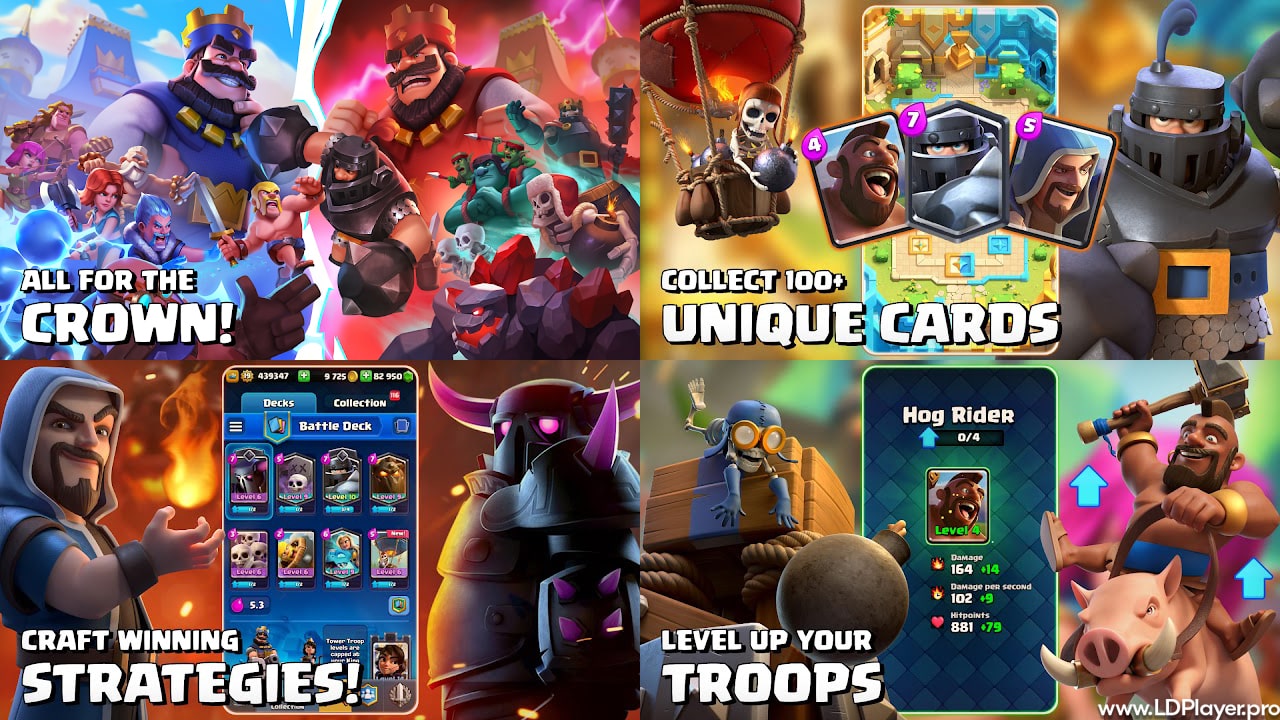
There are over 100 cards in Clash Royale. These are split into five groups: Common, Rare, Epic, Legendary, and Champion. Each card has its own job and power. Some are good at attacking towers, some are great at defense, and others support your team. Players can mix cards to make different decks and try new ideas.
Live Battles Against Real People
Every match in Clash Royale is against a real person. The game matches players by their trophy count. This makes the battles fair, since you’re playing someone at the same skill level.
Clans and Clan Wars
Joining a Clan lets players chat, share cards, and help each other. In Clan Wars, groups fight each other over several days. Winning can give good rewards. Being in a Clan also makes the game feel more fun and social.
Special Events and Challenges
The game adds new modes often. These can be fun like “Triple Elixir” or random like “Draft Mode.” These changes keep the game from feeling boring. Winning these events also gives extra gold, chests, and sometimes rare cards.
Ranked Mode: Path of Legends
For players who like a challenge, Path of Legends is the ranked system. Players move up the ladder by winning more. The higher they go, the better the rewards. They can earn special emotes and cool skins too.
How To Install Clash Royale on LDPlayer
Though Clash Royale is a mobile game, it can be played on PC using an Android emulator. LDPlayer is one of the best choices for this. It lets players enjoy the game with a bigger screen, strong internet, and a mouse.
Here’s how to install Clash Royale on LDPlayer:
-
Download LDPlayer
Go to the LDPlayer website and download LDPlayer 9. It runs smoother and faster for most games. -
Install LDPlayer
Open the downloaded file and follow the steps to finish installing it on your computer. -
Open Google Play Store
Once LDPlayer is ready, click on “System Apps,” then open the Play Store. Log in using a Google account. -
Search for Clash Royale
Use the search bar at the top to type in “Clash Royale.” Press enter. -
Install the Game
Click the install button on the Clash Royale page. It works just like on a phone. -
Start and Set Up
After it’s installed, click the icon to launch the game. LDPlayer has tools that let you set hotkeys. You can use these to place cards faster in a match.
How To Play Clash Royale
Getting better at Clash Royale means knowing how to use your Elixir and when to play your cards.
Build a Balanced Deck
A good deck needs attack, defense, and support cards. One strong attacker isn’t enough. You also need cheap cards for fast defense. Spells like Fireball or Zap help control enemies. Don’t pick only high-cost cards or you won’t be able to defend in time.
Manage Your Elixir
You start with 5 Elixir and it fills up to 10. Every move you make should count. If you spend 5 Elixir and only stop 2 Elixir worth of enemies, you are behind. These small losses can add up and hurt you later.
Right Card, Right Place
Where you place cards matters. Putting a troop in the middle might pull enemy units and let both towers help you. That’s called kiting. Timing is just as important. Drop a card too early or too late, and it won’t help.
Defend First, Then Push
A common mistake is to attack all the time. It’s smarter to wait, defend well, and then counterattack. Use the leftover troops to push forward when your enemy has no Elixir left.
Safety and Legality
Players must be careful when using tools like LDPlayer to play Clash Royale on a PC.
Is it Safe to Use an Emulator?
LDPlayer is safe to use, but Supercell doesn’t officially support it. That means if the game breaks on LDPlayer, they won’t help fix it. Supercell says third-party tools are not allowed, but they don’t ban people just for using emulators—unless cheats are used.
Keep Your Account Safe
Always connect Clash Royale to your Supercell ID. That saves your progress online. If you lose your PC or delete the emulator, you won’t lose your cards or trophies.
Play Fair
Never use cheats, bots, or fake apps that say they give you free Gems. These can get your account banned forever. Only download Clash Royale from the Google Play Store through LDPlayer.
Clash Royale FAQ
Is Clash Royale free?
Yes, it is free. But you can buy Gems or the Season Pass if you want things faster.
Can you play without internet?
No, Clash Royale needs a working internet connection. Every match happens live, and both players must stay connected.
Does playing on LDPlayer help you win?
Not really. The game plays the same. But the mouse and bigger screen can make some things easier to see and do.
What is the highest level?
Right now, the top King Tower level is 15. To get there, you need to upgrade many cards and play for a long time.
Final Words
Clash Royale is fun, smart, and full of action. It mixes fast battles with deep thinking. Players collect cards, make decks, and test them in real-time matches. The game gives both short fun and long-term goals. Playing on PC using LDPlayer can help with better controls and visuals. But the real way to win is by learning how cards work and making smart plays. Whether on phone or PC, every move matters in Clash Royale.