Geometry Dash is a fast, rhythm-based action platformer that tests timing, focus, and patience. It looks simple at first: a small icon moves forward on its own, and one tap can mean the difference between a clean run and a restart. But the real challenge comes from how tightly each jump, flight, and gravity switch matches the music. With a strong soundtrack and a creative community, Geometry Dash has grown from a mobile hit into a long-lasting game that players return to for years.
This guide explains the core gameplay, key features, installation on LDPlayer, how the different forms work, and the best practices for safe and fair play. The main goal stays the same in every level: learn the pattern, follow the beat, and improve step by step.
What is Geometry Dash?
Geometry Dash is a rhythm-based action platformer developed by Robert Topala (RobTop Games). The game is built around simple controls and strict timing. The icon moves automatically, and players tap or click to jump, fly, flip gravity, or change movement styles depending on the section.
The music is not just background sound. It is part of the gameplay. Obstacles often match the beat, and many sections feel easier once the rhythm is understood. One mistake restarts the attempt, which pushes players to build memory and consistent timing instead of relying on luck.
The full version of Geometry Dash is a paid game that includes the complete set of official levels, the level editor, and access to a huge collection of community-made levels. There are also free spin-offs like Geometry Dash Lite, World, and SubZero. These free versions are useful for trying the gameplay style, but they do not offer the same depth as the full release.
Geometry Dash is available on mobile devices (iOS and Android) and on PC through Steam. Many players also run the Android version on a computer using an emulator, which can make control mapping and screen size more comfortable for some setups.
Geometry Dash Features
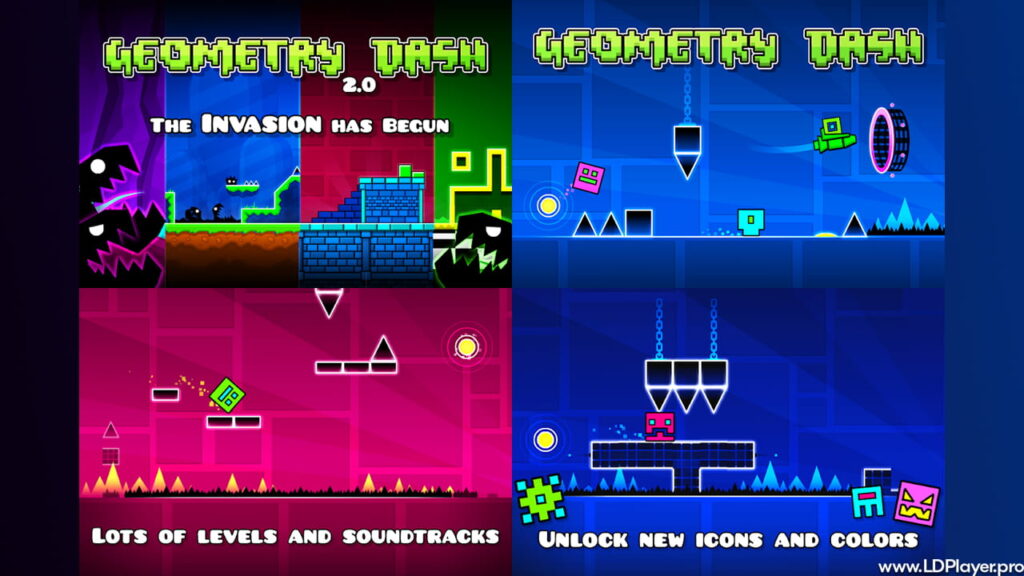
The long-term popularity of Geometry Dash comes from its core gameplay loop and its tools for creators. Over time, updates have expanded what levels can look like and how they can play, with the 2.2 update bringing major upgrades for both playing and creating.
Rhythm-Based Action Platforming
Every move depends on timing. The icon responds instantly, but obstacles leave no room for late input. Music helps players “feel” the timing and learn patterns faster. This tight link between sound and movement is a key reason Geometry Dash feels so unique.
Level Editor
The level editor is one of the biggest reasons the game stays fresh. It allows creators to build and publish custom levels with detailed layouts, effects, triggers, and synced gameplay. With the 2.2 update, creators gained tools like Platformer Mode, camera controls, and more advanced visual effects. These tools support levels that can feel very different from classic auto-run stages while still keeping the same timing-focused style.
Massive Soundtrack
Geometry Dash includes a strong set of built-in tracks and supports a wide library of custom songs. Many community levels use music from Newgrounds, giving creators and players more variety in style, energy, and pacing. Music choice matters because it shapes the mood and the timing of each section.
Unlockable Icons and Colors
Customization is a big part of progression. Icons, colors, and trails unlock through achievements, level completion, secret rewards, and other goals. This system gives players reasons to keep improving, even outside of beating harder levels.
Practice Mode
Practice Mode is built for learning. Checkpoints can be placed to repeat hard parts without restarting the entire level. This makes difficult sections more manageable and helps build muscle memory in a faster, less frustrating way.
Demon Levels
Demon-rated levels represent the highest difficulty range. Many Demon levels are community-made and push precision to the limit. They often require perfect control, consistent timing, and strong pattern memory. For many players, clearing Demon levels is the long-term goal that keeps Geometry Dash exciting.
How To Install Geometry Dash on LDPlayer
Geometry Dash can be played on PC through Steam, but some players prefer the Android version on a computer using an emulator. LDPlayer is a common option because it supports key mapping and runs Android apps in a desktop environment. Below is a clear setup process.
- Download and Install LDPlayer:
Download the latest LDPlayer installer from the official LDPlayer website. Run the installer and follow the steps until setup is complete. - Launch LDPlayer:
Open LDPlayer after installation. It will load an Android-style home screen. Basic system apps should appear automatically. - Access the Store:
Open the Google Play Store (or the LD Store if available). To use the Play Store, sign in with a Google account. This is required for downloading apps through official channels. - Search for the Game:
In the store search bar, type “Geometry Dash.” Choose the correct official listing. If the full version is owned, install the paid app. If not, the Lite version can be installed for a basic gameplay preview. - Install the Game:
Click “Install.” The emulator will download the files and add the app to the home screen. - Configure Controls:
After launching Geometry Dash, open the key-mapping tool in LDPlayer and bind the main tap action to a key like Spacebar or to a mouse click. This setup can help many players keep timing consistent.
For stable play, LDPlayer settings can also be adjusted for resolution, frame rate, and performance mode depending on the PC hardware.
How To Play Geometry Dash
Geometry Dash uses different forms (also called modes) that change how the icon moves. Each form follows its own rules, and learning them is essential for clearing harder levels. Timing stays important in every form, but the way input works changes from one to another.
Cube:
The default form. Tap to jump. Jump timing must match the distance to the next platform or obstacle. Some sections require fast taps, while others require delayed jumps.
Ship:
Hold to fly upward and release to drop. The ship does not “jump,” so smooth control matters more than quick taps. Small adjustments are often needed to stay centered through tight gaps.
Ball:
Tap to switch gravity. The ball flips between floor and ceiling. Timing is based on when gravity switches happen and where the landing surface is placed.
UFO:
Tap to hop mid-air. Each tap creates a short jump, similar to a quick bounce. It often feels like controlled hopping rather than normal jumping.
Wave:
Hold to move diagonally up, release to move diagonally down. The movement is sharp and fast, and small timing mistakes can crash instantly. Many players find the wave to be one of the hardest forms to master.
Robot:
Hold to jump higher, release to jump lower. The robot gives variable jump height, so input length matters. This form rewards strong control and clean rhythm.
Spider:
Tap to teleport instantly to the opposite surface. The spider moves in sharp, instant switches instead of smooth flips, so timing must be precise.
Swing (New in 2.2):
The swing form has ship-like motion with gravity switching behavior. It can feel very different from older forms, and it often requires learning new timing habits.
Tip: Practice Mode is the fastest way to learn difficult sections. Placing checkpoints before a hard part allows repeated attempts with less downtime. Over time, repeated practice builds the muscle memory needed for clean runs in Geometry Dash.
Safety and Legality
Geometry Dash should always be downloaded from official sources. This protects devices, protects accounts, and supports the developer.
Official Stores:
The safe and legal ways to get Geometry Dash are the Google Play Store, Apple App Store, and Steam. These platforms provide verified files and reliable updates.
Avoid Modded APKs:
Cracked or “unlocked” APK files from unknown websites are risky. They can include malware, hidden trackers, or files that harm device performance. They also break the rules of fair use and reduce support for future updates.
Fair Play:
The Geometry Dash community values real progress and real skill. Hacks like speed changes, auto-complete tools, or noclip runs can cause bans from rankings and damage trust in community spaces. Legitimate clears keep leaderboards meaningful and keep achievements respected.
For the best experience, keep gameplay clean, keep downloads official, and use practice tools built into Geometry Dash instead of external cheats.
Geometry Dash FAQ
Q: Is Geometry Dash free?
A: Geometry Dash Lite, Geometry Dash World, and Geometry Dash SubZero are free versions that include limited content. The full Geometry Dash game is a paid release that includes the level editor and full access to user-generated content.
Q: Can Geometry Dash be played on a Mac?
A: Yes. The Steam version supports macOS. Android emulators can also be used on Mac hardware for players who prefer the mobile version style.
Q: What is the hardest level in Geometry Dash?
A: The hardest level changes over time because top players keep verifying new Extreme Demon levels. Community ranking lists track the current top difficulty levels as new ones are completed.
Q: Does the Steam version sync with mobile?
A: Geometry Dash supports account-based saving through cloud features. When a player uses the same account and saves progress correctly, data can be loaded across supported devices.
Final Words
Geometry Dash stays popular because it rewards real improvement. It does not rely on pay-to-win systems or random power boosts. It gives a clear challenge, quick restarts, and tools that help players learn through repetition. The result is a game where progress feels earned, whether the goal is beating official levels, finishing a first Demon, or building a custom level in the editor.
With strong music sync, deep creation tools, and a huge community of creators and players, Geometry Dash offers an experience that stays fresh long after the first levels. For anyone looking for a skill-based rhythm challenge, Geometry Dash remains one of the most rewarding platformers to master.