HATSUNE MIKU: COLORFUL STAGE! is a rhythm game loved by many fans around the world. It mixes catchy music with stories that are full of feelings. The game is perfect for anyone who enjoys tapping to the beat, following a story, or listening to Vocaloid songs. Although it was first made for phones, many players now play it on PC using emulators like LDPlayer. This setup gives smoother gameplay, better control, and sharper graphics. It helps players enjoy the game without lag or battery problems. In this guide, everything about HATSUNE MIKU: COLORFUL STAGE! will be explained in a simple way. You’ll learn how the game works, what makes it fun, and how to start playing on both mobile and PC without any trouble.

What is HATSUNE MIKU: COLORFUL STAGE!
HATSUNE MIKU: COLORFUL STAGE! is a music game made by Colorful Palette and published by SEGA. The story happens in Japan, mostly around the streets of Shibuya. But the fun twist is that the characters can visit magical places called “Sekai.” These Sekai worlds are made from the feelings of each music group.
There are five different groups in the game. Each group has its own music style and story. For example, Leo/need plays more rock-style songs, while Vivid BAD SQUAD leans toward street pop. The characters are supported by Virtual Singers like Hatsune Miku, Rin, Len, Luka, MEIKO, and KAITO. Players get to enjoy songs, unlock stories, and dress up characters. The game mixes rhythm gameplay with deep stories, giving players more than just music to tap to. It feels more like a full music world you can explore.
HATSUNE MIKU: COLORFUL STAGE! Features
Big Song Collection
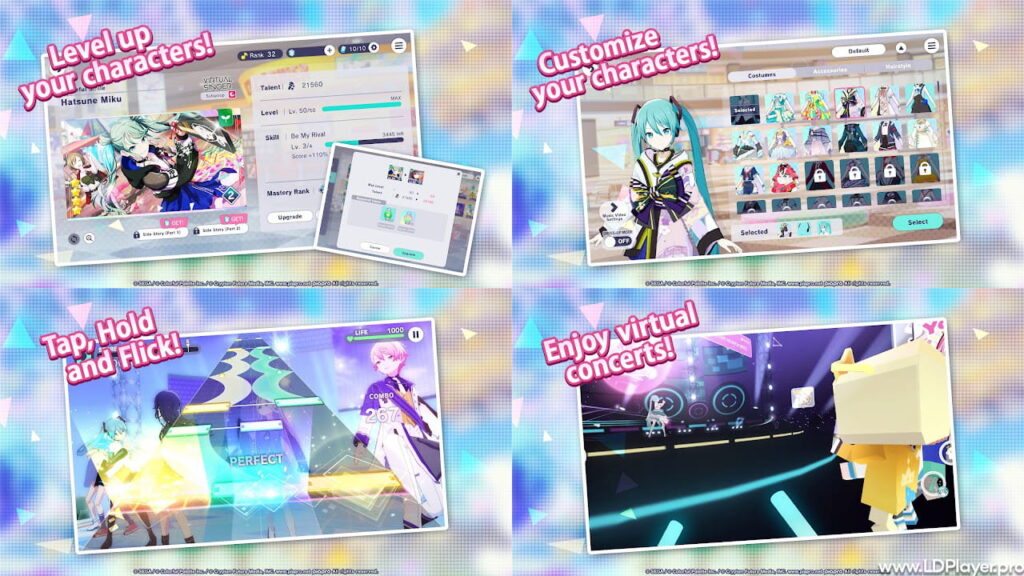
Players can play many songs, both old favorites and new ones made just for this game. Songs like “Tell Your World” and “Bring It On” are included. More songs keep getting added, so the music list never feels boring.
Virtual Live Shows
This feature lets players join real-time concerts inside the game. Players can watch performances, wave glow sticks, and chat using emotes. It makes the game feel like a real concert you can attend anytime.
3D Music Videos
Many songs in HATSUNE MIKU: COLORFUL STAGE! come with 3D music videos. You can even change the characters in the video and pick what they wear. This lets everyone make the show look just the way they want.
Strong Stories
Each music group has its own story. These stories talk about friendship, dreams, and personal growth. They are told in a way that’s easy to understand but still emotional. The characters talk using voice actors and move using Live2D animation, which adds more feeling.
Cards and Costumes
Players can collect special cards for each character. These cards also unlock costumes. Dressing up your characters adds more fun and changes how they look in videos and live shows.
How To Install HATSUNE MIKU: COLORFUL STAGE! on LDPlayer
Using LDPlayer to play HATSUNE MIKU: COLORFUL STAGE! on PC is a good choice. It gives better performance and more control.
Step 1: Download LDPlayer
Go to the LDPlayer website and get the latest version. Be sure to download the 64-bit version. This is very important because the 64-bit type works better with this game.
Step 2: Install and Open
Run the setup and finish installing LDPlayer. Then open the program.
Step 3: Sign In to Google Play
Click on “System Apps” and open the Play Store. Sign in using your Google account.
Step 4: Search for the Game
Type HATSUNE MIKU: COLORFUL STAGE! into the Play Store search bar.
Step 5: Install the Game
Click on the install button. Make sure your internet is stable, as the game size is quite large.
Step 6: Set Your Keys (Optional)
After installing, open the game. Use LDPlayer’s keyboard tool to set controls. Many players use keys like A, S, D, and F for better tapping. This makes it easier to hit fast notes in harder songs.
How To Play HATSUNE MIKU: COLORFUL STAGE!
The main idea of HATSUNE MIKU: COLORFUL STAGE! is simple but takes time to get really good at. Notes come down the screen, and you tap them as they hit the line at the bottom.
Tap Notes
Just tap once when the note hits the line.
Hold Notes
Press and keep holding for the full length of the green bar.
Flick Notes
Flick in the shown direction. These notes are pink and need quick movement.
Slide Notes
Keep holding the note and slide your finger (or mouse) along the path.
Extra Tip
Changing note speed helps a lot. Try setting it to 9.0 or 10.0. It spreads the notes apart so they are easier to see. Many players find that faster speeds help them react better.
Safety and Legality
It’s important to play HATSUNE MIKU: COLORFUL STAGE! in the right way. This keeps your account safe and makes the game fair for everyone.
Always Use Trusted Sources
Download the game from Google Play or the App Store. Do not use APK files from random websites. These can be unsafe and might harm your device or steal data.
Using LDPlayer is Fine
LDPlayer is okay to use if you don’t cheat. Do not use tools that play the game for you. Playing fair keeps the fun for all, especially during co-op and ranked events.
Account Linking
Link your account to Google Play or Game Center. This way, your progress stays safe. Be careful if you play on both Android and iOS. Paid crystals do not move between them. Use the transfer option the right way to avoid losing anything.
HATSUNE MIKU: COLORFUL STAGE! FAQ
Q: The screen goes black after the tutorial. What can I do?
A: This usually happens if the wrong LDPlayer version is used. Switch to 64-bit if you aren’t already. Also try changing settings to “Open GL” and give the emulator at least 4GB RAM.
Q: Is the game free?
A: Yes, HATSUNE MIKU: COLORFUL STAGE! is free to play. You can unlock all songs by playing. There are things to buy, like costumes and Gacha items, but they’re not needed to enjoy the game.
Q: Can I play with friends?
A: Yes, the game has a “Co-op Show” mode. You can play songs with up to four other players. You can invite your friends or join random rooms. Playing together makes the game more fun and social.
Final Words
HATSUNE MIKU: COLORFUL STAGE! is not just a rhythm game. It’s a place where music, fun, and emotions come together. Whether you play on your phone or your PC with LDPlayer, the game is easy to pick up and enjoy. The characters feel real, the songs are catchy, and the gameplay keeps you coming back. It’s true that playing on a big screen with smooth controls feels better. So if you love Vocaloid music, cool stories, or just a good rhythm game, give this one a try. Join the fun, explore each Sekai, and tap along with Miku and her friends today.