Ludo King has changed how people enjoy classic board games in today’s digital world. It takes a very old game and brings it into modern life in a simple way. Now, people from different countries can play together anytime. Some play with family at home, while others play with new people online. Because of this, the game feels both familiar and exciting.
Ludo King turned a simple board game into a mobile experience that fits in a pocket. It is easy to play, easy to access, and fun every time the dice rolls.
What is Ludo King?
Ludo King is a multiplayer board game that works on many devices. It runs on Android, iOS, Desktop, and Windows platforms. This makes it easy for players to join from anywhere. The rules stay the same as the traditional version, so players already know how to play.
Each player moves four tokens from start to finish based on dice rolls. However, the game adds modern features that improve the experience. For example, it includes themes, online play, and extra games like Snakes and Ladders. Because of this, it connects both young and older players. Many families use it as a common game they all enjoy.
Ludo King Features
Cross-Platform Multiplayer
One key feature is cross-platform play. This means players using different devices can still play together. For example, one player can use a phone while another uses a computer. As a result, no one gets left out. This feature helps the game reach more users across the world.
Multiple Game Modes
The game offers several ways to play, which keeps things interesting. Each mode suits a different situation.
Online Multiplayer allows players to compete with random users worldwide. This creates a competitive environment.
Play with Friends lets users create private rooms. Then, they can invite friends using a code. This makes it more personal.
Computer Mode works offline. Players can practice against AI without needing the internet.
Local Player mode turns one device into a shared board. So, people sitting together can play on the same screen.
Because of these options, players always find a way to enjoy the game.
Engaging Themes and Customization
Visual design matters, so the game offers different themes. These themes change how the board looks. Options include Nature, Egypt, Disco, Cake, and Candy styles.
Players can unlock or buy these designs. As a result, the game feels fresh every time. Even though the rules stay the same, the look keeps changing.
Real-time Voice Chat
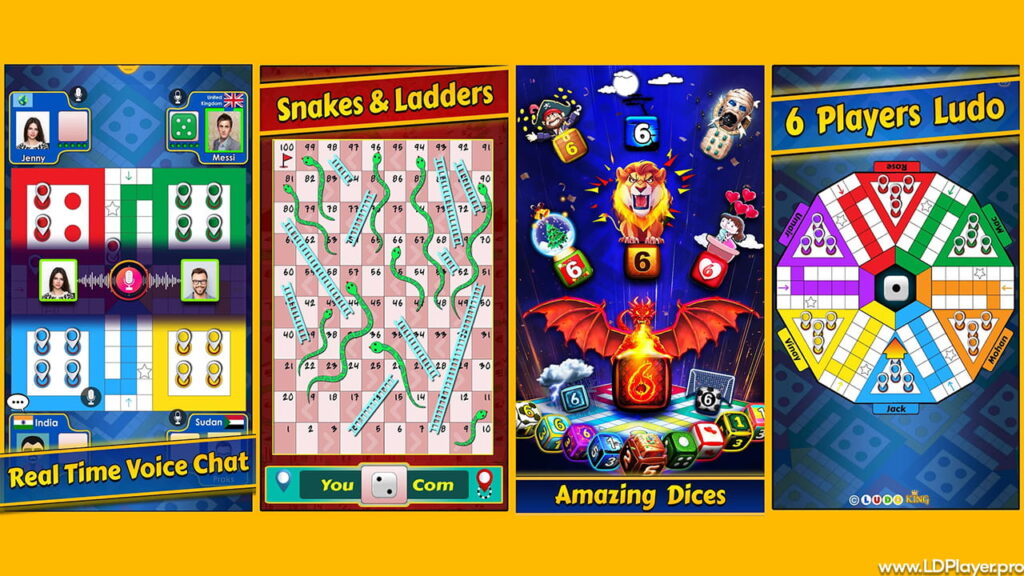
Communication adds more fun to gameplay. The voice chat feature allows players to talk during matches. This makes the game feel more real and social.
Friends can laugh, plan moves, or react instantly. Because of this, the digital version feels close to playing on a real board.
The 6-Player Mode
Traditional Ludo supports four players. However, Ludo King adds a 6-player mode. This increases competition and strategy.
With more players, the board becomes more active. Moves become harder to plan, and surprises happen often. Therefore, many players enjoy this mode for group sessions.
How To Install Ludo King on LDPlayer
Playing on a bigger screen can improve the experience. It also saves phone battery. LDPlayer is a popular emulator for this purpose.
First, download LDPlayer from its official website. Then, install it by following the steps shown on the screen.
After installation, open the emulator and sign in with a Google account. This step allows access to the Play Store.
Next, search for Ludo King in the store. Once the game appears, click install.
After installation, open the game inside LDPlayer. Players can also set keyboard controls. For example, assigning a key to roll the dice makes gameplay smoother.
How To Play Ludo King
The main goal is simple. Each player must move four tokens from start to home.
At the start, a player needs to roll a six to bring a token onto the board. Without a six, the token stays in the base.
Players take turns in a clockwise order. Each move depends on the number rolled on the dice.
If a token lands on an opponent’s token, the opponent goes back to the base. This adds a competitive element to the game.
Some squares are safe zones. These include star-marked spaces and starting points. Tokens in these areas cannot be captured.
The winner is the first player to move all four tokens into the home area. Because of this, planning and timing both matter.
Safety and Legality
Many players think about safety before downloading any game. Ludo King is safe and legal to use. It does not involve real money gambling in its normal version.
The game uses a Random Number Generator for dice rolls. This ensures fairness in every match. Each roll stays completely random and unbiased.
User data also stays protected through standard privacy practices. However, players should always download the game from official sources. This includes app stores or trusted platforms.
By following these steps, users can enjoy the game without concerns.
Ludo King FAQ
Q: Can the game work without internet?
Yes, it supports offline play through Computer Mode and Local Player mode.
Q: Is the game free?
Yes, it is free to download and play. However, optional purchases exist for themes and items.
Q: How can friends join a match?
Players can create a room and share a code. Friends use this code to join the same game.
Q: Can progress transfer to a new device?
Yes, linking the account to Google or Facebook helps sync data across devices.
Final Words
Simple games still have strong value today. Ludo King proves that clearly. While many games focus on heavy graphics, this one focuses on fun and connection.
It brings families together and also connects strangers worldwide. Players can enjoy quick matches or long sessions based on their time.
Because of regular updates and different modes, the game stays fresh. Whether played on mobile or PC, the experience remains smooth and enjoyable.
In the end, the journey of each token toward home creates excitement every time. That feeling keeps players coming back again and again.