Roblox is not just a game. It’s a place where people from all over the world come to play, build, and connect. Every day, millions of users join to explore cool worlds, hang out with friends, and even create their own games. It’s a platform full of action, learning, and fun. From racing to role-playing to game-making, there’s always something new happening on Roblox.
Roblox has changed how people think about gaming. In the past, only big companies made games. Now, anyone can do it. In 2026, this game will keep growing as more people use it to make and play games across phones, PCs, and consoles. It works on many devices, so players can always stay connected. This guide explains why this is so popular, how to make it better using LDPlayer, and how to stay safe while playing or creating.

What is Roblox?
Roblox is an online platform where people play games made by other users. But it’s more than that. It’s also a tool that lets anyone create games using Roblox Studio. Roblox Studio is a special app that uses Lua, a simple programming language. With it, people can make any kind of game. Some games are simple and fun. Others are big and complex. From school kids to expert developers, anyone can create something cool in this game. People also earn money by building games and selling items. This makes it more exciting for both players and creators.
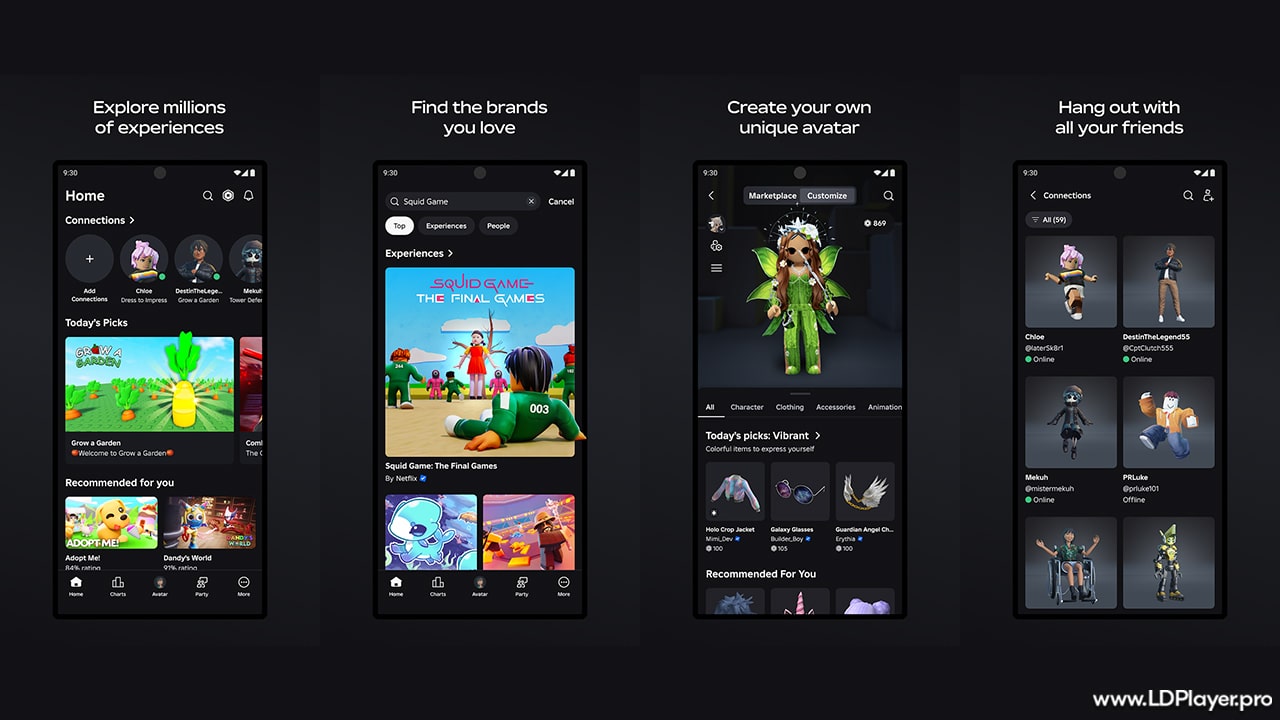
Roblox Features
In 2026, this game will have many cool things that make it better than most gaming platforms. Here are the main ones:
Endless Choices
There are millions of games on Roblox. Players can fight pirates in Blox Fruits or build houses in Brookhaven. No matter what someone likes, there’s always something to play.
Avatar Options
Players can change how they look using Robux. Robux is the money used in the game. You can buy clothes, hats, dances, and more to make your avatar unique.
Play with Friends
Roblox lets people chat and play together. Players can add friends, join groups, and talk in real time while playing games.
Play Anywhere
Start a game on a phone, then switch to a PC later. This works across all devices, so users never have to stop playing.
How To Install Roblox on LDPlayer
LDPlayer is a tool that helps you play mobile games on a computer. Some people like using LDPlayer to play Roblox because it makes games run smoother.
Download LDPlayer
Go to LDPlayer’s website and get LDPlayer 9. This version works best in 202\65.
Turn On Virtualization
Check your computer’s BIOS settings. Turn on a setting called Virtualization Technology. This helps games run faster.
Search for Roblox
Open the LD Store or the Google Play Store inside LDPlayer. Search for Roblox.
Install Roblox
Click “Install.” The app will load and show up on your virtual screen.
Set Up Controls
You can use your keyboard to play Roblox games in LDPlayer. This gives better control during fast-paced games.
How To Play Roblox
Starting with Roblox is fast and easy. Here’s how to get into the game quickly:
Make an Account
Pick a fun username and a strong password. Never use your real name.
Find Fun Games
Go to the “Discover” tab. It shows games that are popular or new. Try a few and see what you like.
Join a Game
Click the green play button on a game page. Roblox will open the game and connect you to other players.
Learn the Basics
Most games use WASD keys to move. Press the spacebar to jump. Each game might have its own special controls, too.
Safety and Legality
This game is serious about keeping players safe, especially kids. In 2026, the safety tools will be even better and easier to use.
Parental Controls
Parents can set how much kids can spend, who they can chat with, and what games they can play. A special dashboard makes it easy to check play history.
Age Checks
This now checks faces to guess age. This helps keep chats and games age-friendly.
Chat Filters
Roblox blocks bad words, personal info, and strange links in chats. This stops people from sharing unsafe things.
Legal Rules
This has a real money system. Developers can get paid using DevEx, the Developer Exchange. But users must follow all the rules in the Terms of Use to keep things fair and legal.
FAQ
Is Roblox Free?
Yes. this is free to join and free to play. Some games or items need Robux, but many fun games don’t cost anything.
What is Robux?
Robux is money inside Roblox. You can buy it or earn it by making games or selling items. Players use Robux to get cool stuff.
Do I Need to Download Roblox?
Yes. You need to install Roblox Player to play games. If you want to use your computer like a phone, you can use LDPlayer.
Final Words
Roblox is more than just games. It’s a tool to learn, create, and have fun with others. Players can design games, earn money, and meet new people. Kids and adults enjoy building their own worlds or playing games made by others. Since this game works on all devices, it fits into daily life easily. And with safety features in place, it’s a good platform for everyone. Whether someone wants to play or create, this game is always ready.