Toontastic 3D is a fun app that turns your phone or PC into a cartoon-making tool. Kids, teachers, and even parents use it to tell stories using animated characters. Instead of watching videos, users get to create their own. This makes it perfect for learning and fun at the same time.
It’s true that Toontastic 3D is not on the app store anymore. But people still want to use it. That’s why many now run it on a PC. The app lets anyone draw, move characters, and talk while recording a story. You don’t need to learn hard animation stuff. Everything is made simple. This guide shows what makes the app special and how to install it on a computer using LDPlayer, an Android emulator. It also covers the steps to make your cartoon and answers common questions.
What is Toontastic 3D?
Toontastic 3D is a cartoon-making app made first by Launchpad Toys, then bought by Google. It’s different from games where you only play. Here, you get to control everything. It’s like being a movie director. People can use it to teach kids how stories work while also having fun drawing and recording.
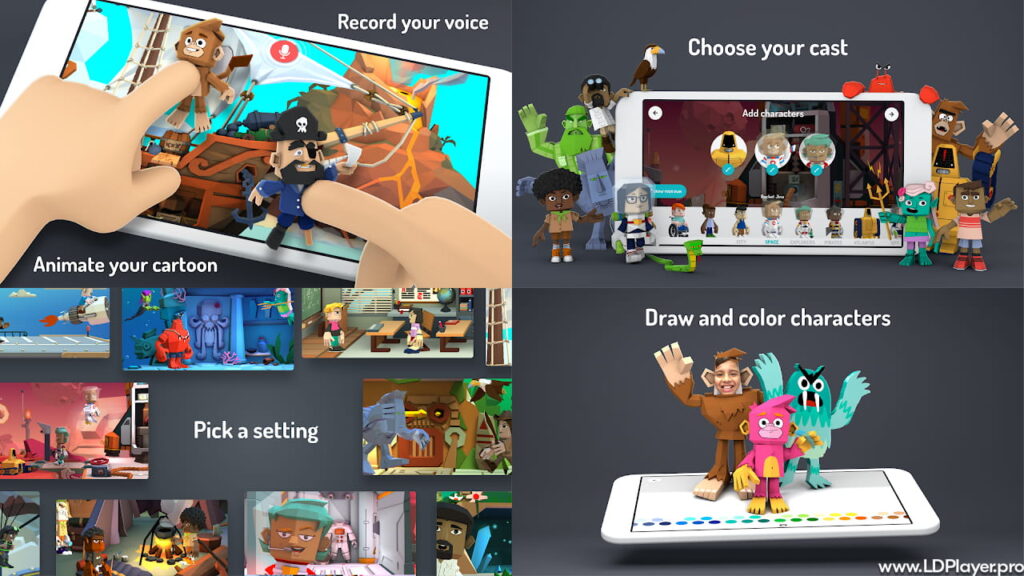
The way it works is very easy. You pick characters, drag them around, and speak. Toontastic 3D records everything. You can also draw your own characters and watch them move in 3D. The app makes sure your voice and movements go into the final cartoon. Even though it’s not on the Play Store anymore, many still enjoy it using PC emulators like LDPlayer.
Toontastic 3D Features
Toontastic 3D has stayed popular because it mixes learning and fun. Every part of it helps kids be more creative.
Story Arc Templates
You can choose between three kinds of story formats. A short story has 3 parts. A classic story has 5 parts. There’s also a science report with 5 parts. These help users understand how stories are made — with a beginning, a problem, and an ending.
Draw Your Own Character
If the built-in ones aren’t enough, you can draw your own. Just use the app’s drawing tool. It takes your drawing and turns it into a 3D model that moves.
Lots of 3D Places
You can choose fun places like space, school, or even a pirate ship. These backgrounds help set the mood of your story.
Voice Recording While Moving Characters
You can talk while moving your characters around. This teaches speaking skills and makes the story feel more real.
Automatic Music
After you record a scene, the app adds background music based on the mood. You just pick how you want it to feel — happy, sad, or exciting.
How To Install Toontastic 3D on LDPlayer
This is not on the regular app stores now. But you can still use it on a PC. This gives you a bigger screen, and that helps a lot when drawing or placing things. The best way is to use LDPlayer, which is a tool that runs Android apps on computers.
Here is the step-by-step way to install Toontastic 3D:
1. Download LDPlayer
Go to LDPlayer’s official site. Choose the latest version, LDPlayer 9. Install it on your computer. It’s free and safe.
2. Get the Toontastic 3D APK File
Since you can’t get it from the Play Store, search for “Toontastic 3D APK” on trusted APK sites like APKPure or Uptodown. Download the file to your desktop.
3. Start LDPlayer
Open LDPlayer and let it load. You’ll see a screen like an Android phone.
4. Drag the APK to LDPlayer
Click the downloaded APK file and drag it into the LDPlayer window. Drop it there.
5. Wait for the install
LDPlayer will detect the file and install it by itself.
6. Open the App
Once you see the game icon in LDPlayer, click it. Now you’re ready to make cartoons.
Important Tip: If your PC is slow, go to the BIOS settings and turn on VT (Virtualization Technology). This helps the app run smoother.
How To Play Toontastic 3D
After opening Toontastic 3D, you will see a big plus sign. That’s how you start.
Choose a Story Type
Pick if you want a short story, classic story, or science report. Each one has a set number of scenes.
Pick a Setting
Click on the first scene, usually called “Setup.” Then choose a place like a school or outer space.
Choose Characters
You can use characters from the app or draw your own. The drawing tool is simple and fun.
Start Recording
Click the record button. Now move the characters around and speak into your mic. The app records all of it.
Add Music
When done, pick the mood for the scene. The app will add music based on how you want it to feel.
Repeat Until Done
Do this for all parts of the story. Then Toontastic 3D makes one video with all your scenes. You can save it to LDPlayer’s gallery.
Safety and Legality
People ask if Toontastic 3D is safe since it’s not on the store. Yes, the app is very safe. Google made it for kids. It has no ads and no in-app buys. The only thing to watch out for is where you get the APK file. Always use trusted sites. Never download from unknown places that ask you to install extra apps.
About the law — this was free from the start. As long as you use it for personal or school use, it’s okay. Don’t try to sell or change the app, and you’ll be fine.
Toontastic 3D FAQ
1. Why is Toontastic 3D not on the app store anymore?
Google stopped updating it in 2022. Sometimes big companies stop older projects that they don’t support anymore.
2. Can Chromebooks run Toontastic 3D?
Yes, if your Chromebook supports Android apps. But running it on a PC with LDPlayer works better for older apps.
3. Is Toontastic 3D still free?
Yes. It’s 100% free. No extra charges or hidden costs.
4. Can I save my cartoons?
Yes. After making your cartoon, Toontastic 3D lets you export it as a video. From LDPlayer, you can copy that file to your computer.
Final Words
Toontastic 3D is still one of the best tools for storytelling. Even though it’s not updated anymore, it still works great. The app helps kids and adults learn how to tell stories in a fun way. Using it with LDPlayer is a smart way to keep enjoying it on a bigger screen.
You don’t need to be an artist or expert. Just open the game, pick your characters, and start creating. It’s easy and fun. And the best part? You can tell your own story, just the way you imagine it. Download Toontastic 3D using LDPlayer today, and keep your creativity going strong.