Wordscapes has changed how many people enjoy word puzzles on a phone or tablet. It mixes a crossword challenge with calm nature scenes. As a top mobile game, it gives a mind workout without feeling stressful. This guide explains the basics, key features, and how to play on a bigger screen.
A simple goal drives each puzzle. Players use given letters to form words and fill a grid. As a result, spelling and word patterns improve over time. In addition, the steady pace makes it easy to focus. Wordscapes supports both casual play and longer sessions.
What is Wordscapes?
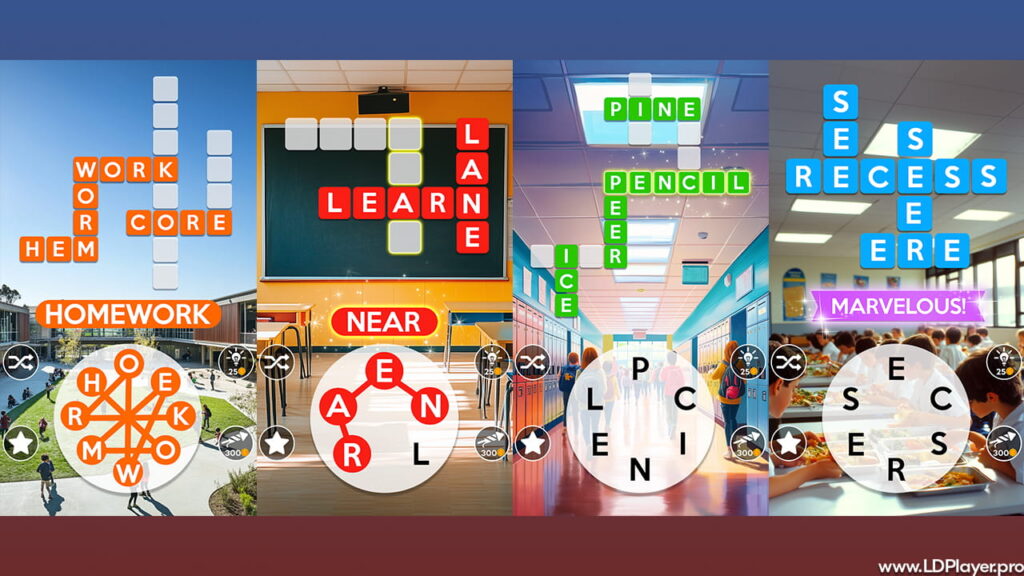
Wordscapes is a word puzzle game made by PeopleFun. Each level shows a set of letters in a circle. Players connect those letters to make words. Then the words fill a crossword-style grid above.
This setup blends anagram thinking with crossword solving. So it feels like a word hunt, not a standard word search. Early levels feel simple, yet later puzzles demand sharper thinking. Also, longer words and tricky letter sets increase the challenge. Because of that, the game stays interesting for many ages and skill levels.
Wordscapes Features
Several features keep players coming back, even after many levels. Also, the game offers steady progress without pressure.
Over 6,000 levels
Thousands of puzzles appear across many stages. Therefore, new levels keep showing up for a long time. The variety helps reduce repeated patterns.
Calm background scenes
Each Wordscapes level shows a nature image, like mountains, forests, or oceans. As a result, the screen feels relaxing while solving words. Also, the clean layout helps reduce distractions.
Daily puzzles and rewards
Daily challenges add a fresh task each day. Then rewards can support progress in later levels. In addition, daily play can raise the Brilliance score.
Brain training benefits
The puzzles test spelling, vocabulary, and pattern matching. So the mind stays active through short, clear tasks. Also, repeated practice can improve quick word recall.
No time limits
Many games rely on timers, which can feel stressful. However, these puzzles allow slow thinking. Because there is no clock, focus stays on solving, not rushing.
How To Install Wordscapes on LDPlayer
Some players prefer a bigger screen and stable controls. In that case, LDPlayer can run the game on a PC using Android emulation. Also, mouse control can feel easier for some people.
- Download LDPlayer
Go to the official LDPlayer website and get the newest version. Then save the installer file to the computer. - Install the emulator
Open the installer and follow the steps on screen. Next, finish setup and start the emulator. - Open Google Play Store
Inside LDPlayer, sign in with a Google account. After that, the Play Store becomes available. - Search for the game
Type “Wordscapes” in the Play Store search bar. Then choose the official app from the results list. - Install and launch
Click Install and wait for the download to finish. Finally, open the game from the LDPlayer home screen.
How To Play Wordscapes
The rules are easy, yet good results need smart choices. First, look at the crossword grid at the top. Next, check the letter circle at the bottom.
The main goal is to fill every blank in the grid. To create a word, touch a letter and swipe through others in order. Then the game checks the word and places it if it fits. Also, longer words can unlock more spaces at once.
Bonus words matter too. Some valid words do not fit into the main grid. However, finding them still gives rewards. Those extra words usually turn into coins. So trying different combinations can pay off.
Power-ups help when stuck. Coins can buy tools like hints that reveal letters. In addition, a bullseye can show a letter in a chosen spot. Because coins are limited, using tools at the right time matters.
Safety and Legality
Wordscapes is safe to download when taken from official stores. It appears on the Apple App Store and Google Play. Therefore, the app file comes from trusted sources.
Playing through LDPlayer also stays within normal use, when the game comes from the Play Store. Also, the game does not need sensitive personal details for basic play. However, like many apps, settings and permissions should still be checked. So only needed access should stay enabled, such as sound or notifications, if desired.
Wordscapes FAQ
Is Wordscapes free to play?
Yes, the download is free. Also, most content works without paying. However, optional purchases can add coins or remove ads.
Can the game be played offline?
Core levels can run without internet. So it works well during travel or poor signal. However, daily puzzles and updates usually need a connection.
What are Brilliance points?
Brilliance points track progress over time. They rise as more puzzles get solved and more words get found. Also, the score shows long-term effort, not just one level.
Final Words
Many puzzle games focus only on speed or competition. However, this one focuses on calm problem solving. Clear goals, steady progress, and relaxing scenes work together well. Also, flexible play options help, whether on a phone or a PC through LDPlayer.
With regular updates and a simple design, Wordscapes remains a strong choice for word puzzle fans. Because the rules stay easy while the puzzles grow harder, it can stay fun for a long time.