Call of Duty: Mobile changed mobile gaming by bringing fast and competitive shooter action to smartphones and tablets. The game delivers smooth gameplay, detailed graphics, and popular multiplayer content from the Call of Duty series. Since launch, the game has continued to grow with regular seasonal updates, new weapons, fresh maps, and different game modes.
What is Call of Duty: Mobile?
Call of Duty: Mobile is a free-to-play first-person shooter game built for Android and iOS devices. The game offers several multiplayer experiences in one package. Instead of releasing a new version every year, the developers continue to update the same platform with seasonal content and gameplay improvements.
The game includes traditional multiplayer matches, Battle Royale battles, ranked competition, limited-time events, and tactical modes. Every season usually introduces new maps, operators, weapons, and rewards. Because of this live-service system, the gameplay always feels fresh and active.
The controls are optimized for touchscreen devices. At the same time, the game also supports controllers and Android emulators for PC users. High-quality graphics, smooth animations, and realistic sound effects help create an experience similar to console shooters.
Call of Duty: Mobile Features
Iconic Multiplayer Modes
The multiplayer section remains one of the biggest parts of the game. Players can compete on classic maps such as Shipment, Raid, Nuketown, and Standoff. Different game modes allow players to choose their preferred playstyle.
Popular modes include:
- Team Deathmatch
- Domination
- Hardpoint
- Frontline
- Search and Destroy
- Kill Confirmed
Ranked Mode gives players a more competitive environment. Players move through ranks starting from Rookie and eventually reach Legendary rank. Seasonal rewards include Epic weapon blueprints, operator skins, and exclusive cosmetic items.
Fast matchmaking and balanced gameplay also help multiplayer matches stay exciting. Short match times make the game easy to play during quick breaks while still offering competitive action.
Battle Royale and DMZ: Recon
Battle Royale mode brings larger-scale combat with survival mechanics and team-based gameplay. Players drop into huge maps, search for weapons, and fight until one squad remains alive.
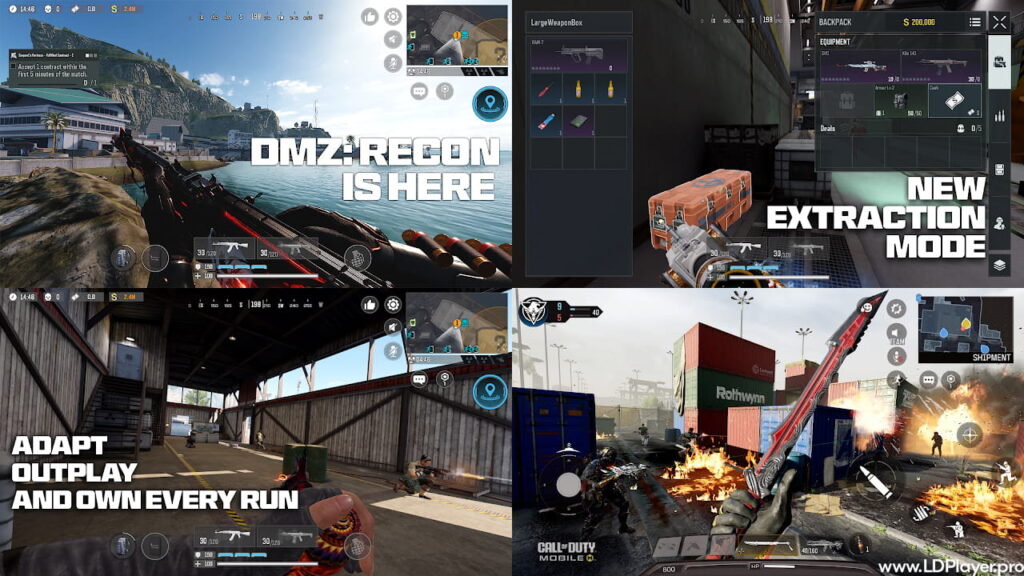
The newer DMZ: Recon mode changes the formula by focusing on extraction gameplay instead of simple survival. Players enter dangerous combat zones, complete objectives, collect loot, and safely extract before enemies stop them.
Maps such as Serpent Island and Building 21 add more tension and strategy. Every match becomes risky because players lose collected gear if extraction fails. This system encourages careful movement, teamwork, and smart decision-making.
DMZ: Recon also rewards players who focus on contracts and tactical planning instead of rushing into every fight. As a result, the mode feels very different from traditional Battle Royale gameplay.
Deep Customization and the Gunsmith System
The Gunsmith system allows detailed weapon customization. Players can change weapon behavior using attachments such as optics, barrels, magazines, grips, lasers, and stocks.
Different attachment combinations improve:
- Accuracy
- Mobility
- Damage range
- Recoil control
- Fire rate
This system helps players build weapons for close-range combat, sniper support, or balanced gameplay. Experimenting with loadouts becomes an important part of improving performance.
Mythic and Legendary blueprints add unique visual effects, custom reload animations, upgraded sound effects, and reactive weapon skins. Cosmetic upgrades help weapons feel more personal without changing gameplay balance.
How To Install Call of Duty: Mobile on LDPlayer
Many players prefer mouse and keyboard controls for better aiming and movement. LDPlayer is one of the popular Android emulators used for this purpose.
Download and Install LDPlayer
Visit the official LDPlayer website and download the newest version available. LDPlayer 9 or newer works best for modern performance requirements.
Run the installer and complete the setup process using the on-screen instructions.
Enable Virtualization (VT)
Open the computer BIOS settings and enable Virtualization Technology such as VT-x or AMD-V. This improves emulator performance and reduces lag during gameplay.
Search for the Game
Open Google Play Store or LD Store inside the emulator. Search for Call of Duty: Mobile in the search bar.
Install the Game
Press the Install button and wait for the emulator to download the game files and required resources.
Configure Engine Settings
Open the emulator settings before launching the game.
Recommended settings include:
- 4 CPU cores or higher
- 8GB RAM allocation
- 1920×1080 resolution
- High frame rate enabled
These settings help create smoother gameplay and better visual quality.
Launch and Update
Start the game and download all required in-game resources. The HD Resource Pack is recommended for players who want higher-quality textures and effects.
How To Play Call of Duty: Mobile
Learning movement, aiming, and positioning takes practice. New players can start with Simple Mode controls, which automatically fire when enemies appear inside the crosshair.
Advanced Mode gives full manual control and is preferred by experienced players because it offers better accuracy and flexibility.
Loadout Management
Players can create custom loadouts before entering matches.
Each loadout includes:
- Primary weapon
- Secondary weapon
- Lethal equipment
- Tactical equipment
- Operator Skill
- Three Perks
Choosing the right setup depends on the map and game mode.
Movement Mechanics
Movement plays a major role in winning fights. Skilled players often use slide movement, jump shots, crouching, and prone positioning to avoid enemy fire.
Using walls, doors, and objects as cover also increases survival chances during combat.
Team Communication
Voice chat and quick communication systems help teams coordinate attacks and defend objectives. Communication becomes especially important in DMZ: Recon because players must plan extraction routes and avoid enemy ambushes.
Safety and Legality
The developers continue working to maintain fair gameplay. The game uses the RICOCHET anti-cheat system to detect cheating software and suspicious activity.
Players using hacks, exploits, or unauthorized tools may receive temporary or permanent bans. Therefore, using official software and trusted platforms remains important.
Using LDPlayer is generally considered safe for emulator gameplay. However, emulator users usually match against other emulator or controller players. This system helps maintain fair competition between touchscreen and PC-style controls.
Keeping the emulator updated also helps prevent performance problems and security warnings.
Call of Duty: Mobile FAQ
Is Call of Duty: Mobile free to play?
Yes. The game is free to download and play. Optional purchases mainly include cosmetics, Battle Pass rewards, and premium bundles.
What are the minimum requirements for the game?
The game generally requires Android 8.0 or newer and iOS 13.0 or newer. Devices with at least 4GB RAM provide better stability and smoother gameplay.
Can players use cross-play features?
Yes. Android and iOS players can play together. Emulator users can also join friends, although matchmaking usually places the entire group into emulator lobbies.
What is the DMZ: Recon mode?
DMZ: Recon is an extraction-based mode where players complete missions, collect loot, and safely leave the combat area before losing their equipment.
Final Words
Call of Duty: Mobile continues to deliver one of the strongest first-person shooter experiences available on mobile devices. Regular seasonal updates, competitive multiplayer modes, detailed weapon customization, and tactical gameplay keep the experience active and exciting.
Whether players enjoy fast multiplayer matches, ranked competition, or survival-based extraction gameplay, the game offers something for every type of shooter fan. With proper settings, optimized controls, and teamwork, players can improve their skills and compete at a high level across every mode available.