BGMI: Online Multiplayer Game brings fast battle royale action, team play, and tactical survival to players across India. Developed by Krafton, the game mixes shooting, movement, planning, looting, and teamwork in every match. Each round starts with a fresh drop, so players must make quick choices from the first minute.

What is BGMI: Online Multiplayer Game?
BGMI: Online Multiplayer Game is a player-versus-player battle royale shooter developed by Krafton. A standard battle royale match can include up to 100 players.
At the start, players parachute onto a selected map. Then they search for weapons, armor, ammunition, healing items, and other supplies. Vehicles can also help squads move across large areas quickly.
The main goal is simple. Players must survive longer than every other opponent or squad. However, reaching the final stage requires more than accurate shooting.
Good decisions often matter as much as gun skill. For example, a squad must know when to fight and when to move away. Choosing the right route can also prevent surprise attacks.
The shrinking safe zone adds constant pressure. A damaging blue zone surrounds the active play area and becomes stronger over time. Therefore, staying aware of the map remains important throughout the match.
BGMI: Online Multiplayer Game also includes weapon attachments, different terrain types, team voice chat, and several combat ranges. These systems make each match more tactical.
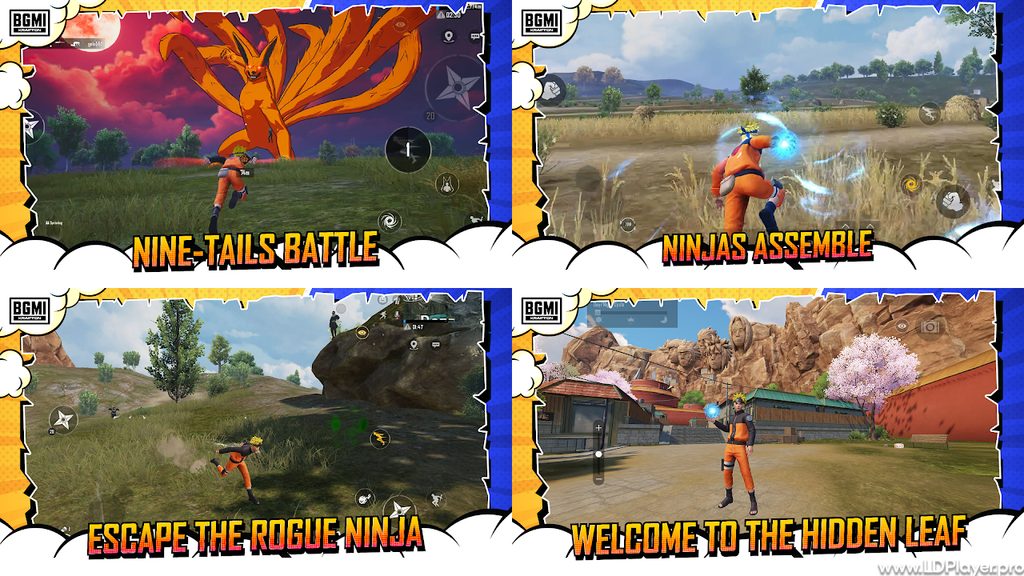
BGMI: Online Multiplayer Game Features
Diverse Battle Maps
The game includes several maps with different layouts, sizes, weather styles, and combat situations. As a result, players must change their strategy between matches.
Erangel: Erangel is a classic 8×8 km island with towns, forests, open fields, hills, bridges, and military areas. It supports close, medium, and long-range combat.
Miramar: Miramar uses a large desert setting with wide open spaces and rocky hills. Long-range rifles and careful vehicle movement can work well here.
Sanhok: Sanhok offers a smaller tropical battlefield with thick plants and short travel distances. Therefore, players often meet enemies more often.
Vikendi & Livik: These maps provide different environments and faster match styles. Livik is especially suitable for shorter matches and quick action.
Map knowledge can improve survival. Knowing building layouts, vehicle locations, high ground, and common rotation paths gives players more useful choices.
Extensive Weaponry and Customization
BGMI: Online Multiplayer Game includes many weapon types for different fighting distances. Players can choose weapons based on personal control, recoil comfort, and team role.
Assault Rifles: Weapons such as the M416, AKM, and SCAR-L work well in many situations. They are commonly used for close and medium-range fights.
Sniper Rifles & DMRs: The AWM, Kar98k, and Mini14 help players attack enemies from longer distances. Accurate shots can place strong pressure on enemy squads.
Submachine Guns & Shotguns: The UMP45, Vector, and S12K are useful during close fights. They can be effective inside buildings and narrow spaces.
Attachments: Scopes, magazines, grips, and muzzle attachments can improve weapon handling. Different attachments can reduce recoil, increase magazine size, or improve aiming options.
Choosing matching weapons is also important. For example, one close-range weapon and one long-range weapon can cover more situations.
Game Modes for Every Playstyle
Players do not need to stay with Classic Battle Royale all the time. Several modes offer faster practice, different rules, and new combat styles.
Arena / Team Deathmatch (TDM): TDM offers quick 4v4 matches with repeated respawns. It can help players practice aim, movement, and close combat.
Payload Mode: Payload Mode adds heavier weapons and special vehicles. Rocket launchers, helicopters, and other equipment create a different combat experience.
Ultimate Royale & Ranked Modes: Competitive modes place more focus on match performance, survival, and skill. Higher-level lobbies often require stronger teamwork and better decision-making.
BGMI: Online Multiplayer Game gives players several ways to improve. Some modes help with shooting practice, while others test full battle royale skills.
High-Frame Rate Performance and Visual Customization
The game provides several graphics settings for supported devices. Players can adjust visual quality based on hardware performance.
Graphics options may include settings such as Smooth and Ultra HD. Higher visual settings can improve detail, but they may also require stronger hardware.
Supported devices can also use higher frame rate options. These can include 90 FPS or 120 FPS on compatible hardware and supported game settings.
Higher frame rates can make movement look smoother. They may also improve target tracking during fast fights. However, stable performance is usually more useful than selecting the highest possible graphics setting.
Players should choose settings that keep gameplay smooth during busy fights. Lowering shadows, effects, or resolution may help weaker hardware maintain better performance.
How To Install BGMI: Online Multiplayer Game on LDPlayer
BGMI: Online Multiplayer Game can be played on a PC through LDPlayer. The emulator runs Android apps inside a desktop environment.
A PC setup can provide keyboard controls, mouse aiming, and a larger display. However, correct emulator settings are important for stable gameplay.
Follow these steps to install and prepare the game.
Step 1: Download LDPlayer
Open the official LDPlayer website. Download the latest suitable 64-bit version, such as LDPlayer 9.
Step 2: Run the Setup
Open the downloaded installer. Follow the setup instructions and choose the preferred storage location.
Step 3: Launch the Emulator
Start LDPlayer from the desktop or Start menu. Allow the emulator to complete its first setup process.
Step 4: Sign in to Google Play
Open the System Apps folder inside LDPlayer. Then launch the Google Play Store and sign in using a Google account.
Step 5: Search for the Game
Use the Play Store search box. Search for BGMI: Online Multiplayer Game or Battlegrounds Mobile India.
Step 6: Install the Application
Select the official Krafton listing. Then choose the Install option and allow the download to finish.
Step 7: Configure System Settings
Open the LDPlayer Settings menu. Assign suitable CPU cores and RAM based on the PC hardware.
A system with enough resources can use four CPU cores and 4 GB RAM. Higher settings should only be used when the computer can handle them.
Step 8: Adjust Display and Frame Rate
Choose a suitable resolution and frame rate. Lower resolutions can help weaker PCs achieve more stable performance.
Step 9: Launch and Update
Open the game from the LDPlayer home screen. Download any required maps, updates, or resource files.
Step 10: Configure Keymapping
Set keyboard and mouse controls based on comfort. Test movement, aiming, firing, crouching, jumping, inventory use, and vehicle controls.
How To Play BGMI: Online Multiplayer Game
BGMI: Online Multiplayer Game requires a mix of shooting skill, map awareness, movement, positioning, and teamwork. Good players usually understand all these areas.
Winning does not depend only on getting many eliminations. Survival, timing, safe movement, and smart fights are also important.
The Drop and Early Game Scavenging
Every match begins inside a transport plane. Players should check the flight path before choosing a landing location.
A strong landing plan can reduce early problems. Squads should also mark one main location before jumping.
Hot Drops: Places such as Pochinki, Boot Camp, and Georgopol often attract many players. These areas can offer fast action and strong loot.
However, hot drops carry a high risk. Players may need to fight before finding enough armor or ammunition.
Cold Drops: Smaller towns and outer map areas usually attract fewer players. Therefore, squads may get more time to collect supplies.
Cold drops can help a team prepare better before fighting. Players can search for Level 2 or Level 3 equipment, healing items, scopes, and suitable weapons.
After landing, looting speed matters. Players should first look for a weapon, ammunition, armor, and basic healing supplies.
Circle Management and Positioning
The safe zone changes during every match. Therefore, players should check the map often.
Center Control: Moving early toward the center can provide more time to choose strong positions. Buildings, hills, compounds, and ridges can offer useful cover.
However, center areas may attract several squads. Players should watch windows, roofs, nearby hills, and common vehicle routes.
Edge Play: Staying near the edge of the safe zone can reduce attacks from behind. This method can also help players move with the blue zone.
Still, edge play has risks. A difficult zone shift may force a squad to travel far while taking damage.
BGMI: Online Multiplayer Game rewards players who plan rotations early. Vehicles, terrain, enemy locations, and available cover should all affect movement decisions.
Team Communication and Combat Tactics
Clear communication can improve squad performance. Short and useful callouts are easier to understand during fights.
Callouts: Players can use compass numbers and map markers to show enemy locations. For example, calling “enemy at 105” gives teammates a clear direction.
Team members should also share information about knocked enemies, vehicles, footsteps, and nearby gunfire.
Utility Usage: Grenades and tactical items can change difficult fights.
Frag grenades can damage enemies behind cover or inside rooms. Smoke grenades can block enemy vision during revives and open-field movement.
Flashbangs can make room pushes safer when used at the correct time. Molotov cocktails can block doorways or force enemies away from cover.
Good squads also avoid standing too close together. Spacing helps reduce damage from grenades and surprise attacks.
Safety and Legality
BGMI: Online Multiplayer Game should always be played through trusted and approved methods. Account safety and fair play help protect both players and the wider game community.
Official Downloads Only: Download the game from trusted sources such as Google Play, the Apple App Store, or official game links.
Avoid unknown APK files and modified installers. Unverified files may create security risks or damage account safety.
Account Protection: Link the game account to trusted sign-in methods. Use strong passwords and enable extra security options when available.
Never share passwords, login codes, OTPs, or account details with strangers. Claims about free UC or free rewards can be used to steal account access.
Fair Play and Emulators: Players using Android emulators should follow Krafton’s rules and game terms. Normal emulator controls should not include unfair software or modified game files.
Hacks, scripts, aimbots, wallhacks, modified files, and other unfair tools can lead to account action. Therefore, players should keep the game and emulator clean.
Fair play creates better matches for everyone. It also keeps competition based on skill, teamwork, and smart decisions.
BGMI: Online Multiplayer Game FAQ
Q1: Is BGMI: Online Multiplayer Game free to play?
Yes. The game can be downloaded and played for free.
Optional purchases may include cosmetic items, weapon skins, outfits, and Royale Pass content. These purchases mainly change appearance and reward access.
Players can still take part in normal matches without buying these items.
Q2: Can I play BGMI: Online Multiplayer Game on a low-end PC using LDPlayer?
Yes, many lower-end PCs can run the game through LDPlayer with reduced settings.
For better performance, use a lower emulator resolution such as 720p. Lower in-game graphics can also reduce system load.
Closing unnecessary background programs may help free RAM and CPU resources. Virtualization should also be enabled when supported by the computer.
Stable settings are more important than maximum visual quality. A lower graphics setting can provide a better experience on weaker hardware.
Q3: Can mobile players and emulator players play together in the same squad?
Mobile and emulator users may be able to join the same team, depending on current game matchmaking rules.
When emulator players are present, matchmaking may place the squad into suitable emulator-related matchmaking pools. This helps maintain better competitive balance.
Players should always follow the current in-game matchmaking notices and official game rules.
Q4: How do I fix lag or frame drops inside the emulator?
First, check whether Virtualization Technology is enabled in the computer BIOS. Intel systems may show VT-x, while AMD systems may show AMD-V.
Next, open LDPlayer settings and assign suitable CPU and RAM resources. Avoid assigning every available system resource to the emulator.
Then, lower the emulator resolution if frame drops continue. Reducing in-game graphics can also improve stability.
Graphics drivers should stay updated. In addition, laptops with dedicated graphics can be set to use the stronger GPU for LDPlayer.
Finally, close heavy background apps before starting BGMI: Online Multiplayer Game. Browsers, video tools, and other games can use valuable system resources.
Final Words
BGMI: Online Multiplayer Game offers battle royale action built around survival, aiming, movement, strategy, and squad teamwork. Every match gives players new situations because enemy movement, loot, circles, and fights keep changing.
Strong shooting skills are useful, but smart decisions are just as important. Good players know when to attack, when to rotate, and when to stay behind cover.
Mobile players can adjust graphics and controls based on device performance. PC players can also use LDPlayer for a larger display, keyboard controls, and mouse input.
Most importantly, BGMI: Online Multiplayer Game rewards practice. Learning map routes, weapon recoil, safe rotations, utility use, and team communication can improve results over time.
Use official downloads, protect account details, and follow fair-play rules. Then prepare the loadout, choose the drop point, enter the battleground, and compete for the final survival position.