Blockman Go brings sandbox games, social chat, and player-made fun into one simple platform. It gives players many block-style games in one app. So, players can jump from action games to role-play games without installing many apps.
Many players enjoy it because it feels easy to start. Also, the game menus are clear. Players can find games, meet friends, change avatars, and join events from the same place.

What is Blockman Go?
Blockman Go is a free sandbox game platform with many small games inside it. These games use a block-style design, so the world looks simple and bright. Players can fight, build, explore, dress up, or take part in team games.
The platform focuses on multiplayer play. That means players often meet real people in matches and lobbies. As a result, the game feels active and social.
Many games inside the app support teamwork. For example, players may protect a bed, collect items, fight enemies, or survive until the end. In other games, players can role-play, visit houses, or enjoy casual tasks.
Blockman Go also gives each player a personal profile. This profile can show an avatar, name, style, and progress. So, the game is not only about winning. It also lets players show their own look.
Blockman Go Features
Diverse Minigame Library
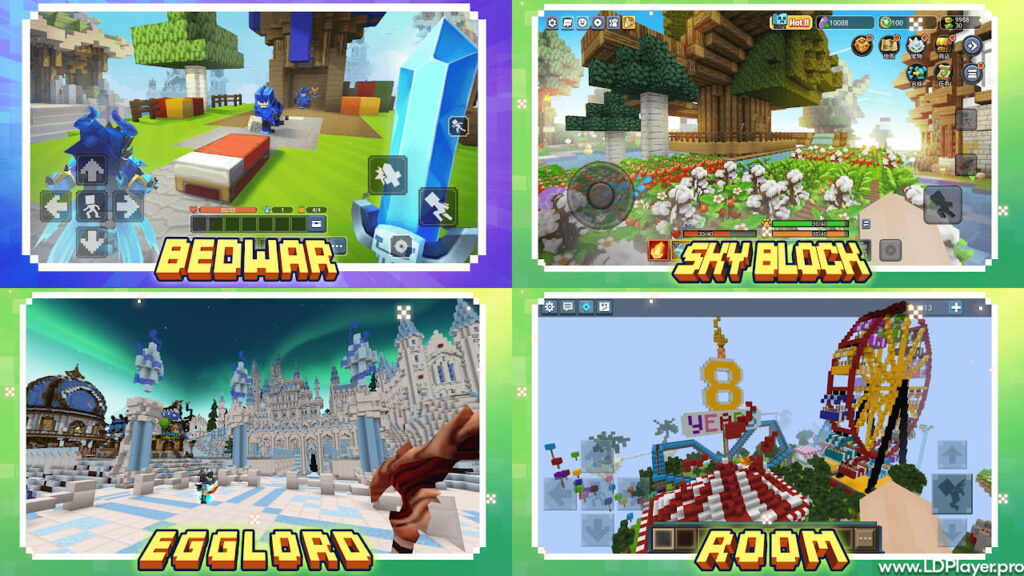
Blockman Go has many minigames for different play styles. Some games focus on battles. Others focus on building, parkour, role-play, or survival. Because of this, players can choose a game that fits their mood.
Bed Wars and Sky Wars are popular choices. In these games, players need fast movement, smart planning, and good teamwork. However, casual players can also find slower games that feel more relaxed.
New games and events can also keep the platform fresh. Therefore, players do not need to play the same mode every day.
Advanced Avatar Customization
The avatar system lets players change how their character looks. Players can use clothes, hats, faces, wings, shoes, and other items. This makes each avatar feel more personal.
Also, different styles help players match a theme. For example, some players may choose a cute look. Others may choose a battle look or a funny outfit.
Avatar items can make the lobby more fun. Since many players meet in shared areas, a clear style helps each player feel unique.
Integrated Social System
Blockman Go includes social tools for chatting and making friends. Players can send messages, join groups, and play with others. This helps teams stay connected before and after matches.
Clans also give players a way to build small communities. A clan can help players find teammates faster. Also, it can make team games feel more organized.
Privacy settings are important too. Younger players should use safety tools and limit who can contact them. This helps make the platform safer and more comfortable.
Cross-Platform Support
Blockman Go works mainly on mobile devices. Players can use Android or iOS devices to play. Also, many players use a PC emulator for a bigger screen and better controls.
PC play can help in fast games. A keyboard and mouse can make movement and aiming easier. As a result, some players prefer PC for competitive matches.
Even so, mobile play is still simple and useful. It lets players enjoy games anywhere with an internet connection.
How To Install Blockman Go on LDPlayer
Playing on LDPlayer can make controls easier for some players. Follow these steps.
Step 1: Download LDPlayer
Go to the official LDPlayer website. Then download the latest version for Windows.
Step 2: Install LDPlayer
Open the installer file. Next, follow the setup steps shown on the screen.
Step 3: Open LDPlayer
After installation, open the emulator from the desktop or start menu.
Step 4: Sign in to Google Play
Open the Google Play Store inside LDPlayer. Then sign in with a Google account.
Step 5: Search for Blockman Go
Use the search bar and type Blockman Go. Choose the official app from the results.
Step 6: Install the Game
Click the install button. After that, the app will download and appear on the home screen.
Step 7: Adjust Settings
Open LDPlayer settings. Then set enough CPU and RAM for smoother play. For many PCs, 4 CPU cores and 4 GB RAM can help.
Step 8: Launch the Game
Open the app and wait for it to load. Then sign in or create an account.
How To Play Blockman Go
After opening Blockman Go, players will see the main lobby. This is the main place for games, friends, events, and avatar changes.
Step 1: Choose a Game
Open the Games section. Then look at popular, new, or recommended games. Select a game card to see more details.
Step 2: Enter the Game
Tap or click the enter button. The selected game will load inside the platform.
Step 3: Learn the Goal
Each minigame has its own rules. So, players should read the short guide or watch what teammates do first.
Step 4: Use the Controls
On mobile, players use touch controls. On LDPlayer, players can use the keyboard and mouse. Usually, WASD controls movement, while the mouse controls the camera.
Step 5: Play with Friends
Players can add friends and join matches together. This makes team games easier and more fun.
Step 6: Complete Tasks
Daily tasks and events can give rewards. These rewards may help players get items or improve their profile.
Step 7: Customize the Avatar
Players can visit the avatar section and change clothes or accessories. This helps the character look more personal.
Safety and Legality
Blockman Go is a legal game platform when downloaded from official stores or trusted sources. Players should use the Google Play Store, Apple App Store, or a trusted emulator setup.
Modded APK files should be avoided. These files can harm the device, steal account data, or break game rules. Also, they may cause account bans.
Parents should help younger players set privacy options. For example, they can limit messages, friend requests, and social contact. This makes online play safer.
Players should also protect login details. A strong password and linked account can help with account recovery. Also, personal information should never be shared in chat.
Safe play is simple. Download from safe places, use privacy tools, and avoid unknown links.
Blockman Go FAQ
Is Blockman Go free to play?
Yes. The game is free to download and play. However, it may include optional purchases for items, cosmetics, or special benefits.
Can players use different devices?
Yes. Players can enjoy the game on mobile devices. Some players also use PC through an emulator.
How can an account be recovered?
Account recovery usually works through the linked login method. This may include Google, Facebook, or another connected account.
What are Gcubes?
Gcubes are a premium currency used in the platform. Players can use them for special items, avatar styles, or selected game features.
Is the game safe for young players?
The game can be safer when privacy settings are used. Also, younger players should avoid sharing personal details with strangers.
Final Words
Blockman Go gives players many sandbox games in one place. It combines action, building, role-play, chat, and avatar style in a simple way.
The platform works well for players who like quick matches. It also works for players who enjoy social spaces and custom looks. Because of this, it can fit many kinds of players.
Playing on mobile is easy and fast. However, PC play through LDPlayer can give better control for some games. So, players can choose the setup that feels best.
Blockman Go is strongest when players explore more than one game mode. Trying new games, joining friends, and using safe account settings can make the experience better.