Yu-Gi-Oh! Duel Links brings the famous card battle game to phones, tablets, and PC emulators in a fast way. It keeps the main ideas of dueling, but it makes each match shorter and easier to follow. So, both new players and long-time fans can enjoy quick battles without feeling lost.

What is Yu-Gi-Oh! Duel Links?
Yu-Gi-Oh! Duel Links is a free digital card game from Konami. It uses Speed Duel and Rush Duel rules, so matches move faster than the full card game. Players build decks, summon monsters, use Spell Cards, set Trap Cards, and try to lower the other player’s Life Points to zero.
The game also includes many characters from the anime series. Because of that, players can unlock famous Duelists, use their skills, and play with well-known cards. Also, the smaller field and deck size make each duel simple to start, but still deep enough to learn over time.
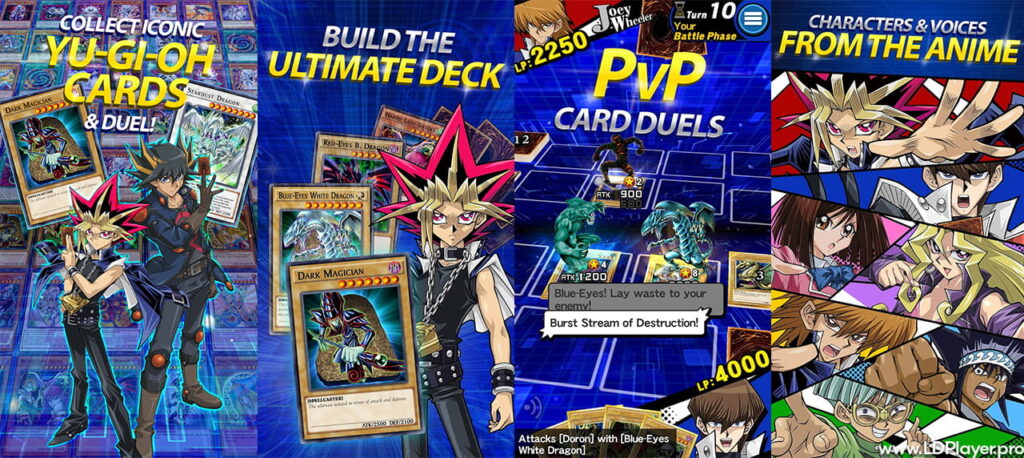
Yu-Gi-Oh! Duel Links Features
Speed Duels and Rush Duels
Yu-Gi-Oh! Duel Links gives players two main ways to play. Speed Duels use a smaller field with three Monster Zones and three Spell or Trap Zones. This makes turns quicker and choices more direct.
Rush Duels work in another way. Players can summon many monsters in one turn and draw until they have five cards. As a result, Rush Duels feel faster and more open for big plays.
Legendary Anime Roster and Full Voice Acting
The game includes many well-known Duelists from different Yu-Gi-Oh! shows. Players can use characters from the original series, GX, 5D’s, ZEXAL, ARC-V, VRAINS, and SEVENS.
Also, many characters have voice lines during duels. When famous monsters enter the field, the game can show 3D summon scenes. So, cards like Blue-Eyes White Dragon and Dark Magician feel more exciting during battle.
Character Skills
Character Skills are a key part of Yu-Gi-Oh! Duel Links. Each Duelist can use special skills that help during a match. Some skills add cards, change hands, support a deck type, or help set up a strong play.
Because of this, deck building is not only about cards. Players also need to choose the right character and skill for their plan.
PvP and PvE Gameplay
Players can duel against real players in Ranked Duels. They can also play against computer Duelists, clear missions, and join events. These modes help players earn cards, Gems, and rewards.
Also, regular events give players new goals. So, the game stays active for both casual players and serious Duelists.
How To Install Yu-Gi-Oh! Duel Links on LDPlayer
Playing Yu-Gi-Oh! Duel Links on LDPlayer can help players enjoy a bigger screen, smoother control, and easier menu use.
- Download LDPlayer
Visit the official LDPlayer website. Download the latest 64-bit version. After that, open the installer and follow the setup steps. - Open LDPlayer and Sign In
Start LDPlayer from the desktop. Then open the Google Play Store inside the emulator. Sign in with a Google account. - Search for the Game
Type the game name in the Play Store search bar. Choose the official Konami app from the results. - Install the Game
Click install and let the app download. Then wait until the main files finish installing. - Start the Game and Download Data
Open Yu-Gi-Oh! Duel Links from the LDPlayer home screen. The game may download extra data on first launch. - Transfer Old Progress
Returning players should use Data Transfer on the title screen. Then they can link a KONAMI ID and restore saved progress.
How To Play Yu-Gi-Oh! Duel Links
To play well, a deck needs a good mix of Monster, Spell, and Trap Cards. Monsters attack and defend. Spell Cards help with quick actions. Trap Cards stop or slow the other player.
Each turn has clear parts. First, the player draws a card. Then they summon monsters, set cards, and use effects. After that, they may attack during the Battle Phase.
The goal is simple. Reduce the opponent’s Life Points to zero before they do the same. However, winning needs smart timing. Players must know when to attack, when to defend, and when to save cards.
Beginners can use Auto-Build to make a simple deck from owned cards. Also, Auto-Duel can help with easy battles against computer players. This helps players earn rewards while learning the game.
Safety and Legality
Yu-Gi-Oh! Duel Links should only be downloaded from trusted places like Google Play, the App Store, or official emulator stores. This helps keep accounts and devices safer.
Players should avoid third-party tools, mod apps, and websites that promise free Gems. These tools can steal account details or break game rules. Also, using unfair tools can lead to account bans.
For safer progress, players should create and link a KONAMI ID. This helps protect saved data and makes it easier to move progress between devices.
Yu-Gi-Oh! Duel Links FAQ
Is Yu-Gi-Oh! Duel Links free to play?
Yes. The game is free to download and play. Players can earn Gems through missions, events, log-ins, and character levels.
Can progress be shared between mobile and PC?
Yes. Players can use one KONAMI ID for Data Transfer. This lets them play on a phone and LDPlayer without losing progress.
What is the difference between Speed Duels and Rush Duels?
Speed Duels use a smaller field and many classic card rules. Rush Duels allow more normal summons and let players draw back to five cards.
How can beginners get more Gems?
Beginners can clear Duel Quizzes, finish missions, level up characters, and join events. These actions give a steady Gem supply.
Final Words
Yu-Gi-Oh! Duel Links is a simple but deep card battle game for many kinds of players. It has fast duels, famous anime characters, character skills, and many ways to build decks.
With LDPlayer, players can enjoy the game on a larger screen with easier controls. So, it becomes more comfortable to collect cards, test decks, and take part in duels.