Apex Legends Mobile brings fast battle royale action to phones, tablets, and supported Android emulator setups. The game focuses on squad teamwork, quick movement, smart combat, and unique Legend abilities. Each match asks players to think fast while working closely with teammates.
What is Apex Legends Mobile?
Apex Legends Mobile is a separate version of the Apex battle royale experience created for mobile systems. It uses mobile-focused controls, menus, game settings, and other features that suit handheld devices.
During a normal match, players enter the battlefield in three-player squads. Many teams land across the map and search for useful equipment before fighting nearby enemies.
Each player chooses a Legend before entering the match. Every Legend comes with different abilities. These usually include a passive ability, a tactical ability, and an ultimate ability.
For example, one Legend may help the team move faster. Another may protect teammates during a fight. Some Legends can find enemies, while others can control important areas.
Because every Legend works differently, squad planning is important. A balanced team can often handle more situations than a team with similar abilities.
Players also need to watch the ring. The ring closes over time and reduces the safe part of the map. Therefore, squads must keep moving while checking enemy positions and nearby cover.
Good teams manage weapons, shields, healing items, ammunition, and movement together. They also share useful equipment when another teammate needs it more.
Apex Legends Mobile Features
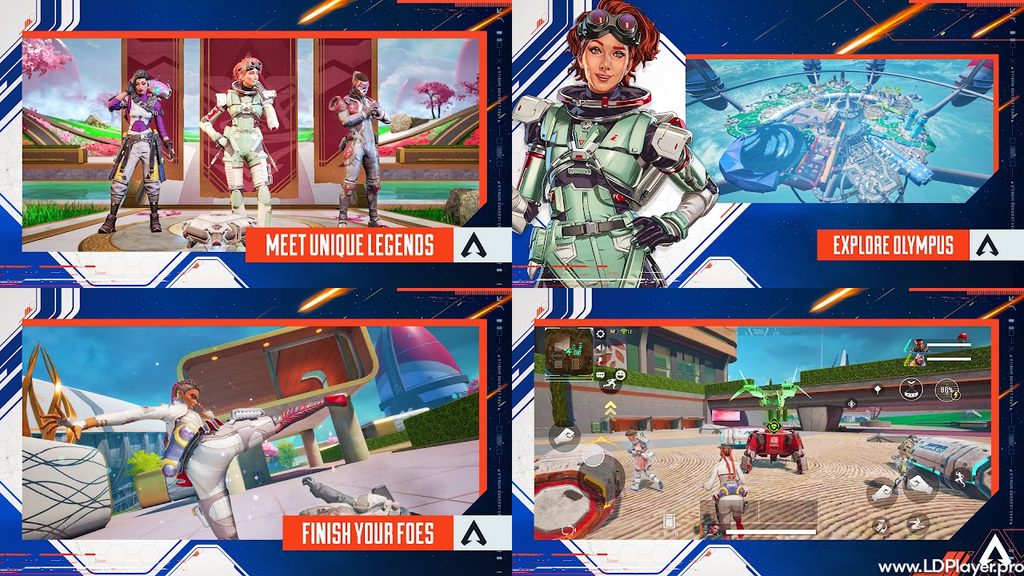
The game includes several features made around mobile play. These systems help players control the game more easily while still keeping fast combat and tactical team play.
Mobile-Exclusive Legends
Apex Legends Mobile includes Legends such as Fade and Rhapsody, which were created for the mobile version. Their abilities give players more options when building a squad.
Fade focuses strongly on movement and repositioning. This can help players escape danger, enter fights, or quickly change location.
Rhapsody brings support tools that can help teammates during combat. Her abilities can change how a squad handles pressure and controls nearby areas.
These mobile-focused Legends add new choices for players who want different team combinations. Therefore, learning how each Legend works can improve squad planning.
Optimized Mobile UI and Custom Controls
The game includes controls designed for touchscreens. Players can move buttons, change their size, and adjust where different actions appear.
This matters because every player holds and controls a mobile device differently. Some players prefer larger shooting buttons. Others need more space for movement, aiming, jumping, and crouching.
Apex Legends Mobile also includes useful systems such as smart pings and visual sound information. These tools can help players understand what is happening nearby.
For example, visual indicators can help show the direction of footsteps or gunfire. At the same time, the ping system lets teammates mark enemies, items, locations, and routes without using voice chat.
Auto-looting options can also reduce the time spent picking up common items. However, players should still manage their inventory carefully during longer matches.
Signature Legend Perk System
The Legend perk system gives players another way to improve and adjust their chosen characters.
By playing matches and making progress, players can unlock different perks connected to specific Legends. These perks can change small parts of how a Legend performs during combat.
Some perks may support movement, defense, information gathering, or ability use. Therefore, players can choose perks that match their normal play style.
A player who prefers aggressive fights may select different perks from someone who focuses on team support. This creates more choices without changing the main role of each Legend.
Learning which perks work well together can also help players prepare for ranked or team-focused matches.
Dynamic Game Modes
Battle Royale is a major part of the game, but other modes give players different ways to play.
Team Deathmatch focuses on direct combat. Players can enter fights more often without spending as much time searching the map.
Arenas offer smaller team battles where positioning and shooting skill matter greatly. Since the fighting area is more controlled, players can practice aiming and ability use more often.
Mini Battle Royale modes can provide a shorter version of the main battle royale experience. These matches may suit players who want faster sessions.
Because these modes work differently, they can also help players improve certain skills before returning to full Battle Royale matches.
How To Install Apex Legends Mobile on LDPlayer
Apex Legends Mobile can be run through LDPlayer when the required game package and emulator support are available. Using an emulator allows players to control Android software from a Windows PC.
Follow the steps below carefully.
1. Download LDPlayer Emulator
Visit the official LDPlayer website and choose a suitable Android version.
For better support with demanding games, a 64-bit Android version may be the better choice on supported computers.
Download the installer and save it to an easy-to-find location.
2. Complete Emulator Setup
Open the downloaded LDPlayer installer.
Follow the setup instructions shown on the screen. Choose the installation location if the setup program gives that option.
After installation finishes, open LDPlayer.
Allow the emulator to complete its first-time setup before installing games or changing advanced settings.
3. Access the Store and Search
Open the LD Store or Google Play Store inside the emulator.
Use the search bar and type Apex Legends Mobile.
Check the game name and publisher information before installing any application. This helps reduce the risk of downloading the wrong package.
4. Install the Application Package
Open the correct game listing.
Choose the install option and allow the emulator to download the required files.
The download size can be large, so a stable internet connection is useful.
After the main installation finishes, open the game. Some extra game files may also need to download before the first match.
5. Configure Keymapping and Game Settings
Open the LDPlayer keyboard mapping tool.
Assign keys for movement, aiming, shooting, jumping, crouching, abilities, healing, inventory access, and other important actions.
Next, open the in-game settings.
Adjust graphics quality based on the computer’s hardware. Lower settings can improve frame rate on weaker systems. Stronger computers may handle higher visual settings more smoothly.
Also adjust mouse sensitivity and aiming speed. Small changes can make a big difference during close fights.
How To Play Apex Legends Mobile
Winning matches requires more than accurate shooting. Teams also need good movement, strong positioning, useful communication, and careful resource management.
Select Balanced Squad Formations
Choose Legends that support different jobs.
A team may include one Legend for defense, another for attacking, and another for support or scouting.
Different abilities can cover more situations. Therefore, avoid choosing Legends only because they are personally popular.
Think about how each ability can help the full team.
Utilize Visual Ping Communications
Use the ping system often.
Mark enemy locations, useful weapons, armor, healing items, and safe routes.
Pings are especially helpful when voice chat is not available. They also give teammates fast information without stopping movement.
Clear pings can help the squad react faster during dangerous fights.
Manage Armor and Shield Upgrades
Good armor can decide how long a player survives in combat.
Look for stronger body shields whenever possible. Also carry shield cells and shield batteries for recovery after taking damage.
Before entering another fight, restore shields when the situation is safe.
Going into combat with weak shields can make even a strong weapon loadout less useful.
Master Fast Movement Techniques
Movement plays a major role in Apex Legends Mobile.
Use running, sliding, jumping, climbing, and ziplines to move quickly through the map.
During fights, avoid standing still for too long. Moving between cover makes it harder for enemies to land easy shots.
However, movement should still have a purpose. Random jumping in open areas can make players easier to track.
Practice moving from one safe position to another.
Position Strategically for Ring Shifts
Keep checking the map and ring timer.
Moving early can help the team reach safe ground before enemy squads block important paths.
High ground can also provide better vision and stronger shooting angles.
At the same time, avoid staying too far outside the ring for extra loot. Healing items can run out quickly when ring damage becomes stronger.
Good positioning often gives the team more time to prepare before the next fight begins.
Safety and Legality
Android emulators are software tools that create an Android-style environment on a computer. They can run supported Android applications through desktop hardware.
Players should still follow the rules of the game and any platform being used.
Always download LDPlayer and other software from trusted official sources. Unknown download websites may contain changed installers, unwanted programs, or unsafe files.
Account security is also important. Use official login systems when available and keep passwords private.
Avoid sharing login details with other people. Strong, unique passwords can reduce the risk of account access problems.
Players should also avoid scripts, cheats, memory tools, modified clients, and other unfair software. These tools can break game rules and may also create security risks.
Fair play keeps matches more enjoyable for everyone.
Apex Legends Mobile FAQ
Is the mobile version cross-platform with PC and console releases?
No. The mobile version uses its own game systems and servers. It does not use the same matchmaking system as the main PC and console versions.
This separation allows the mobile game to use controls, balance changes, and features designed around mobile devices.
What are the recommended PC system requirements for LDPlayer?
A computer should have a modern Intel or AMD processor, enough memory, and suitable graphics support for stable emulator performance.
Around 8 GB of RAM or more can help when running demanding Android games. A dedicated graphics card can also improve frame rate and visual quality.
Virtualization Technology should be enabled when the computer and processor support it. This setting can improve emulator performance.
Available storage space is also important because the emulator, game files, and game updates may use several gigabytes.
Is the game free to play?
Yes. Apex Legends Mobile follows a free-to-play model.
Players can access the main game without buying the base application. Optional purchases may include cosmetic items, skins, passes, and other visual content.
These items mainly focus on appearance and player customization rather than replacing normal combat skill.
Final Words
Apex Legends Mobile delivers quick squad combat, Legend abilities, fast movement, and battle royale gameplay built around mobile controls. Players can create different squad combinations, adjust control layouts, practice movement, and improve their decision-making across several game modes.
Using LDPlayer can also provide keyboard and mouse controls for players who prefer playing Android games on a PC. Proper keymapping, sensible graphics settings, and stable emulator performance can make controls easier to manage.
However, strong teamwork remains important in every match. Teams should share information, protect each other, manage shields, watch the ring, and choose better positions before fighting.
Learning Legend abilities also takes time. Players who understand when to attack, retreat, heal, or move can make better choices during difficult situations.
With useful controls, team-focused gameplay, and several tactical systems, Apex Legends Mobile gives players many ways to improve their skills and enjoy competitive squad battles.