MONOPOLY has stayed one of the most popular board games for many years. Millions of players know its simple goal. Buy property, collect rent, make smart trades, and try to become the last player with money.
What is MONOPOLY?
MONOPOLY is a digital property trading board game based on the famous tabletop game licensed by Hasbro. The mobile version keeps the main rules and ideas that players already know.
Each player moves around the board by rolling dice. Along the way, players can buy properties, collect rent, trade with others, and build houses or hotels. The main goal is simple. Players need to manage their money well and avoid bankruptcy.
The digital edition adds modern graphics and animations to the traditional board. Instead of moving physical tokens by hand, the game handles movement, money, cards, rent, and other actions automatically.
Players can also choose from several game modes. Some people may prefer to compete against computer-controlled players. Others may want to play with friends in the same room or join online matches.
Because the basic rules remain familiar, new players can learn the game without much trouble. At the same time, experienced players can still use trading, planning, and property management skills.
MONOPOLY Features
The mobile edition includes several features that make the classic board game easier to enjoy on a digital device. These additions improve the presentation while keeping the traditional gameplay style.
Immersive 3D Environments
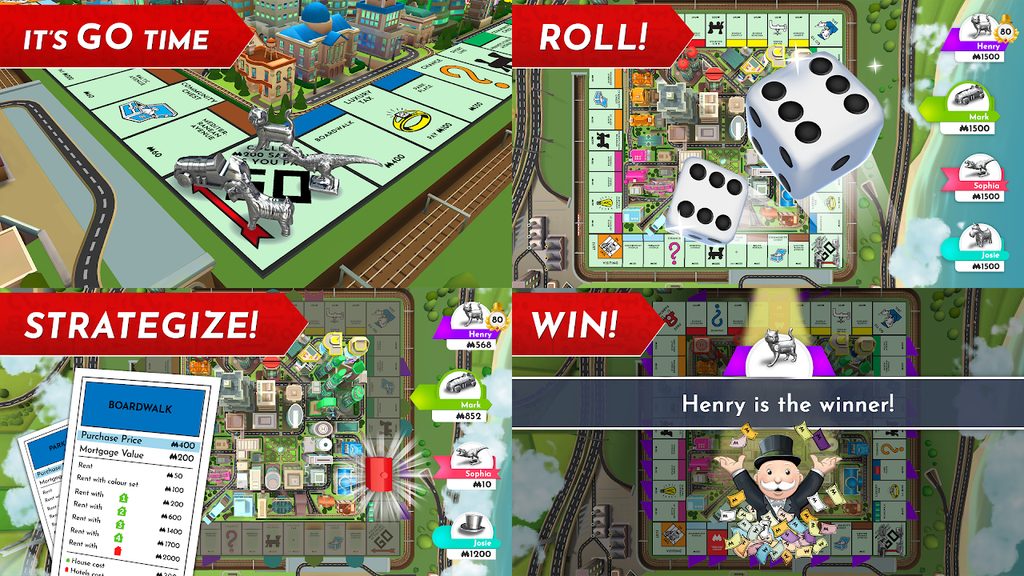
The digital board uses animated 3D graphics instead of a simple flat design. Buildings, tokens, and other parts of the board appear with clear details and smooth movement.
These visual effects make each turn easier to follow. For example, players can watch their token move after every dice roll. Property changes and other events also appear directly on the screen.
The design gives the traditional board a more modern look without changing the basic rules.
Diverse Multiplayer Modes
Different multiplayer options make it possible to choose how each match is played.
Pass & Play allows several people to use one device. Each person takes a turn and then passes the device to the next player. This mode works well for friends or family members sitting together.
Online multiplayer gives players another option. It allows people to compete with other users through an internet connection.
Solo players can also start matches against AI-controlled opponents. This mode can help new players learn the rules, test trading ideas, or enjoy a game without waiting for other people.
Exclusive Customization
Players can change parts of the game to make each match feel different. Depending on the available content, this may include different boards, tokens, or dice styles.
Customization does not change the main purpose of the game. However, it gives players more choices when setting up a match.
Some people may enjoy using a classic design. Others may prefer a different board style or a new token. These small changes can help keep repeated matches feeling fresh.
Ad-Free Premium Experience
The game uses a premium format, so players can focus more on the board instead of dealing with regular advertising during matches.
That can be useful because board games often take some time to complete. Frequent ads could interrupt trading, planning, and other important parts of a turn.
The main gameplay also depends on decision-making, property ownership, dice rolls, and money management. Cosmetic content does not replace the need for good planning.
As a result, players can spend more time thinking about trades, building property groups, and managing their cash.
How To Install MONOPOLY on LDPlayer
Playing MONOPOLY on a PC through LDPlayer allows users to run the Android version on a larger screen. The process is similar to installing a mobile application through the Google Play Store.
Follow these steps:
- Download the Emulator:
Visit the official LDPlayer website and download the installer that matches the computer. - Install the Software:
Open the downloaded installer. Then follow the instructions shown on the screen until LDPlayer finishes installing. - Launch LDPlayer:
Open the emulator after installation. Allow it to complete any first-time setup that appears. - Open the App Store:
Find the Google Play Store inside LDPlayer and open it. Sign in with a Google account when required. - Search for the Game:
Use the Play Store search bar and enter the game name. Check the application details before starting the installation. - Install the Application:
Select the official game published by Marmalade Game Studio. Then choose the install option and allow the download to finish. - Launch and Play:
After installation, the game icon should appear inside LDPlayer. Open it to begin setting up a match.
Using a PC can provide more screen space for viewing properties, player information, and the full board. It can also be helpful during longer sessions when a mobile device may need charging.
How To Play MONOPOLY
A match begins with the usual setup options. Players may choose a game mode, board, token, and other available settings before starting.
Once the match begins, each player takes a turn rolling the dice. The token then moves around the board based on the number shown.
Landing on an available property usually gives the player a chance to buy it. Buying useful properties can create more chances to earn rent later.
However, landing on property owned by another player normally means rent must be paid. The amount can increase when the owner has completed a color group and added houses or hotels.
Trading also plays an important role. Players can exchange properties with each other to complete color sets. A good trade can improve one player’s position, so every offer should be checked carefully.
Cash management matters as well. Spending too much too early can leave a player without enough money for rent, taxes, or other costs.
Chance and Community Chest cards can also change a turn. A card may provide money, require a payment, move a token, or send a player to jail.
As the match continues, stronger property groups can produce higher rent. Eventually, players who cannot pay what they owe may become bankrupt.
The game ends when only one financially active player remains.
Safety and Legality
Using an Android emulator generally means running a mobile operating environment on a computer. However, users should still follow safe installation habits.
LDPlayer should be downloaded from its official source rather than from unknown third-party websites. The same care applies when installing the game. Using the official Google Play Store inside the emulator helps reduce the risk of downloading modified or unofficial files.
Players should also avoid cracked applications, unofficial APK files, or websites that promise free access to paid content. Such files may create security problems or break platform rules.
Account details should only be entered into trusted login screens. In addition, keeping the emulator, operating system, and security software updated can help protect the computer.
Players should also follow the terms and rules connected with the game, Google Play, and the emulator software being used.
MONOPOLY FAQ
Can this game be played offline?
Yes. Offline play is available for situations where an internet connection is not needed. Players can compete against AI opponents, while Pass & Play can allow several people to take turns on the same device.
This makes the game useful for local sessions where online matchmaking is not required.
Are there in-app purchases required to win?
Winning depends mainly on dice rolls, property choices, trading, money management, and decisions made during the match.
Optional content may include visual items such as boards or tokens. These types of items are mainly designed to change the appearance of the game rather than replace normal gameplay skills.
Is it possible to play cross-platform?
Online multiplayer is designed to make it easier for players to join matches from supported devices and platforms.
However, multiplayer access may depend on the game version, account setup, connection, and current platform support. Keeping the application updated can help reduce connection or compatibility problems.
Final Words
MONOPOLY brings the familiar property trading board game to phones, tablets, and other supported devices. The digital version keeps the well-known rules while adding animated graphics, multiplayer options, AI opponents, customization, and automatic game management.
Playing through LDPlayer can also give PC users another way to enjoy the mobile edition. A larger display can make the board easier to read, while mouse controls may feel more comfortable for some players.
Success still depends on more than lucky dice rolls. Smart property buying, careful spending, useful trades, and good timing can strongly affect each match.
New players can begin with AI opponents to understand the rules. Meanwhile, experienced players can test their skills against friends or online opponents.
Whether the goal is a short local game or a longer online match, the digital edition keeps the main experience easy to understand. Choose a token, roll the dice, buy useful property, make careful trades, and work toward becoming the final player left on the board.