Block Blast! is a simple puzzle game that mixes calm play with smart thinking. It gives players a clean board, bright blocks, and clear rules. So, it feels easy at first. However, each move still matters.
What is Block Blast!?
Block Blast! is a free block puzzle game from Hungry Studio. The game uses an 8×8 grid. Players place block shapes on this grid to clear full rows and columns.
Unlike Tetris, blocks do not fall from the top. Also, there is no fast timer. The game gives three block shapes at the bottom. Players drag each shape onto empty spaces. After all three shapes get placed, the next set appears.
A row or column clears when it becomes full. Then, the cleared space opens again. This gives more room for new shapes. The game ends when no current shape can fit anywhere on the board.
Because of this, Block Blast! rewards planning. A player should not only look at one block. Instead, each move should help the next two blocks fit well.
Block Blast! Features
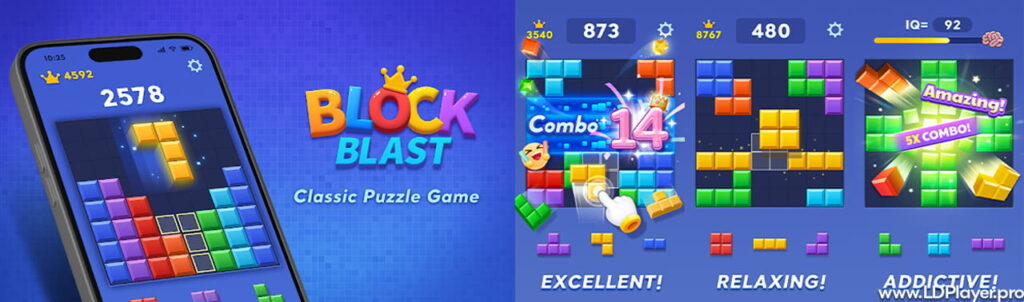
Block Blast! has a clean design and simple controls. Yet, the game has enough depth to keep players interested for a long time.
Dual Dynamic Game Modes
The game has two main modes.
Classic Block Puzzle is an endless mode. The goal is to survive and score as high as possible. Since the board can fill fast, players must keep open space ready.
Adventure Block Puzzle Mode gives set levels and special goals. Some levels may include colored gems or fixed board shapes. Therefore, this mode feels more guided than Classic mode.
Completely Offline Accessibility
Block Blast! can work without WiFi. This makes it useful during travel, bus rides, flights, or places with weak signal. Since the game does not need a constant internet link, players can enjoy it almost anywhere.
Advanced Combo Multiplier Architecture
The score system rewards smart clears. When a player clears more than one line with one move, the score grows faster. Also, clearing lines in back-to-back turns can build strong combos.
So, good players often prepare the board first. Then, they place one key block to clear many lines at once.
Immersive Audio-Visual Presentation
The game uses bright blocks, smooth effects, and clear sound feedback. Each cleared line gives a sharp pop and a small visual burst. As a result, every good move feels clear and satisfying.
How To Install Block Blast! on LDPlayer
Playing on PC gives a bigger screen and better comfort. Also, it helps save phone battery. LDPlayer 9 is an Android emulator that can run mobile games on a computer.
Follow these steps to install Block Blast! on LDPlayer.
1. Download and Install LDPlayer
Open a web browser and go to the official LDPlayer website. Download LDPlayer 9. Then, open the installer file.
Follow the setup steps shown on the screen. After installation, LDPlayer will create an Android-like system on the PC.
2. Launch the Emulator and Access Store
Open LDPlayer from the desktop shortcut. After it loads, the Android home screen will appear.
Next, find the Google Play Store icon. Some versions may also show LDStore. Either option can help find the game.
3. Authenticate Account Credentials
Sign in with a valid Google Account. This step allows access to the Play Store. It can also help sync game progress when supported.
Use a safe account and avoid sharing login details with others.
4. Search for the Title
Click the search bar in the store. Type “Block Blast!” and press Enter.
Look for the official game by Hungry Studio. Choosing the correct app helps avoid unsafe copies.
5. Execute Installation
Open the game page. Then, click the Install button.
The emulator will download and install the app on the virtual Android system. After that, the game icon will appear on the home screen.
6. Boot and Configure Input
Click the game icon to start. The mouse works well for drag-and-drop moves.
In most cases, no special key setup is needed. Players can click, hold, drag, and release blocks on the grid.
How To Play Block Blast!
Block Blast! starts with an empty 8×8 board. Three block shapes appear at the bottom. The player must place all three before getting new shapes.
The main goal is simple. Fill full rows or columns to clear them. However, the best play needs planning.
Before placing the first block, check all three shapes. Then, look for spaces where each one can fit. This helps avoid blocked corners and tiny empty gaps.
A common mistake is placing the easiest block first. That can leave no room for a large block. So, place the hardest shape first when needed.
Core High-Score Directive
Never treat one block as a single move. Each block affects the whole board. Before dropping a piece, ask one question: will the other two pieces still fit after this move?
This habit helps keep the board open. It also helps create better clears.
Prioritize Center Clearance
Keep the middle area open when possible. The center gives space for large shapes. For example, big squares and long blocks need wide open room.
It is often safer to place small shapes near edges. However, do not trap empty single squares. Those small holes can become a problem later.
Maintain the Combo Train
Combos help raise the score quickly. Try to clear at least one row or column often. If several turns pass with no clear, the score growth slows down.
So, build lines with care. Leave space for a final block to finish the clear.
Engineered Traps for Multi-Clears
Strong players create almost-full rows or columns on purpose. They leave one slot open. Later, one perfect piece can clear two or three lines at once.
This method needs patience. Still, it can give a much higher score than clearing one line too early.
Safety and Legality
Legality Status
Block Blast! is an official game owned and maintained by Hungry Studio. Players should download it from trusted places only, such as Google Play, the App Store, or verified emulator stores.
Using official sources helps protect the device. It also helps players get the latest safe version.
Safety and Data Integrity
The game does not need special root access to run. It also does not need complex setup. On PC, using a trusted emulator adds another safe layer.
Players should avoid modified APK files. These files may include harmful code. Therefore, official downloads are always the better choice.
Block Blast! FAQ
Is Block Blast! completely free to play?
Yes, the main game is free. Players can enjoy the puzzle modes without paying. The game may show ads between sessions. These ads help support the game.
Can pieces be rotated before placing them on the grid?
No, blocks cannot be rotated or flipped. Each shape must stay in the same direction shown at the bottom. This rule makes planning more important.
What happens if I make a mistake or close the application mid-game?
The game can save the current board state. So, when the app closes or gets interrupted, the session can often continue from the same point.
Final Words
Block Blast! gives a calm but smart puzzle experience. It has no falling blocks, no harsh timer, and no hard control system. Because of that, many players can learn it fast.
At the same time, high scores need real planning. Players must protect open space, watch every shape, and build smart clears.
On mobile, the game works well for short breaks. On PC with LDPlayer, it gives a larger and more relaxed setup. Overall, Block Blast! is a clear choice for players who like simple rules and deep puzzle play.