CarX Drift Racing 2 is one of the most popular drifting games for mobile and PC players. The game gives a realistic drifting experience with detailed car tuning, smooth controls, and competitive online modes. Unlike normal racing games, the focus stays on controlled drifting, sharp cornering, and keeping the car stable during long slides.
Many drifting fans enjoy CarX Drift Racing 2 because it mixes real driving physics with deep customization options. Every car setup changes how the vehicle moves on the track. Because of this, players can improve their drifting skills while also building unique cars for different driving styles.

What is CarX Drift Racing 2
CarX Drift Racing 2 is a drifting simulator developed by CarX Technologies. The game focuses on professional-style drifting instead of traditional racing. Players earn points by maintaining drift angles, speed, and smooth transitions through corners.
The physics system in CarX Drift Racing 2 reacts to tire grip, suspension settings, engine power, and road surfaces in real time. As a result, every tuning change affects vehicle handling during gameplay.
The game also includes many cars inspired by famous drift vehicles from Japan, Europe, and the United States. Players can fully customize these cars with visual parts, tuning upgrades, and performance adjustments.
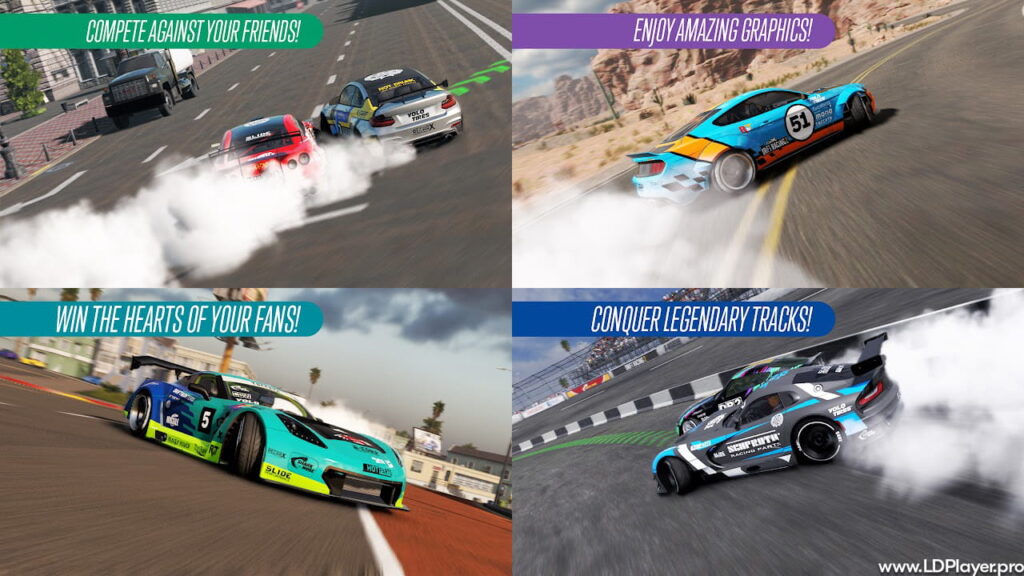
CarX Drift Racing 2 Features
CarX Drift Racing 2 includes many systems that make the gameplay deeper and more realistic. Both casual players and experienced drifting fans can enjoy the different features available in the game.
Realistic Driving Physics
The driving physics system is one of the strongest parts of CarX Drift Racing 2. Different track surfaces affect how the car behaves during a drift. Asphalt offers strong grip, while sand and grass reduce stability and traction.
In addition, tuning changes directly impact performance. Adjustments to suspension stiffness, wheel alignment, tire pressure, and differential settings all change how the car reacts during turns and transitions.
Because of these details, drifting feels more natural and skill-based instead of arcade-like.
Deep Visual Auto Tuning
Players can fully customize the appearance of their vehicles. The game allows changes to mirrors, headlights, bumpers, body kits, wheels, spoilers, and exhaust systems.
The livery editor also gives players freedom to create detailed designs using decals and vinyl layers. Some players recreate real drift team liveries, while others design original styles for online events and car meets.
This level of customization helps every vehicle feel unique on the track.
XDS Tandem Drifting Mode
The XDS mode brings professional tandem drifting rules into the game. In this mode, one driver becomes the Leader while the other becomes the Chaser.
The Chaser earns points by following the Leader closely without making contact. Judges evaluate angle, speed, line accuracy, and drift consistency during the run.
As a result, tandem battles in CarX Drift Racing 2 feel competitive and technical at the same time.
Multiplayer and Online Rooms
Online rooms allow players to drift together in real time. Many players use these rooms for tandem practice, free driving sessions, and friendly competitions.
The multiplayer system also helps players share tuning setups and livery ideas with the global community. Because of this, the game continues to grow with active players from many countries.
How To Install CarX Drift Racing 2 on LDPlayer
Many players prefer using LDPlayer on PC for better controls and smoother performance. Keyboard controls, controllers, and racing wheels can improve drifting precision during gameplay.
Follow these steps to install the game on LDPlayer.
Step 1: Download LDPlayer
Visit the official LDPlayer website and download the latest version of the emulator. LDPlayer 9 is recommended because it offers improved stability and performance for modern mobile games.
Step 2: Install the Emulator
Open the downloaded installer file and complete the installation process by following the on-screen instructions.
After installation finishes, launch the emulator from the desktop shortcut.
Step 3: Open Google Play Store
On the LDPlayer home screen, open the System Apps folder and select Google Play Store.
Then sign in using a Google account.
Step 4: Search for the Game
Use the search bar at the top of the Play Store and type “CarX Drift Racing 2”.
Select the correct game from the search results.
Step 5: Install and Launch
Press the Install button and wait for the download process to finish.
Once installed, the game icon will appear on the LDPlayer home screen. Open the game and start drifting.
How To Play CarX Drift Racing 2
Learning drifting mechanics takes time and practice. However, understanding the basic controls makes progression much easier.
The game offers different control options, including touch buttons, virtual steering wheel controls, and tilt steering.
To begin a drift, players need enough speed before entering a corner. Then the driver can use a quick steering movement or the handbrake to break rear tire traction.
Once the car starts sliding, throttle control becomes very important. Too much throttle can cause a spin-out, while too little power can stop the drift completely.
Counter-steering also plays a major role during drifting. The front wheels must point toward the direction of movement to maintain balance and angle.
With enough practice, players can link multiple corners together smoothly and improve overall drift scores.
Safety and Legality
Players should always download the game from trusted sources such as the Google Play Store, Apple App Store, or official emulator stores.
Using modified APK files or unofficial hacks creates serious risks. Many third-party files contain malware that may damage devices or steal personal information.
In addition, using cheats violates the game’s rules. Accounts using unauthorized modifications may receive permanent bans from online servers and multiplayer modes.
For the safest experience, it is best to use official versions only.
CarX Drift Racing 2 FAQ
Is CarX Drift Racing 2 free to play?
Yes, the game is free to download and play. However, optional in-app purchases are available for premium currency, cars, and tuning items. Many rewards can still be unlocked through normal gameplay progression.
Can players enjoy the game offline?
Several features work without an internet connection, including single-player gameplay and vehicle tuning. However, multiplayer rooms, cloud saves, and online competitions require internet access.
Does the game support controllers?
Yes, the game supports many Bluetooth controllers on mobile devices. Players using LDPlayer on PC can also connect gamepads and racing wheels for better control accuracy.
What are the minimum system requirements?
Mobile devices should have at least 3GB of RAM and a stable processor for smooth gameplay. On PC, LDPlayer works best with a quad-core processor and a dedicated graphics card.
Final Words
CarX Drift Racing 2 continues to attract drifting fans because of its realistic handling, detailed tuning system, and competitive multiplayer modes. Every drift feels rewarding because the gameplay depends on skill, timing, and proper vehicle control.
The game also offers deep customization options that allow players to build cars matching their own driving style. From visual upgrades to suspension tuning, every adjustment changes the driving experience.
Whether playing on mobile devices or through LDPlayer on PC, players can enjoy a detailed drifting simulator that stays focused on realism and control. With practice, patience, and smart tuning setups, anyone can improve their drifting skills and enjoy the competitive world inside CarX Drift Racing 2.