Cooking Mama: Let’s cook! is a fun cooking game made for mobile and PC play. It turns simple kitchen tasks into short, clear mini-games.
The game also brings the classic Cooking Mama feel to modern devices. Each recipe comes with clear actions. For example, the game may ask players to slice vegetables, stir soup, or flip meat at the right time. Because each task is short, the game feels fast and fun.

What is Cooking Mama: Let’s cook!
Cooking Mama: Let’s cook! is a family cooking game from Office Create Corp. The main idea is simple. Players follow Mama’s instructions and make many kinds of dishes.
The game does not punish small mistakes too hard. So, a missed step does not always ruin the whole recipe. This makes the game friendly for new players. Also, it helps younger players learn food steps in a safe way.
The game mixes cooking with light village management. Players cook meals, serve food, collect items, and grow their own small food world. As a result, the game has more to do than only making recipes.
Basic gameplay loop:
Harvest ingredients > Complete cooking mini-games > Serve dishes in the restaurant > Earn items and rewards > Expand the Happy Village > Repeat with better results
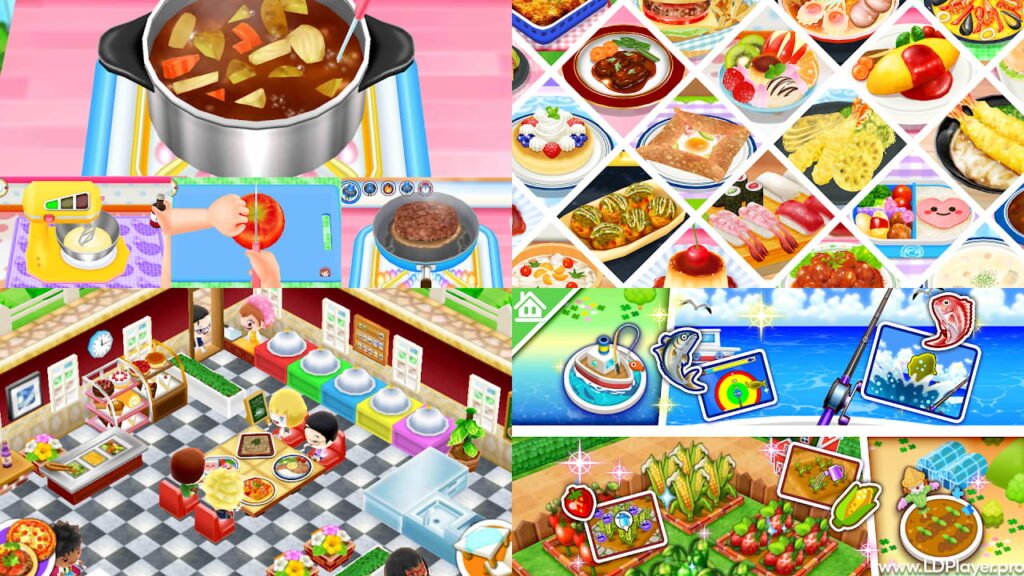
Cooking Mama: Let’s cook! Features
Cooking Mama: Let’s cook! includes several modes that keep the game fresh. Each mode supports the main cooking system in a simple way.
Intuitive Culinary Mini-Games
The main cooking mode uses short mini-games. Each recipe breaks into small food steps. For example, players may peel potatoes, cut onions, grate cheese, knead dough, or fry fish.
Most tasks take only a few seconds. However, good timing still matters. Players need to swipe, tap, drag, or move in circles. These controls make the game easy to learn.
Also, each task has a clear goal. The screen shows what action should happen next. So, players do not need long lessons before cooking.
Better performance gives better medals. Therefore, careful movement helps more than random tapping.
The Happy Village Ecosystem
After cooking, players can use dishes in Happy Village. This mode adds light management to the game. Players serve food, collect rewards, and improve the village.
The village includes useful places such as fields, a ranch, and fishing spots. In the fields, players grow crops. On the ranch, players care for animals and collect goods. Through fishing, players get seafood for more recipes.
These items help players make more food. They can also turn into Happy Foods. Happy Foods work like a useful game currency. Players can use them for decorations and restaurant growth.
Because of this system, Cooking Mama: Let’s cook! feels more active. Cooking connects to farming, serving, and upgrading.
Game Plaza and Brain Exercises
The Game Plaza gives players a break from cooking. It includes many small non-cooking games. These games may test memory, speed, and pattern skills.
Some games ask players to help others. Some ask players to manage shop tasks. Others focus on quick choices. So, the plaza adds variety without making the game hard.
Also, rewards from these mini-games can support progress. This makes the Game Plaza useful, not just extra content.
Weekly Challenge Rankings
Weekly challenges give competitive players a clear goal. Each week, the game highlights a recipe or mini-game. Players try to get high scores and better medals.
These rankings can make the game more exciting. Players can compare results with others and improve their timing. Also, the challenge system gives a reason to return often.
How To Install Cooking Mama: Let’s cook! on LDPlayer
Cooking Mama: Let’s cook! was made for mobile devices. However, players can also enjoy it on PC through an Android emulator like LDPlayer. A bigger screen can make food tasks easier to see. Also, PC play can help save phone battery.
Follow these steps to install the game on LDPlayer.
1. Download and Setup LDPlayer
Go to the official LDPlayer website. Download the latest installer for Windows.
After that, open the installer file. Follow the setup instructions on the screen. For smoother loading, install LDPlayer on an SSD when possible.
Once setup ends, open LDPlayer from the desktop or start menu.
2. Enable Hardware Virtualization (VT)
Hardware Virtualization helps LDPlayer run better. It can reduce lag and make gameplay smoother.
Restart the computer. During startup, enter the BIOS menu. The key is often F2, Delete, or another key shown by the computer brand.
Next, find the CPU or advanced settings area. Turn on Intel VT-x or AMD-V. Then save changes and restart Windows.
This step can improve performance in Cooking Mama: Let’s cook!, especially during fast mini-games.
3. Access the Application Store
Open LDPlayer. Then open the LDStore or Google Play Store inside the emulator.
For Google Play, sign in with a Google account. This lets the store download and update apps in the normal way.
4. Search and Install the Game
Use the search bar and type Cooking Mama: Let’s cook!. Choose the official game from Office Create Corp.
Then press Install. The emulator will download the game and place the icon on the home screen.
5. Map Input Controls and Launch
Open the game after installation. Then use the keymapping option on the side panel of LDPlayer.
Set mouse drag actions for swipes. Also, map taps to easy keys if needed. Save the control layout before playing.
Good controls help with chopping, stirring, and quick timing tasks.
How To Play Cooking Mama: Let’s cook!
Cooking Mama: Let’s cook! uses simple screen actions. Each recipe shows icons and movement hints. So, players can follow the visual guide and complete each step.
Chopping and slicing need quick straight swipes or taps. A steady rhythm works better than random fast clicks.
Stirring and mixing need round movements. Keep the finger or mouse inside the bowl area. This helps keep the action smooth.
Frying and grilling need good timing. Tap or click when the food is ready to flip. Sound and visual cues can help with this step.
Heat control needs small slider movements. Keep the marker inside the safe green area. Large movements may push the heat too far.
At the end of a recipe, the game checks each step. Better steps lead to better medals. Gold medals can give useful rewards and help with progress.
Safety and Legality
Players should install Cooking Mama: Let’s cook! only from trusted stores. Google Play and the Apple App Store offer the safest download paths.
Using LDPlayer to run the mobile game on PC is generally safe when the emulator comes from the official source. Also, the game should still be downloaded from an approved app store inside the emulator.
Players should avoid modified APK files. These files may promise unlimited currency or unlocked items. However, they can include harmful software. They may also break normal game rules.
Safe play means using official files, normal updates, and trusted accounts.
Cooking Mama: Let’s cook! FAQ
Is Cooking Mama: Let’s cook! free to download and play?
Yes. The base game is free to download and play. It includes standard cooking content and village features.
However, some extra items or recipe packs may need in-app purchases. Players can still enjoy the main game without buying every add-on.
Can the game be played offline?
Some parts can work offline, such as basic cooking and local play. However, online features need an internet connection.
For example, cloud sync, daily rewards, and challenge rankings may need online access. So, a stable connection is best for full play.
Why are some recipes locked?
Some recipes unlock after progress. Players may need a higher level, more village growth, or certain items.
Other recipes may belong to paid packs or special updates. The in-game store shows which content needs purchase.
How can keymapping be improved on PC?
Open the keymapping panel in LDPlayer. Then set simple keys for taps and smooth mouse drag paths for swipes.
For repeated actions, macro tools can help reduce hand strain. This is useful during fast chopping or stirring tasks.
Final Words
Cooking Mama: Let’s cook! gives players simple cooking fun with steady progress. It mixes recipe steps, mini-games, farming, serving, and village growth.
Also, LDPlayer can make the game easier to play on a larger screen. With the right setup and controls, players can cook with better comfort.
Overall, Cooking Mama: Let’s cook! is a friendly choice for players who enjoy food games, quick tasks, and light restaurant play.