Gacha Club is a free creative game for character design, stories, mini-games, and RPG battles. It gives players many tools to make anime-style characters and build scenes with them.

What is Gacha Club?
Gacha Club is a casual dress-up and role-playing game made by Lunime. It builds on the ideas from Gacha Life, but it adds more design tools, more scene options, and a battle system.
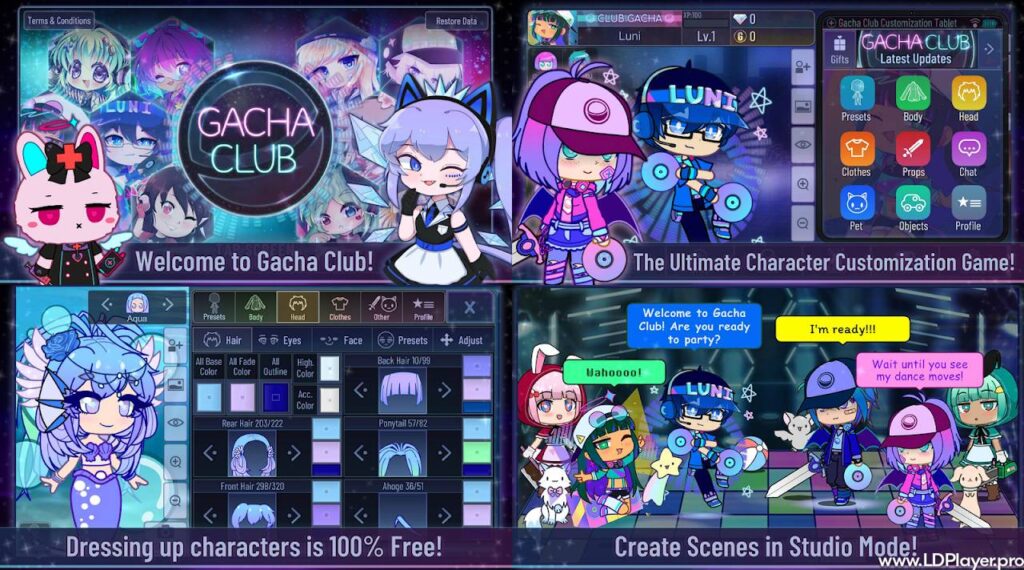
Players can create characters, set poses, add text, and make story scenes. Also, the game includes battles, pets, units, and mini-games. So, it works well for both creative play and light strategy play.
Unlike many mobile games, Gacha Club does not lock main clothing items behind paid draws. Most design tools are open from the start. As a result, players can focus on making characters without worrying about paid limits.
Gacha Club Features
Gacha Club includes many tools for players who enjoy design, stories, and battles. Each part of the game supports a different kind of play.
Character Customization
The character creator lets players design 10 main characters and 90 extra characters. So, players can save up to 100 designs.
Players can change hair, eyes, skin color, clothes, shoes, hats, and accessories. Also, many items allow color changes. This helps each design look more personal.
The game also lets players move, resize, and rotate some parts. For example, hats and accessories can be placed in better spots. As a result, characters can look more detailed and more unique.
Studio Mode
Studio Mode is used for making scenes and stories. Players can place up to 10 characters in one scene. Then, they can add poses, faces, backgrounds, and speech bubbles.
This mode is useful for skits, comics, short stories, and visual scenes. Also, the narrator text option helps add story lines without linking the words to one character.
Because of this, Gacha Club works well for creators who enjoy making simple digital stories.
Battle Mode and Gacha System
The battle area adds a light RPG system. Players can collect units, form teams, and fight enemies in different modes.
There are story battles, tower battles, training battles, and special battle areas. Each unit has an element, stats, and skills. Also, pets can support the team with useful boosts.
The gacha system is mainly used for battle units and pets. It does not control the main dress-up closet. So, players can still make characters freely.
In-Game Mini-Games
Mini-games give players another way to earn rewards. These games are simple and quick to play.
Players can earn Gems and Bytes through mini-games. Then, these rewards can be used for units, pets, and other battle needs. This makes progress possible without spending real money.
How To Install Gacha Club on LDPlayer
Playing Gacha Club on LDPlayer can make the screen larger and controls easier. It can also help players design characters with a mouse and keyboard.
1. Download and Install LDPlayer
First, download LDPlayer from its official website. The computer should use Windows 7 or a newer version.
After the file is downloaded, open the installer. Then, choose the install location and follow the setup steps shown on the screen.
2. Launch the Emulator and Set Up Google Account
Next, open LDPlayer from the desktop shortcut. After it loads, find the Google Play Store app.
Open the Play Store and sign in with a Google account. This step allows the emulator to download apps.
3. Search for Gacha Club
After signing in, use the search bar in Google Play Store. Type the game name and press Enter.
Players may also use the LD Store search tool. However, choosing the official game page is important.
4. Execute the Installation Process
Select the official app made by Lunime. Then, click the Install button.
The emulator will download and install the game. After that, the icon will appear on the LDPlayer home screen.
5. Launch Gacha Club and Customize Performance
Open the game from the new icon. Then, adjust LDPlayer settings if needed.
Players can change screen size, display quality, and keyboard controls. These settings can make character design smoother on a computer.
How To Play Gacha Club
When the game starts, players will see default character slots. To begin, choose a slot and open the character editor.
From there, players can change the body, hair, face, clothes, colors, and accessories. Also, profile options can be edited. This includes name, birthday, favorite things, and other small details.
After making a character, players can save the design in a slot. Extra character slots help keep more designs ready for future scenes.
Next, players can open Studio Mode. In this mode, characters can be placed on a background. They can use poses, faces, text boxes, and scene effects.
For battle play, players can open the Battle menu. Teams can fight enemies and earn rewards. Also, skills and special attacks help during fights.
Mini-games are another helpful part. They give quick rewards and add simple fun between design sessions.
Safety and Legality
Gacha Club is made as a family-friendly game. Most of its main tools can work offline. This helps players create characters and scenes without needing a constant internet connection.
The game does not include hidden real-money purchases in the main design system. So, accidental spending is not a normal concern inside the core game.
Lunime owns the game, its base assets, and its system. However, players can create their own characters and stories using the tools provided.
Players can share screenshots, skits, and videos online. Still, shared content should follow safe content rules on each platform.
Gacha Club FAQ
Is Gacha Club completely free to download and play?
Yes. The game is free to download and play. Its main character design tools are available without required payments.
Can character data be transferred between Android and Windows versions?
No. Direct data transfer between Android and Windows versions is not built into the game.
What are Gems and Bytes used for inside the game?
Gems and Bytes are in-game rewards. Players can earn them from mini-games and battles. Then, they can use them for units, pets, and upgrades.
Does Gacha Club require a constant internet connection?
No. Many parts of the game work offline. This includes character design, Studio Mode, mini-games, and many story features.
How many characters can be saved in total?
Players can save 10 main characters and 90 extra characters. So, the total number is 100 saved designs.
Final Words
Gacha Club gives players a simple way to create characters, build stories, and enjoy RPG battles. It keeps the main design tools open, which helps more people enjoy creative play.
Also, using LDPlayer can make the game easier to view and control on a computer. A larger screen can help with small details, colors, and scene work.
For players who enjoy anime-style design, simple stories, and light battles, Gacha Club remains a strong creative choice.