Need for Speed No Limits is a mobile racing game built for fast action. It gives players short races, sharp turns, strong cars, and street battles in the city of Blackridge. The game focuses on speed, timing, car control, and smart upgrades.
Also, the game keeps the core feel of the Need for Speed series. Players can drift, use nitro, escape police units, and tune cars for better race results. Since races are short, the game fits well for quick play. However, it still gives enough depth through car parts, blueprints, events, and garage builds.
Need for Speed No Limits works well for players who enjoy arcade racing. It does not try to act like a full racing simulator. Instead, it makes every race feel direct and easy to follow. So, players can focus on speed, upgrades, and winning events.
What is Need for Speed No Limits?
Need for Speed No Limits is a free-to-play racing game for mobile devices. The game places players in underground street races across Blackridge. In this city, drivers race crews, face bosses, build cars, and push their way up the street racing ranks.
Unlike slow racing games, this game uses simple arcade controls. Players drift through corners, use nitro on straight roads, and avoid traffic or police cars. Because of this, each race feels fast and active.
The main goal is to build better cars and win more races. Players collect blueprints to unlock vehicles. They also earn cash, parts, and materials to improve engine power, turbo, gearbox, wheels, and other car systems.
Need for Speed No Limits also has a story campaign. Each chapter has rivals, race goals, and car rating needs. Therefore, players must upgrade cars often to pass harder races and stronger bosses.
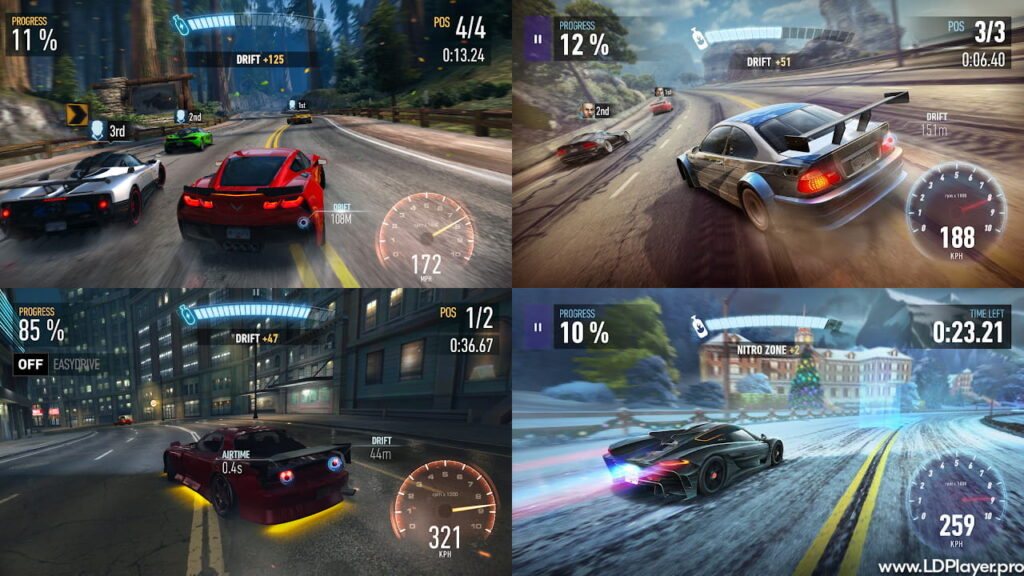
Need for Speed No Limits Features
Need for Speed No Limits includes many features that make the game fun for casual players and long-time racing fans.
Extensive Licensed Car Roster
The game includes many real car brands. Players can unlock sports cars, muscle cars, supercars, and hypercars. These cars come from well-known makers such as Ferrari, Lamborghini, McLaren, Porsche, Pagani, and more.
Each car has its own class and upgrade path. So, players must choose cars based on race needs and Performance Rating. A faster car may help in later chapters, but early cars still matter for daily races and events.
Also, collecting cars adds long-term goals. Players can build a garage, upgrade favorite rides, and prepare different vehicles for different events.
Deep Visual and Performance Customization
Car tuning is a major part of Need for Speed No Limits. Players can change how a car looks and how it performs. Visual options may include body kits, spoilers, rims, wraps, paint, stance, and other style parts.
Performance upgrades are just as important. Players improve parts such as the engine, turbo, gearbox, ECU, wheels, and nitro. These upgrades raise the car’s Performance Rating, also called PR.
Higher PR helps unlock harder races. However, upgrades need cash, parts, and materials. So, good resource planning matters. Players should not waste rare parts on cars they do not plan to use often.
Diverse Game Modes and Special Events
The game offers more than the main campaign. Special Events give players a chance to drive and earn rare cars. These events often have time limits, so players must complete tasks before the event ends.
There is also Underground Rivals, known as UGR. This mode lets players compete against other drivers through weekly divisions and leaderboards. Better cars, clean driving, and strong upgrades help players move higher.
Daily assignments also support progress. They give useful rewards and help players collect needed items over time. As a result, steady play can improve the garage without forcing instant purchases.
Cutting-Edge Mobile Visuals
Need for Speed No Limits uses strong mobile visuals for its race scenes. Roads, lights, reflections, smoke, motion blur, and nitro effects help races feel fast. The city also has dark streets, bright signs, and heavy traffic.
The visual style supports the underground racing theme. More importantly, it helps players read the road quickly. Clear race effects make drifting, boosting, and avoiding traffic easier during fast races.
How To Install Need for Speed No Limits on LDPlayer
Playing on LDPlayer can give players a bigger screen and easier keyboard controls. It can also help players who prefer PC controls over touch controls.
1. Download and Install LDPlayer
First, use a Windows PC. Then download the latest LDPlayer version from the official LDPlayer website. LDPlayer 9 is a good option for modern mobile games.
After the download ends, open the installer. Follow the setup steps on the screen. Once the setup finishes, launch LDPlayer from the desktop or start menu.
2. Configure the Google Play Store
Next, open LDPlayer and find the system apps folder. Then open the Google Play Store. Sign in with a Google account to use Play Store services.
This step is needed because the game installs through Google Play. It also helps with app updates and account access.
3. Search for the Game
After signing in, click the search bar inside the Play Store. Type Need for Speed No Limits carefully. Then press Enter or click the search icon.
Choose the official game page from the results. Make sure the publisher name matches the official listing before installing.
4. Download and Install
Click the Install button on the store page. The download size may change with updates. So, a stable internet connection is useful.
Once the download ends, LDPlayer will install the game inside the emulator. After that, the game icon will appear on the home screen.
5. Launch and Map Controls
Open the game from the LDPlayer home screen. Then use the keyboard mapping panel on the right side of LDPlayer.
Set steering keys, drift control, nitro control, and other actions. Many players use WASD or arrow keys for movement. After mapping controls, test them in an early race and adjust them as needed.
How To Play Need for Speed No Limits
Need for Speed No Limits is easy to start, but good driving takes practice. Races are short, so small mistakes can cost the win.
Perfecting the Launch
At the start of a race, a meter appears on the screen. The goal is to keep the needle in the green zone when the race begins.
A perfect launch gives the car a quick speed boost. Therefore, players should practice timing at the start of every race.
The Art of Drifting
Drifting helps cars turn through corners without losing too much speed. On mobile, players usually swipe down to start a drift.
A wide drift looks cool, but it may slow the car down. So, a small and clean drift is often better. It also helps fill the nitro bar faster.
Strategic Nitrous Deployment
Nitro gives a strong speed boost. Players should use it on straight roads or after sharp corners. This helps the car regain speed at the right moment.
Using nitro too early can waste power. Also, using it before a tight turn can make control harder. Because of this, timing matters more than just boosting often.
Managing the Campaign and Blueprints
The campaign has PR limits. If a car’s PR is too low, the next race may stay locked. To raise PR, players must upgrade parts and rebuild cars with blueprints.
Blueprints are key items. They help unlock cars and raise star levels. Higher star levels allow stronger part upgrades. As a result, players should replay useful races, finish daily tasks, and join events to collect more items.
Safety and Legality
Need for Speed No Limits is safe and legal when downloaded from trusted stores. Players should use official platforms such as Google Play, the Apple App Store, or approved emulator access.
However, unsafe APK files and hacked versions can harm devices. They may steal data, break game files, or lead to account bans. Also, tools that claim unlimited gold or free money can violate game rules.
For safe play, players should avoid cheats, mod tools, and unknown download sites. Official downloads protect accounts and keep progress linked to the correct platform.
Need for Speed No Limits FAQ
Is Need for Speed No Limits an offline game?
No. The game needs an active internet connection. It uses online servers for progress, updates, events, cloud saves, and multiplayer features.
How do I increase my car’s PR (Performance Rating)?
Players can raise PR by upgrading parts, adding better materials, and collecting blueprints. Rebuilding a car to a higher star level also allows stronger upgrades.
Can I transfer my progress between Android and iOS?
Progress usually stays tied to the platform account. Android uses Google Play, while iOS uses Apple services. So, direct transfer between both platforms may not be available.
Are microtransactions required to finish the game?
No. Players can make progress through regular play. Purchases can speed up upgrades or unlock some items faster, but careful play can still complete major game content.
Final Words
Need for Speed No Limits gives players quick racing, car tuning, police chases, and street crew battles in one simple package. The game works well for mobile play, and LDPlayer can make it easier for PC users.
With smart upgrades, clean driving, and regular event play, players can build a strong garage and move deeper into Blackridge racing.