Play Together VNG gives players a bright online world where social play comes first. Kaia Island works like a shared town. Players can walk around, chat, join events, and spend time with friends.
Also, the game fits both mobile and PC players. On PC, the bigger screen helps players see more details. Keyboard controls also make movement easier in fast mini games.
This guide explains the game, its main features, and the steps to play it on PC with LDPlayer.
What is Play Together VNG?
Play Together VNG is a multiplayer casual social game published by VNG Games. The game takes place on Kaia Island, a lively place with shops, homes, schools, fishing spots, and event areas.
Instead of forcing players into one fixed story, the game gives freedom. Players can choose how they spend time. Some may focus on mini games. Others may decorate houses, collect pets, fish, or meet new friends.
Stars and Gems help support progress. Stars are used often for normal items and daily needs. Gems are more special and can help unlock selected items faster.
Because this version supports the local player base, players can enjoy smoother access, local events, and better support.
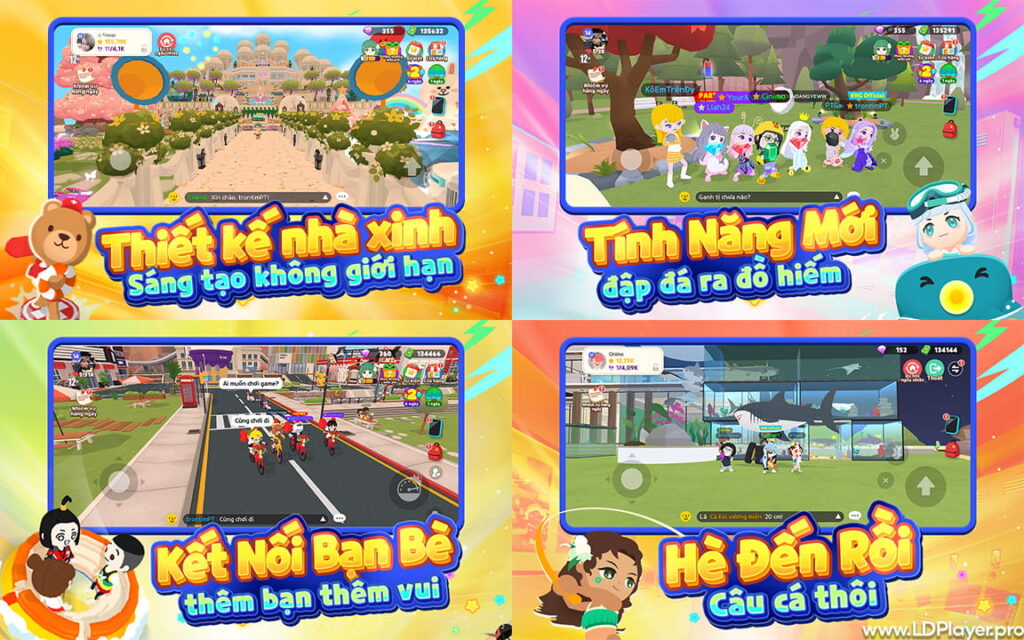
Play Together VNG Features
The Vibrant Plaza and Social Hubs
The Plaza is the main meeting place in Play Together VNG. Many players gather there during the day. It has key spots like the School, Town Hall, Camping Ground, and other activity areas.
Players can meet friends, start chats, accept small jobs, and move to events from this area. Also, the Plaza helps new players learn the game faster because many important places stay close together.
Thrilling Game Zone Minigames
The Game Zone is made for players who enjoy quick challenges. It includes obstacle courses, survival games, and jumping stages. These games test timing, focus, and movement.
Players must avoid falling, move at the right moment, and stay ahead of others. Winning gives rewards like Stars and experience. However, even losing can still help players learn stage patterns.
On PC, keyboard controls can make these games easier. WASD movement and a jump key give more stable control than touch controls.
Deep Character and Home Customization
Play Together VNG gives players many ways to show their style. Characters can wear shirts, hats, shoes, costumes, bags, and other items. The style can be cute, simple, funny, sporty, or formal.
Home design is also a major part of the game. Players can buy different house types and decorate rooms with furniture, walls, floors, lights, and themed items.
A well-designed home can also support social play. Players can invite others, host small parties, and receive visits. So, home design is not only for looks. It also helps build friendships.
The Virtual Ecosystem: Fishing and Pets
Fishing is one of the calmest parts of Play Together VNG. Players can visit ponds, docks, beaches, and deep-sea areas. Better rods can help catch better fish.
Fish can be sold for Stars or placed inside aquariums at home. Rare fish can make a room look more special.
Pets add another fun layer. Players can hatch pets, raise them, and let them follow around Kaia Island. Pets make the world feel more alive and personal.
How To Install Play Together VNG on LDPlayer
Playing on PC can improve comfort, control, and screen view. LDPlayer helps run the Android version on a Windows computer.
1. Download and Install LDPlayer
Use a Windows 7, Windows 10, or Windows 11 PC. Download LDPlayer from its official source. For smoother play, LDPlayer 9 is a good choice.
After downloading, open the installer. Then follow the setup steps. Installing it on an SSD can help the game load faster.
2. Optimize Emulator System Settings
Open LDPlayer settings before starting the game. Go to the performance or advanced settings area.
Set CPU to 4 cores when the PC supports it. Set RAM to 4096 MB for better stability. Then choose 1920×1080 resolution for a clear screen.
These settings help Play Together VNG run with fewer frame drops.
3. Access the Google Play Store
Open LDPlayer and find the Google Play Store app. Sign in with a Google account.
This step allows app downloads and updates. Keep the account secure and do not share login details.
4. Search and Download the App
Type Play Together VNG in the Play Store search bar. Choose the official app from VNG Games.
Then press Install. Wait until the download and setup finish. After that, the game icon will appear in LDPlayer.
5. Configure Keymapping and Launch
Open the game first. Then click the keyboard mapping icon on the LDPlayer side menu.
Set WASD for movement. Set Spacebar for jumping. Add other keys for action buttons when needed.
This setup helps in racing, jumping, and obstacle stages.
How To Play Play Together VNG
New players start by arriving on Kaia Island. The first goal should be learning the map and earning Stars.
Ms. Info’s quests help beginners understand the basics. These tasks explain movement, shops, jobs, and daily activities. They also give starter rewards.
The School offers simple classes and mini games. These may include typing, cooking, math, or other quick tasks. Completing them can give useful rewards.
Fishing is another smart daily activity. Players can fish during quiet times and sell catches for Stars. Better fish can also be placed in home aquariums.
Camping at night brings different activities. Players can catch insects or enjoy calm outdoor areas with friends.
A balanced routine works best. Join mini games for active rewards. Then fish, attend school, and finish quests for steady progress.
Home parties also help social growth. Players can invite others, show their rooms, and build a wider friend circle.
Safety and Legality
Play Together VNG should only be played through official channels. This keeps accounts safer and helps protect game progress.
Players should avoid modified APK files, cheat tools, speed tools, and outside macro programs. These tools can harm the account and may lead to bans.
Account details must also stay private. Passwords, login codes, and transfer codes should never be shared with strangers.
Respectful chat matters too. Kaia Island is made for players of many ages. Kind words and safe behavior help keep the community friendly.
Play Together VNG FAQ
Can I play Play Together VNG with friends who are using the global version?
The VNG version and global version may use separate servers. So, friends should use the same version to play together smoothly.
How do I redeem gift codes in Play Together VNG?
Open the in-game phone menu. Then go to Settings and find the Coupon area. Enter the code and check the mailbox for rewards.
iOS players may need to use the official web coupon page when the in-game option is not shown.
What happens to my old items if I migrate my account?
When account migration is supported, players should use the official migration method only. Items, currency, outfits, and home data should be moved through the correct system.
Do not share migration codes with anyone. A private code helps protect the account.
Final Words
Play Together VNG gives players a simple and fun way to enjoy Kaia Island. It mixes mini games, fishing, pets, fashion, home design, and social play in one online space.
Playing on PC with LDPlayer can make the game feel smoother. The bigger screen helps with viewing the island, while keyboard controls help during fast stages.
With a good setup and safe account habits, players can enjoy daily tasks, meet friends, decorate homes, and build their own island life.