Quiz Of Kings: Trivia Games is made for people who enjoy quiz battles and smart challenges. The game mixes learning with online play, so every match feels useful and fun. Players answer questions, pick topics, use help tools, and try to score more than their opponent.
Moreover, the game fits both casual users and serious trivia players. A new player can start a quick match with ease. At the same time, skilled players can plan better moves, choose strong categories, and climb rankings.

What is Quiz Of Kings: Trivia Games?
Quiz Of Kings: Trivia Games is an online quiz game based on turn-based trivia battles. Instead of playing alone, users compete with other players in structured matches. Each match has stages, topic choices, and timed questions.
The main goal is simple. Players must choose the correct answer from several options before time runs out. However, good timing and smart topic picks can make a big difference. So, the game is not only about memory. It also needs focus, planning, and quick choices.
In addition, the game includes many question types across areas like history, sports, science, movies, art, general knowledge, and more. This wide topic range keeps each match fresh. It also gives players many chances to learn something new.
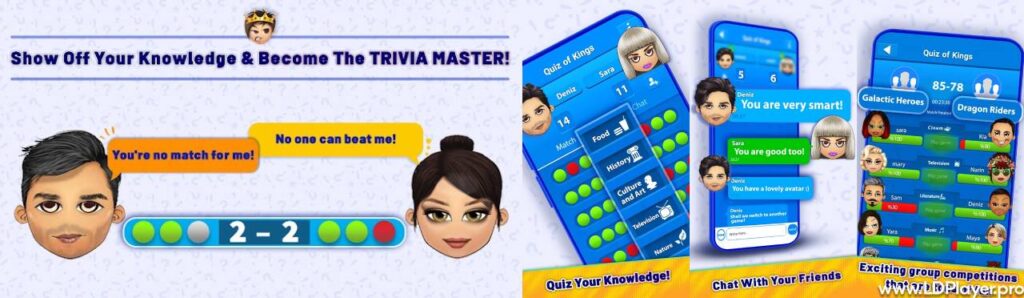
Quiz Of Kings: Trivia Games Features
Quiz Of Kings: Trivia Games includes several useful features that make the experience more active and social. Each feature supports learning, fair play, and steady progress.
Dynamic Trivia Duels
A normal duel has six stages. During these stages, players take turns choosing topic sets. Each set includes three questions, and each question has a timer.
Because of this system, every round feels tense. A player may choose a strong topic to gain points. However, the opponent may answer well and close the gap. So, every stage matters until the match ends.
The Question Factory
The Question Factory lets players create and rate questions. This feature helps the game grow with help from the community. Users can submit new trivia questions, review other questions, and support better content.
As a result, the question pool can stay active and varied. It also gives players a way to take part beyond normal matches. Good questions help make the game more useful for everyone.
Help Options
Quiz Of Kings: Trivia Games gives players helpful tools during hard questions. These tools can remove wrong answers, show a common answer choice, or give another chance.
These help options should not be used too early. Instead, players should save them for questions that may change the result of the match. With smart use, one help tool can protect a lead or help a player catch up.
Social Elements and Group Challenges
The game also supports social play. Players can chat, send messages, invite friends, and join groups. These features make the game feel more connected.
Groups and clans can also compete in larger challenges. Therefore, users do not only play for personal scores. They can also support a team and move up leaderboards together.
How To Install Quiz Of Kings: Trivia Games on LDPlayer
Playing Quiz Of Kings: Trivia Games on a PC can feel more comfortable for many users. A larger screen makes questions easier to read. Also, mouse controls can help with faster answer selection.
Follow these steps to install the game on LDPlayer.
1. Download LDPlayer
First, visit the official LDPlayer website. Then, download the latest installer for the computer system.
After the download finishes, open the setup file. Follow the setup instructions shown on the screen. Once the installation ends, LDPlayer will be ready to use.
2. Launch the Emulator and Access App Store
Next, open LDPlayer from the desktop or start menu. Wait until the emulator loads fully.
Then, find the Google Play Store icon or LDStore inside the emulator. Click it to open the app store area. A Google account may be needed to use the Play Store.
3. Search for the Title
After opening the store, go to the search bar. Type Quiz Of Kings: Trivia Games exactly as the title appears.
Then, press enter and check the search results. Choose the official game listing to avoid wrong or unsafe apps.
4. Install and Synchronize
Now, click the Install button on the game page. LDPlayer will download and install the app inside the Android system.
After installation, click the game icon to open it. Then, log in with the correct account to sync progress, if account sync is available.
How To Play Quiz Of Kings: Trivia Games
Starting the game is simple. After opening Quiz Of Kings: Trivia Games, players can begin a quick match, invite a friend, or practice with an AI trainer.
A standard duel includes six stages. When a player gets the turn to choose, they should pick a topic they know well. For example, a player who enjoys movies should choose cinema when it appears. A player who likes facts may pick history or science.
After the topic is selected, three questions appear one by one. Each question has multiple answer options. The player must choose the right answer before the timer ends.
Accuracy is very important. However, speed can also help in close matches. So, players should read fast but not guess too early. A careful answer often gives better results than a rushed mistake.
Help tools can support players during difficult moments. For example, removing two wrong answers can make a hard question easier. Also, the audience poll can guide players when they feel unsure.
At the end of the six stages, the player with the higher score wins. Winners may receive crowns, coins, ranking points, or other game rewards. Over time, steady wins can improve rank and status.
Safety and Legality
Quiz Of Kings: Trivia Games is safe to play when downloaded from trusted sources. Players should use official app stores or trusted official download pages. This helps avoid fake versions, unsafe files, or changed apps.
The game uses online features, so account safety matters. Users should protect login details and avoid sharing private information in chats. Also, children should play with proper guidance when using online social features.
In-game purchases may exist, so users should check payment settings before buying coins or items. Parents can also use store-level controls to manage purchases.
Using the game through LDPlayer is also allowed when the emulator supports normal app use. However, users should avoid modified files, unfair tools, or unofficial versions. Fair play keeps the game safe and fun for all players.
Quiz Of Kings: Trivia Games FAQ
Is Quiz Of Kings: Trivia Games completely free to play?
Yes, the game is free to download and play. Basic trivia matches and main gameplay features are available without a required payment. However, optional in-game purchases may be offered for coins, items, or extra features.
Can the game be played without an active internet connection?
No, an internet connection is needed for most parts of the game. Online duels, matchmaking, chat, groups, and question updates depend on active internet access.
How can players contribute their own questions to Quiz Of Kings: Trivia Games?
Players can use the Question Factory inside the game menu. From there, they can write questions, add answer choices, and submit them for review. They can also rate questions from other users to help improve the question pool.
Is the game suitable for new trivia players?
Yes, new players can start with simple matches and learn as they go. Since the game includes many topics, users can choose areas they know well. Over time, they can improve by playing often and reviewing mistakes.
Can the game be played with friends?
Yes, players can invite friends and play direct matches. They can also join groups, chat, and take part in team challenges. This makes the game more social and more enjoyable.
Final Words
Quiz Of Kings: Trivia Games is a strong choice for players who enjoy trivia, online matches, and learning through play. It offers quick duels, many topics, help tools, user-made questions, and social features.
Also, the game is easy to start but takes practice to master. Players must think fast, pick topics wisely, and use help tools at the right time. With regular play, users can improve their knowledge and compete at higher levels.
For the best experience, download the game from trusted sources and play fairly. Whether on mobile or PC through LDPlayer, this trivia game gives players a clear path to learn, compete, and enjoy every match.