Roblox VN is the official local version of Roblox for players in Vietnam. It gives users a safer way to play, create, chat, and buy items under local rules. Also, it helps players connect with friends through better local support and smoother access.

What is Roblox VN?
Roblox VN is the licensed Roblox app made for the Vietnamese market. It works with VNGGames, also known as VNG, to follow local game rules and content rules.
This version is not a fake app or a copy. It is an official client made for users in Vietnam. So, players can enjoy Roblox while staying inside the legal system of the country.
The app still lets users enter many Roblox experiences. Players can explore games, join friends, use avatars, and keep many account items. However, the account may move into the Vietnam region after login.
Because of this change, users should understand the rules before signing in. Once an account joins Roblox VN, some payment and login options may follow the local system.
Roblox VN Features
Roblox VN comes with local changes that make the app easier for Vietnamese players. These changes focus on speed, support, payment, events, and safety.
Optimized Network Connection & Local Data Servers
The local setup helps reduce lag during play. As a result, many users may get faster loading and better connection quality.
Also, local server support can help during busy hours. This matters in games with many players, large maps, or quick movement.
Better network routing can make gameplay feel more stable. So, players may notice smoother movement, faster joining, and fewer delays.
Regional Payment Integration & Discounted Robux
Roblox VN supports local payment methods through approved channels. These may include common Vietnamese payment options and local banking choices.
Because payments work inside the local system, buying Robux can feel easier. Also, users do not need to depend only on global store payment methods.
Some local offers may give better value at certain times. Still, prices can change, so users should always check the official payment page before buying.
Exclusive Local Community Events & Giveaways
The local version can include events made for Vietnamese players. These events may happen during holidays, school breaks, or special community days.
Also, local campaigns can bring gifts, items, or rewards. These rewards may not always appear in the global app.
Community events help players meet others in the same region. Therefore, the app feels more connected to local culture and local users.
Vietnamese Language Interface & Dedicated Support
The app uses Vietnamese language support in menus, settings, and help areas. This makes it easier for young players and parents to understand the platform.
Also, local customer support can help with account issues, payment problems, and safety questions. This is useful when users need clear answers in their own language.
Because of this, parents can manage settings with more confidence. Players can also fix common problems without guessing through hard English menus.
How To Install Roblox VN on LDPlayer
Playing on LDPlayer lets users run the Android app on a computer. This can help with keyboard control, bigger screen size, and steady performance.
1. Download and Configure LDPlayer
Step 1: Visit the official LDPlayer website.
Step 2: Download the latest 64-bit version.
Step 3: Install LDPlayer on the computer.
Step 4: Open LDPlayer after installation.
Step 5: Go to the Settings menu.
Step 6: Set CPU to at least 4 cores.
Step 7: Set RAM to at least 4GB.
Step 8: Save the settings and restart the emulator.
These settings can help Roblox VN run better. Also, they can reduce freezing in large games.
2. Set Emulator Location or Google Play Region
Step 1: Open Google Play Store inside LDPlayer.
Step 2: Sign in with a Google account.
Step 3: Make sure the region is set to Vietnam.
Step 4: Check that the app store can show local apps.
The app may not appear when the region is wrong. So, this step is important before searching.
3. Search and Download the Application
Step 1: Click the search bar in Google Play Store.
Step 2: Type Roblox VN.
Step 3: Choose the official app from VNGGames Co., Ltd.
Step 4: Tap Install.
Step 5: Let the download finish.
Always check the publisher name before installing. This helps avoid unsafe apps.
4. Configure Control Mapping and Launch
Step 1: Open the app from the LDPlayer home screen.
Step 2: Click the keyboard mapping tool.
Step 3: Add movement keys like W, A, S, and D.
Step 4: Set mouse-look controls.
Step 5: Save the control layout.
Step 6: Join a game and test the controls.
Good control mapping makes gameplay easier on PC. Also, it helps players move and look around faster.
How To Play Roblox VN
Starting in the local app is simple. Still, users should read each screen before moving forward.
Account Authentication
Open the app first. Then create a new account or sign in with an existing Roblox account.
New users should choose a strong password. Also, they should add recovery details when possible.
Existing users should check account rules before logging in. This helps avoid confusion later.
The Regional Lock Warning
Logging into Roblox VN may move the account into the Vietnam region. This can affect future login, payment, and support options.
Therefore, users should read the warning screen with care. Parents should also review it for younger players.
Once the account changes region, some global app features may not work the same way. So, it is better to understand the change first.
Discovering Experiences
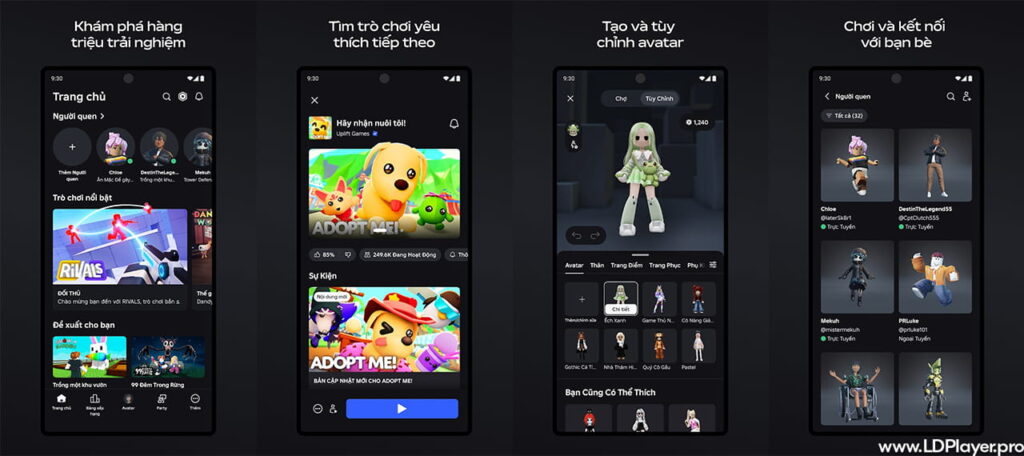
After login, the home page shows many games and experiences. Some may be popular worldwide, while others may trend in Vietnam.
Tap any experience to open its page. Then press the play button to join.
The app may take a short time to load game files. After that, the player enters the world and can start playing.
Creating Groups via Party Mode
Party Mode helps friends play together. It lets users form a group before joining an experience.
Players can search for usernames. They may also use QR codes when the feature is available.
This makes group play faster. Also, it helps friends join the same game with fewer steps.
Safety and Legality
Roblox VN is an official and legal way to access Roblox in Vietnam. It follows local rules for online games, content, payment, and user safety.
Users should download it only from trusted app stores or official sources. This reduces the risk of fake apps, stolen passwords, and unsafe files.
Parents can use safety settings to manage play time, chat, and content access. These tools help protect younger users from unsafe contact and unsuitable content.
Also, the system may use text filtering and moderation tools. These tools help reduce harmful words, scams, and bad behavior.
Some features may require age checks or extra account details. For example, voice-related features may need stronger identity checks.
Players should never share passwords, login codes, or private account details. Also, they should avoid links sent by unknown users.
Roblox VN FAQ
Can I communicate with players using the global client version?
Chat and social features may follow local safety rules. Because of this, some communication options may work differently from the global app.
The local version focuses on safe chat inside the Vietnam system. This helps support local moderation and content rules.
Is my current inventory safe if I transition from the global version?
Most account items should stay linked to the account after login. This can include avatar items, badges, gamepasses, and Robux balance.
Still, users should check all account details after moving. Also, they should contact official support if something looks wrong.
Why am I unable to buy global gift cards anymore?
After an account moves into the local system, payments may need to use approved local channels.
This means some global gift cards may not work. Users should use the official VNG payment route for safe purchases.
What happens if my account remains inactive for over six months?
Long inactive accounts may face limits under local service rules. So, users should check the official terms inside the app.
If a player plans to stop playing for a long time, account settings should be reviewed first. This can help protect account data.
Final Words
Roblox VN gives Vietnamese players a local, official, and safer way to enjoy Roblox. It supports better local access, Vietnamese language help, local payment choices, and community events.
Also, it gives parents clearer tools for safety and account control. Players can enjoy games, create memories, and join friends with more local support.
For the safest experience, users should install the app only from official sources. They should also protect passwords, read account notices, and use trusted payment methods.