Wolfoo Police And Thief Game is a fun mobile police game made for young children. It gives kids a safe way to play, learn, and enjoy simple police missions. The game uses bright scenes, clear tasks, and friendly characters from the Wolfoo world.
Children enjoy games where they can act like helpers. So, a police game can feel exciting for them. In this game, kids can protect a small city, find clues, and stop silly thieves. However, the game keeps every scene soft, safe, and easy to understand.

What is Wolfoo Police And Thief Game?
Wolfoo Police And Thief Game is an educational mobile game for preschool and kindergarten children. In the game, children play as Officer Wolfoo and help keep Cop City safe.
The game is based on the Wolfoo animated world. So, children can meet familiar characters, places, and sounds. This makes the game feel friendly and easy for young players.
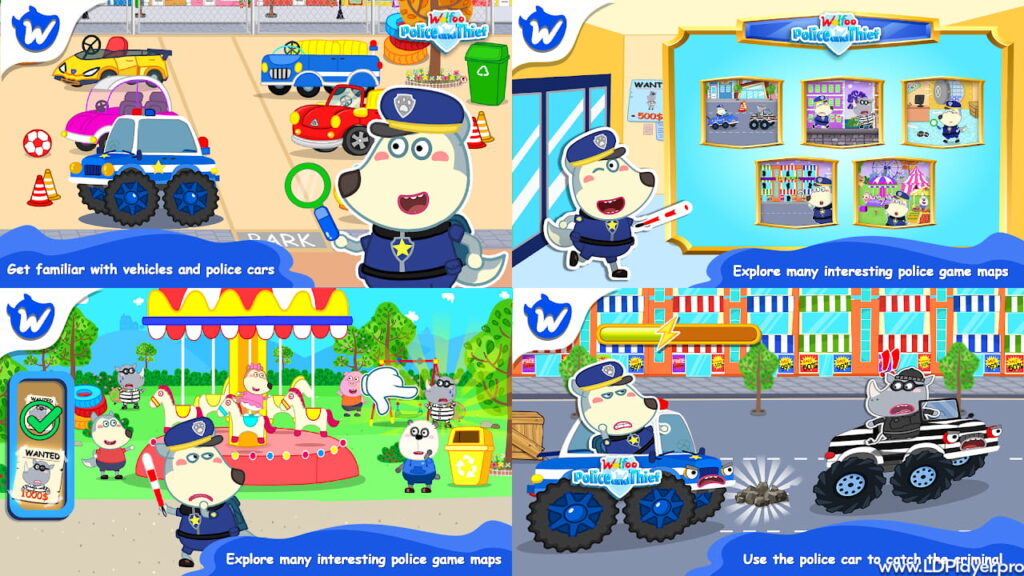
Players visit the police station, check missions, look for clues, and chase thieves. For example, a thief may take toys, hide in a mall, or run through the city. Then, kids must find the right way to solve the task.
The game does not show harsh crime scenes. Instead, it turns police work into a child-friendly lesson. Children learn about helping others, following safety rules, and doing good things for the community.
Also, the game supports early learning. Kids can improve memory, focus, hand control, and simple thinking skills. As a result, play time can become useful learning time.
Wolfoo Police And Thief Game Features
Wolfoo Police And Thief Game has many parts that support fun and learning. Each feature gives children a clear goal. Also, the game uses simple controls, so young players can understand the task quickly.
Problem-Solving and Logic Puzzles
Children become little detectives in the game. They need to look around rooms, streets, shops, and other places. Then, they find clues that help them catch the thief.
These puzzle tasks help children think step by step. First, they notice details. Next, they compare clues. After that, they choose where to go. This helps build logic in a simple way.
Also, the puzzles are not too hard. They match the needs of young children. So, kids can feel proud when they finish a mission.
Diverse Vehicles and Exciting Chases
A police game feels more exciting with police cars. This game includes different vehicles for chase missions. Children may drive a police car, a special truck, or another fun vehicle.
These parts help children practice hand-eye control. They must steer, avoid blocks, and keep moving in the right direction. However, the driving stays simple and safe.
Moreover, chase scenes add action without stress. Kids can enjoy movement, speed, and rewards while still following easy game rules.
Varied Environments and Levels
The game includes many places in Cop City. Children may visit the police station, a shopping mall, city roads, and other busy areas. Because of this, the game does not feel the same every time.
Each level gives a new task. Sometimes, children search for stolen items. Other times, they follow a thief or find hidden clues. Therefore, kids learn to adjust to new scenes.
These changing levels also help children stay focused. They look, think, move, and finish each goal.
Authentic Wolfoo Universe Integration
Fans of Wolfoo will enjoy the familiar style. The game uses colorful graphics, cute animations, and friendly voices. Also, children can play with characters like Wolfoo and Lucy.
This connection makes the game feel close to the show. As a result, young players may feel more comfortable while playing.
How To Install Wolfoo Police And Thief Game on LDPlayer
Playing on a phone is simple. However, some families may prefer a larger screen. LDPlayer lets users run Android games on a Windows PC. So, children can see the game more clearly and use easier controls.
Follow these steps to install the game on LDPlayer.
Step 1: Download and Install LDPlayer
Go to the official LDPlayer website. Then, download the latest version for Windows. After the file downloads, open the installer and follow the setup steps.
Step 2: Launch the Emulator
Open LDPlayer from the desktop. The first launch may take a short time. This happens because LDPlayer sets up the Android system on the PC.
Step 3: Access the Google Play Store
Find the Google Play Store app on the LDPlayer home screen. Open it and sign in with a Google account. This step lets the emulator download apps safely.
Step 4: Search for the Game
Use the search bar at the top of the Play Store. Type Wolfoo Police And Thief Game and press enter. Then, check the game name and publisher before installing.
Step 5: Install the Application
Click the game icon and press the install button. The app will download and install on LDPlayer. After that, the game icon will appear on the home screen.
Step 6: Start Playing
Click the game icon to open it. Then, adjust keyboard controls if needed. Now, children can enjoy the game on a bigger screen.
How To Play Wolfoo Police And Thief Game
Wolfoo Police And Thief Game is easy for young children to play. The game uses clear buttons, simple missions, and friendly signs.
First, players choose a character. They may select Officer Wolfoo, Lucy, or another available character. Next, they go to the police station and pick a mission.
After the mission starts, children move through the map. They can tap buttons, jump, search, and follow clues. The game may show a picture or hint that helps them find the thief.
During chase missions, players drive a police vehicle. They steer around blocks, collect rewards, and follow the thief. Then, they finish the mission and bring peace back to Cop City.
Also, children can replay levels. This helps them practice and learn from mistakes. So, the game supports both fun and skill growth.
Safety and Legality
Child safety matters in every children’s game. This game uses a soft design, safe scenes, and simple tasks. It avoids scary moments and keeps the story suitable for young players.
Wolfoo Police And Thief Game is made as an official Wolfoo title. Therefore, families should download it from trusted app stores or safe emulator platforms. This helps avoid fake apps and unsafe files.
Parents should still guide children during play. For example, they can check screen time, sound level, and app permissions. Also, they can help children understand that police work means helping people and keeping places safe.
The game may include kid-safe ads or store features, based on the platform version. So, parents should review device settings before play. This gives families better control and peace of mind.
Wolfoo Police And Thief Game FAQ
Is Wolfoo Police And Thief Game free to play?
Yes, the game is free to download and play. Some versions may include ads or optional items, depending on the store.
What age group is this game designed for?
The game is made for children aged 4 and above. It is suitable for preschool, pre-K, and kindergarten players.
Can I play Wolfoo Police And Thief Game offline?
Some game parts may work offline after installation. However, store access, updates, and some features may need an internet connection.
Does the game collect any personal data from children?
Parents should check the privacy details shown on the app store page. Also, they should use trusted download sources and review app permissions.
Final Words
Wolfoo Police And Thief Game gives young children a fun way to become little helpers. It mixes simple police missions with learning, movement, and problem-solving.
The game can help children practice focus, memory, hand control, and basic logic. Also, the Wolfoo world makes each task feel friendly and familiar.
For the best experience, families should download the game from trusted sources. Parents can also guide children, set healthy screen time, and enjoy the missions together.