Growtopia is a massive multiplayer online sandbox game where players can build, trade, explore, and create almost anything they imagine. Since its release, the game has grown into a huge online universe filled with millions of player-made worlds. Players enjoy its mix of creativity, social features, and item trading. This guide explains the main parts of the game, basic mechanics, and how to enjoy a better experience on PC.
What is Growtopia?
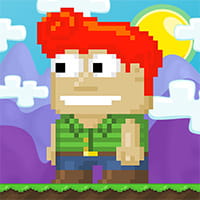
Growtopia is a 2D sandbox platform game built around the idea of “Punch, Build, and Grow.” Instead of following a fixed story, players enter an open world where creativity drives the gameplay. Every block, decoration, and useful item can become part of a custom world made by players.
The game gives complete freedom to design worlds, create mini-games, trade rare items, or simply spend time with friends. Unlike many online games, Growtopia depends heavily on its community. Players shape the economy, build events, and create new experiences every day.
Another important part of Growtopia is its cross-platform support. Players on Android, iOS, and PC can play together without limits. This shared environment helps keep the community active and connected at all times.
Growtopia Features
Endless World Creation
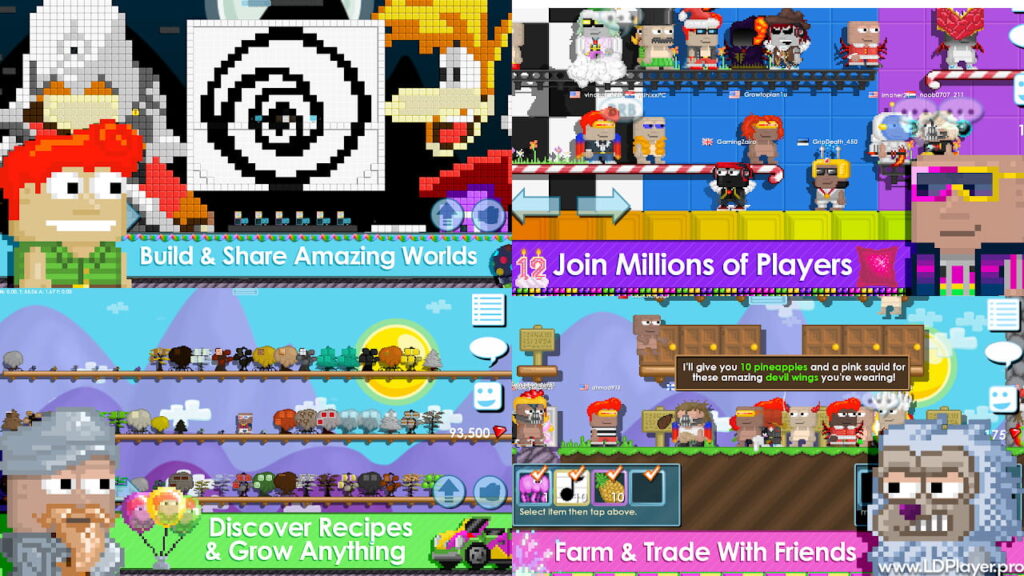
One of the biggest reasons players enjoy Growtopia is the freedom to build worlds from scratch. Every world starts empty, giving players full control over the design and purpose.
Some players create trading areas where people buy and sell items. Others build parkour maps, roleplay worlds, game shows, or relaxing hangout places. The game includes many blocks, decorations, weather effects, and tools that help make each world feel different.
World ownership also plays a major role. Once a player claims a world and protects it with locks, the world becomes a personal creative space. Friends can also receive access to help build large projects together.
The Unique Splicing System
The splicing system is one of the most recognized mechanics in Growtopia. Instead of collecting finished items from enemies or quests, players grow items by combining seeds.
When two different seeds are planted together, they can create a completely new tree. Harvesting that tree gives new blocks, items, or seeds. This process encourages players to test combinations and discover new creations.
The system adds depth to the gameplay because players constantly search for better combinations. Rare items often come from difficult or uncommon seed mixes, which also increases their trading value.
Player-Driven Economy
Growtopia has a fully player-based economy. Prices are not controlled by official stores. Instead, players decide item values through trading and demand.
World Locks work as the main currency in the game. Rare items, event rewards, and limited objects can become very valuable over time. Because of this, trading becomes an important part of progression.
Many players spend time farming items, collecting resources, and opening trade worlds. Experienced traders learn market trends and try to profit from changing prices. This system makes the economy feel active and alive every day.
Social Interaction and Minigames
Growtopia is not only about building. Social interaction also plays a huge role in the overall experience.
Players can chat with others, join guilds, visit public worlds, and take part in community events. Thousands of player-made mini-games are available across different worlds. Popular activities include races, parkour challenges, casinos, puzzle maps, and surgery simulations.
The large online community helps keep the game fresh. New worlds and activities appear regularly, giving players new things to explore all the time.
How To Install Growtopia on LDPlayer
Many players prefer using Growtopia on a PC because keyboard controls and a larger screen can improve gameplay. LDPlayer is one of the popular Android emulators used for this purpose.
Step 1: Download LDPlayer
Visit the official LDPlayer website and download the latest version of the emulator. LDPlayer 9 usually provides stable performance for most systems.
Step 2: Install the Emulator
Open the installer file and follow the setup instructions shown on the screen. After the installation finishes, launch the emulator.
Step 3: Open Google Play Store
Inside LDPlayer, open the System Apps folder and select Google Play Store. Sign in using a Google account.
Step 4: Search for the Game
Use the search bar at the top of the Play Store and type “Growtopia.” Open the official game page from the results.
Step 5: Install the Game
Press the “Install” button and wait for the download to finish. The game icon will appear on the emulator home screen after installation.
Step 6: Adjust Settings
Open the emulator settings and enable keyboard mapping. Players can use arrow keys or WASD controls for movement. This setup can make movement smoother during gameplay.
How To Play Growtopia
New players can learn the basics quickly by understanding the main gameplay loop.
Punch
Players break blocks by punching them. Breaking blocks rewards gems, seeds, and useful materials. Gems work as the main basic currency inside the game.
Build
Blocks and decorations can be placed almost anywhere in a world. Building allows players to design homes, games, farms, and shops.
Protection is very important while building. Players should always use Small Locks, Big Locks, or World Locks to protect worlds from unwanted changes.
Grow
Seeds can be planted to grow trees. Once trees fully grow, players harvest them for more items and additional seeds. Farming resources becomes an important part of progression.
The Main Goal
Growtopia does not have a final ending or story completion. Progress depends on personal goals. Some players focus on collecting rare items, while others become skilled builders or successful traders.
The open structure gives players freedom to play in different ways without strict rules.
Safety and Legality
Because Growtopia includes item trading and online interaction, account safety is very important.
Players should only download the game from trusted platforms such as the Google Play Store, App Store, or official PC versions. Fake websites that promise free World Locks or gems often try to steal accounts.
Scam worlds also exist inside the game. Before completing any trade, players should carefully check the trade window and confirm all items. Rushing trades can lead to mistakes.
Passwords should never be shared with anyone. Official staff members will never ask players for login information.
Growtopia FAQ
Is Growtopia free to play?
Yes. Growtopia is free to download and play. Players can purchase gems, but many items can still be earned through farming, trading, and gameplay activities.
Can players use different devices together?
Yes. The game supports cross-platform play. PC, Android, and iOS players can join the same worlds and interact normally.
What is a World Lock?
A World Lock protects a world from unwanted editing. Only trusted players can build or break blocks inside the protected area. World Locks also work as the main trading currency.
How can players earn more gems?
Gems come from breaking blocks, harvesting trees, completing challenges, and participating in activities inside the game.
Final Words
Growtopia continues to attract players because it combines creativity, trading, and social gameplay in one connected universe. The freedom to create worlds and discover new item combinations gives the game long-term appeal.
Using tools like LDPlayer can improve the PC experience with better controls and smoother gameplay. At the same time, understanding the basics of building, farming, and trading helps new players progress more easily.
Whether players want to become expert builders, skilled traders, or active community members, Growtopia offers enough freedom to support many different playstyles. The adventure begins with a single seed and grows from there.