Cyber Hunter is a sci-fi battle royale game made for fast action, smart movement, and fair fights. It gives players a large future map, high-tech tools, and many ways to move across land, buildings, and open air.
What is Cyber Hunter?
Cyber Hunter is an open-world battle royale game by NetEase Games. Players enter the match as Wanderers and fight to survive until the end. The game takes place in a future world filled with advanced gear, special skills, and large areas to explore.
Unlike many shooters, this game does not keep players on flat ground. Players can climb walls, glide from tall places, and use tools during combat. As a result, every building, hill, and tower can become part of the fight.
Cyber Hunter Features
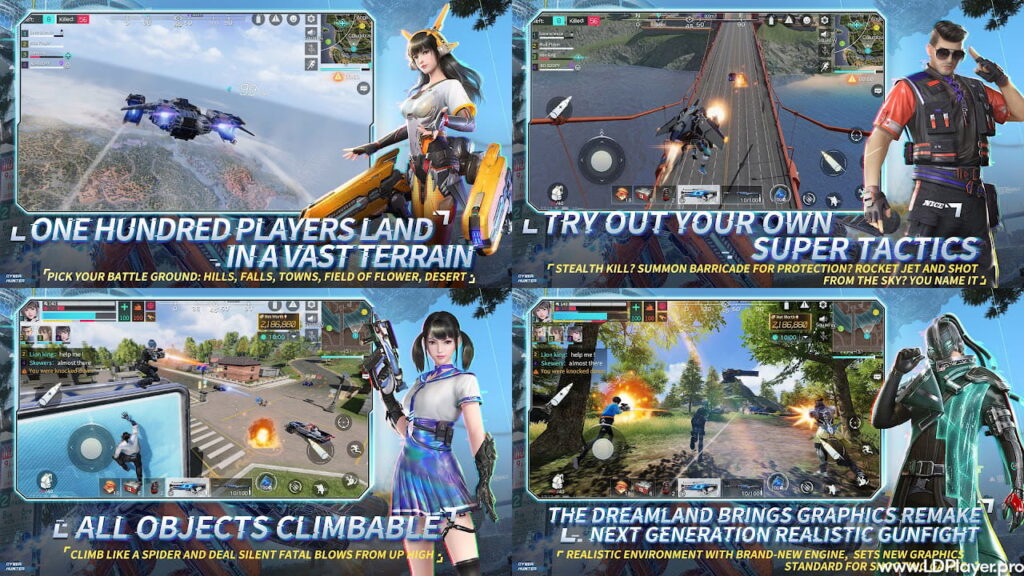
Extreme Vertical Mobility and Parkour
Cyber Hunter gives players full freedom to move in many directions. Players can climb walls, reach rooftops, and cross high places with parkour moves.
Also, gliding helps players move safely after jumping from tall spots. This makes travel faster and gives players better control during fights. So, high ground can often become the key to winning.
Quantum Cube Tactical Droid Skills
The Quantum Cube system adds more strategy to each match. Players collect quantum energy during the game. Then, they can use that energy to build useful tools.
For example, players can create cover, set healing support, or use special defense skills. Because of this, smart choices matter as much as good aim.
Next-Generation Character Customization
Cyber Hunter lets players design their own Wanderer with many style options. Players can change face details, outfits, and other visual parts.
This helps each character look different in the lobby and on the field. Also, it gives players a stronger link to their own game profile.
Futuristic Arsenal and Weaponized Vehicles
The game uses future-style weapons instead of only normal guns. Players can find special rifles, heavy weapons, support guns, and other combat tools.
Vehicles also play a big role. Some vehicles help players move across rough land. Others help teams cross water or escape danger. Therefore, vehicle use can change the result of a match.
How To Install Cyber Hunter on LDPlayer
Playing Cyber Hunter on LDPlayer can give better control, smoother aiming, and keyboard support. Follow these steps carefully.
1. Download the Emulator Client
Go to the official LDPlayer website. Download the latest stable emulator version. LDPlayer 9 or newer is a good choice for better performance.
After that, open the installer file. Follow the setup steps on the screen. Choose the install folder and finish the setup.
2. Enable Hardware Virtualization (VT)
Restart the computer. During startup, enter the BIOS menu. Most systems use F2, F12, DEL, or ESC.
Next, find the CPU or advanced settings section. Turn on Virtualization Technology. This may appear as VT-x or AMD-V.
Then, save the changes and restart the computer. This step helps the emulator use the processor better.
3. Access the App Repository
Open LDPlayer after the computer restarts. From the home screen, open LD Store or Google Play Store.
Log in with a valid Google account. This allows safe app downloads and proper app updates.
4. Execute the Application Installation
Use the search bar and type Cyber Hunter. Choose the official game from the results. Make sure the publisher name is NetEase Games.
Now, click install. The emulator will download and set up the game files. Wait until the full installation ends.
5. Configure Keymapping and Engine Parameters
Open Cyber Hunter from the LDPlayer home screen. Then, click the keyboard icon on the side menu.
Set WASD for movement. Add mouse control for aiming. Also, set keys for jumping, climbing, shooting, skills, and item use.
After that, open the game settings. Choose graphics and frame rate settings that match the computer. Use higher settings only when the game runs smoothly.
How To Play Cyber Hunter
Cyber Hunter follows the core battle royale style. However, the movement system and droid skills make every match more active.
The Infiltration Phase
Each match starts with players dropping from a carrier. Players guide their fall and choose a landing place.
It is better to land near loot, cover, and tall areas. Good landing spots help players find weapons fast. Also, high places can give a safer view of nearby enemies.
Resource and Energy Harvesting
After landing, players should collect weapons, armor, healing items, ammo, and quantum energy. These items improve survival chances.
Quantum energy is very important. It powers droid skills. So, players should keep collecting it during the match.
Zone Navigation and Spatial Combat
The safe zone gets smaller as the match continues. Players must move before the zone closes.
During fights, players should mix shooting, climbing, gliding, and skill use. For example, a player can climb to higher ground, build cover, and attack from a safer angle.
If caught in open ground, use a skill to create protection. This can turn a weak spot into a better fighting position.
Safety and Legality
Cyber Hunter should always be downloaded from official or trusted sources. This helps protect the device and the game account.
Players should not use modified files, cheat tools, or unfair plug-ins. These tools can harm the game and may cause account bans.
The game also uses safety systems to protect fair play. These systems check for unfair changes, scripts, and other bad actions. Therefore, clean play keeps the community fair for everyone.
Cyber Hunter FAQ
Is Cyber Hunter completely free to play?
Yes. The game is free to play. Players can enjoy the main modes, weapons, movement, and matches without paying.
However, the game may include optional paid items. These usually include skins, outfits, passes, or visual upgrades.
Can progress be synced between mobile devices and an emulator?
Yes. Progress can sync when the same linked account is used. Players may connect the game profile with supported account services.
Because of this, levels, items, and progress can stay safe across devices.
What are the minimum system requirements for running the game smoothly?
For Android devices, the game needs a supported Android version and enough memory. More RAM helps the game run better.
For LDPlayer on PC, a modern processor, enough RAM, and a good graphics card help improve performance. Also, enabling VT can reduce lag and stutter.
Why does my game experience high latency or network lag?
Lag can happen because of weak internet, busy networks, or poor server connection. Background downloads can also slow the game.
To improve this, use a stable connection. Also, close downloads, reduce background apps, and choose the best available server region.
Final Words
Cyber Hunter gives players a future battle royale experience with fast movement, smart tools, and creative combat. Its climbing, gliding, droid skills, and advanced weapons make each match feel active.
For the best result, players should learn the map, collect energy, use skills wisely, and move before the zone closes. With practice, better aim, and smart movement, every Wanderer can improve match by match.