Call of Duty: Mobile – Garena brings fast-shooting action to mobile devices across Southeast Asia. It combines classic maps, familiar weapons, and several game modes in one free game. Players can join short multiplayer matches or enter large Battle Royale areas with friends.
The game uses smooth controls, clear sound effects, and detailed graphics. It also gives players many ways to change weapons and controls. As a result, both new and skilled players can build a setup that fits their play style.
What is Call of Duty: Mobile – Garena?
Call of Duty: Mobile – Garena is the official regional version of Activision’s mobile shooting game. TiMi Studio Group developed the game, while Garena publishes it in selected Asian regions.
The game brings content from several Call of Duty titles into one mobile app. Players can use well-known weapons, operators, scorestreaks, and maps from Modern Warfare and Black Ops.
It is free to download and play. Optional purchases mainly include cosmetic items, battle passes, character skins, and weapon designs. These items can change the look of equipment, but basic access does not require payment.
The regional release also supports local payment methods and customer service. In addition, it includes seasonal events made for players in supported areas. Local servers can help reduce delays when players have a stable internet connection.
Call of Duty: Mobile – Garena Features
Iconic Multiplayer Modes and Maps
Multiplayer is a major part of Call of Duty: Mobile – Garena. Most matches use two teams with five players on each side. These matches are usually short, fast, and focused on teamwork.
Team Deathmatch asks teams to earn points by defeating enemies. Domination requires players to capture and defend marked areas. Hardpoint moves the main control area during the match. Search & Destroy gives each player one life per round.
Other modes may appear during events or seasonal updates. Gun Game changes weapons after each successful elimination. Free-for-All places every player against everyone else.
Players can fight on classic maps such as Nuketown, Crash, Hijacked, Firing Range, and Standoff. Each map has different paths, open areas, hiding spots, and close-range zones.
Learning these areas can improve match results. For example, narrow paths often suit submachine guns. Meanwhile, open spaces may work better with assault rifles, marksman rifles, or sniper rifles.
Sound also plays an important role. Footsteps, gunfire, reload sounds, and scorestreak alerts can reveal nearby danger. Therefore, using headphones may help players notice enemy movement sooner.
Thrilling Battle Royale Experience
Battle Royale offers a larger and slower style of combat. Up to 100 players can enter one match, depending on the selected mode and current game settings.
Players start without a complete loadout. They must land, search buildings, collect weapons, find armor, and gather healing items. The safe area becomes smaller as the match continues.
Call of Duty: Mobile – Garena includes solo, duo, and squad options when available. Squad matches require better communication because teammates must share supplies and protect each other.
The map includes cities, open fields, hills, roads, and water areas. Vehicles help teams move across long distances. Cars are useful on roads, while helicopters can reach distant places quickly.
Operator classes add another tactical choice. The Medic class can support healing. Scout tools can help locate enemy movement. Ninja skills can improve quiet movement and reach higher positions.
Choosing the right class depends on the team plan. A balanced squad may include support, tracking, movement, and defensive skills. Good planning often matters more than rushing into every fight.
Extensive Weapon Customization with Gunsmith
The Gunsmith system lets players change how a weapon works. Each gun can use several attachments, although the exact options depend on the weapon type.
Attachments include barrels, muzzles, optics, stocks, lasers, rear grips, underbarrels, ammunition, and special perks. Players can equip up to five attachments on a standard Gunsmith build.
Every attachment can affect weapon performance. Some reduce recoil, while others improve aiming speed. A larger magazine allows more shots before reloading. However, it may also reduce movement or aiming speed.
Call of Duty: Mobile – Garena allows players to save builds for different situations. A close-range setup may focus on fast movement and quick aiming. A long-range setup may focus on control, accuracy, and bullet range.
Players should test each build in training mode. A popular build may not suit every player. Sensitivity settings, device size, and control style can change how a weapon feels.
Weapon balance may also change after updates. Therefore, players should check weapon details and adjust attachments when needed.
Regional Events and Exclusive Rewards
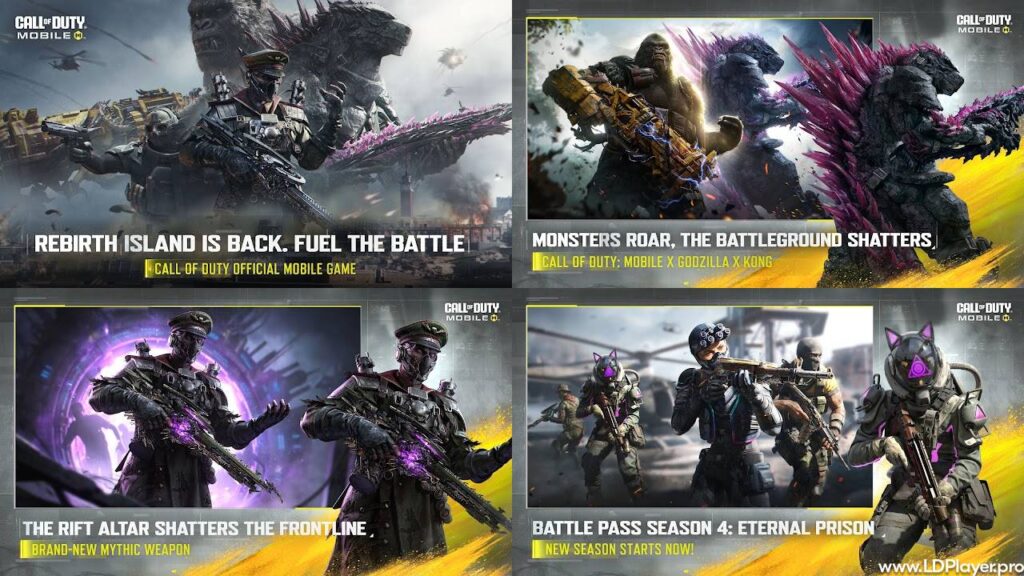
Garena often provides seasonal events, themed challenges, and regional activities. These events can include special missions, login rewards, limited game modes, and community tournaments.
Players may earn weapon camos, calling cards, operator skins, charms, crates, or in-game credits. Some rewards require daily tasks, while others need several matches or event points.
The seasonal battle pass offers free and paid reward tracks. Players can move through the tiers by earning battle pass experience. This experience usually comes from normal matches and seasonal tasks.
Call of Duty: Mobile – Garena may also include collaborations made for specific regions. These activities can bring new visual items, event menus, and short-term challenges.
Event dates and rules can change. For that reason, players should read the in-game event page before starting a task.
How To Install Call of Duty: Mobile – Garena on LDPlayer
Players who prefer a larger screen can use LDPlayer on a compatible Windows computer. A keyboard and mouse can also offer more control during aiming and movement.
1. Download and Install LDPlayer
Visit the official LDPlayer website through a trusted browser. Choose the latest 64-bit version that supports the computer’s operating system.
Open the downloaded installer. Then, follow the instructions shown on the screen. Select an installation location with enough free storage space.
After installation, launch LDPlayer. Allow the program to complete its first setup before installing any game.
2. Enable Hardware Virtualization (VT)
Hardware virtualization can improve emulator speed and stability. Intel systems may call this feature Intel VT-x. AMD systems may call it AMD-V or SVM Mode.
Restart the computer and open the BIOS or UEFI menu. The correct key depends on the computer maker. Common keys include Delete, F2, F10, or Esc.
Find the virtualization option and enable it. Save the changes, then restart the computer.
Avoid changing other BIOS settings without clear knowledge. Incorrect settings can cause startup or hardware problems.
3. Sign In to Google Play or LD Store
Open LDPlayer and select the Google Play Store or LD Store. A Google account may be required for Play Store access.
Enter the correct account details. Complete any security check shown by Google.
Using a separate gaming account may help keep personal files and game activity apart. However, the account must remain secure and accessible.
4. Search and Download the Game
Type Call of Duty: Mobile – Garena into the store search bar. Check the app name, publisher, icon, and regional availability before installing it.
Select the official game and press the Install button. Wait for the main app package to finish downloading.
Open the game after installation. Additional maps, sounds, skins, and graphic files may require more downloads. A stable internet connection can make this process smoother.
5. Configure Keymapping and Settings
Open the LDPlayer settings menu before starting a match. Set the CPU and memory based on the computer’s available hardware.
A system with enough resources can use four CPU cores and 4 GB of RAM. However, lower settings may work better on older computers.
Choose a screen resolution that matches the monitor. Higher resolutions look sharper, but they also need more graphics power.
Open the keymapping tool and select the FPS control profile. Check movement, aiming, firing, crouching, jumping, reloading, and weapon switching.
Test all controls in training mode. Adjust mouse sensitivity until aiming feels steady and natural.
How To Play Call of Duty: Mobile – Garena
Getting started is simple, but strong results require practice. New players should learn the controls before entering ranked matches.
Account Binding
The login screen may offer Garena, Facebook, and Guest account options. Available methods can depend on the region and current game version.
A Guest account is quick to create. However, it may be harder to recover after deleting the app or losing the device.
Binding Call of Duty: Mobile – Garena to a supported account helps protect game progress. It can also make account recovery easier.
Use a strong password and avoid sharing login details. Also, keep linked email and social accounts secure.
HUD and Control Customization
The HUD controls movement, aiming, firing, skills, grenades, scorestreaks, and other actions. Players can move each button to a comfortable place.
Simple Mode can fire automatically when the aim reaches an enemy. This mode may help beginners learn basic movement.
Advanced Mode gives direct control over firing. It includes options for hip fire and aim-down-sight shooting. Skilled players often prefer this mode because it offers more control.
Sensitivity settings affect camera movement and aiming speed. High sensitivity allows fast turns, while low sensitivity can improve small aim changes.
Change one setting at a time. Then, test it in training mode before making another change.
Mastering Movement
Movement can decide the result of a gunfight. Standing still makes a player easier to hit.
Sliding can help players enter cover or cross open ground. Jumping around corners may surprise an enemy, but it can also reduce accuracy.
Drop-shotting means going prone during a fight. This move can make shots miss, although skilled enemies may expect it.
Players should also practice moving from cover to cover. Walls, boxes, vehicles, and buildings can block enemy fire.
Call of Duty: Mobile – Garena rewards players who combine movement with map knowledge. Good timing is often more useful than constant jumping or sliding.
Loadout Optimization
A loadout includes a primary weapon, secondary weapon, grenades, perks, operator skills, and scorestreaks.
Assault rifles work well in many situations. Submachine guns suit close-range fights. Sniper rifles are useful on maps with long sightlines.
A secondary pistol can help when the main weapon needs reloading. Launchers can damage enemy scorestreaks or vehicles.
Lethal equipment includes grenades and other damage tools. Tactical equipment can slow, blind, reveal, or block enemies.
Perks provide extra effects. Agile can support faster actions. Toughness may reduce flinch during gunfire. Dead Silence can reduce movement sound in certain situations.
Create several loadouts for different maps and modes. One setup will not work well in every match.
Safety and Legality
The official Garena release is a licensed game distributed through approved platforms. Players should use official app stores and trusted emulator sources.
Never install modified APK files from unknown websites. These files may contain harmful software, stolen login tools, or unfair game changes.
Cheats, scripts, injectors, and unauthorized tools break the game rules. Using them can lead to account limits or permanent bans.
Keep the game, emulator, and device security software updated. Updates often fix bugs and security problems.
Protect linked accounts with strong passwords. Two-step verification should also be enabled when the account service supports it.
Call of Duty: Mobile – Garena may place emulator players in emulator-based matchmaking. This system helps reduce unfair control differences between touch players and keyboard users.
Players should also avoid buying accounts from other people. The original owner may recover the account later. Account trading may also break platform rules.
Call of Duty: Mobile – Garena FAQ
Is the game free to play?
Yes. The game is free to download and play. Optional purchases include cosmetic items, battle passes, and other in-game content.
Which regions can access this version?
The Garena version supports selected Southeast Asian areas and nearby markets. These include the Philippines, Thailand, Indonesia, Singapore, Malaysia, Taiwan, Hong Kong, and Macau.
What are the minimum device requirements?
Android devices generally need Android 5.1 or later and at least 2 GB of RAM. iOS devices generally need iOS 12.0 or later.
More free storage may be needed after installing maps, audio files, skins, and update data. Device performance can also depend on the processor and graphics hardware.
Can mobile players cross-play with PC emulator players?
The matchmaking system usually detects emulator users. It can then place them with other emulator players or mixed teams using emulators.
This process helps protect fair play for users with touch controls.
Where can the game be downloaded?
Regional players can download Call of Duty: Mobile – Garena from supported official app stores. PC players can also install it through a trusted Android emulator.
Always check the publisher name before downloading the game.
Final Words
Call of Duty: Mobile – Garena offers quick multiplayer action, large Battle Royale matches, and detailed weapon settings. It also gives regional players local events, community activities, and nearby server support.
New players can begin with basic controls and simple loadouts. After that, they can improve movement, map knowledge, aim, and team communication.
Regular practice helps players understand weapons and game modes. Careful account protection also keeps progress safer.
Whether playing on a phone, tablet, or supported emulator, the game offers many ways to enjoy competitive shooting action.