Survivor.io brings fast roguelite survival action to mobile devices and PC. The game takes place in a city filled with dangerous zombies. Large enemy groups attack from every direction. The main goal is to survive each stage, defeat bosses, and protect the city.
Players control a brave warrior with strong combat skills and great growth potential. During each battle, weapons become stronger as the character gains experience. New skills also appear after each level. As a result, every run can feel different.

What is Survivor.io?
Survivor.io is a single-player roguelite action game developed by Habby. It mixes bullet-hell combat with simple movement controls. Each chapter usually lasts between 15 and 20 minutes.
During a stage, monsters enter the map in large groups. Enemy numbers and strength increase as time passes. Therefore, players must keep moving while building enough damage to control the crowd.
Defeated enemies drop experience gems. Collecting these gems fills the level bar. Once the bar becomes full, the player can choose one upgrade from several random options.
These upgrades include active weapons and passive skills. Active weapons deal damage during battle. Meanwhile, passive skills can improve attack power, health, speed, range, or cooldown time.
Since each upgrade choice is random, every match creates a new build. One run may focus on close-range damage. Another run may use rockets, fire, lightning, or spinning weapons.
Players must also fight elite enemies and large bosses. These enemies have more health and stronger attacks. However, defeating them can provide useful chests and skill upgrades.
Outside each battle, players can improve equipment, unlock characters, and increase permanent stats. This long-term growth helps with harder chapters and challenge modes.
The basic goal of Survivor.io remains easy to understand. Clear stages, collect gear, improve skills, and prepare for stronger enemies.
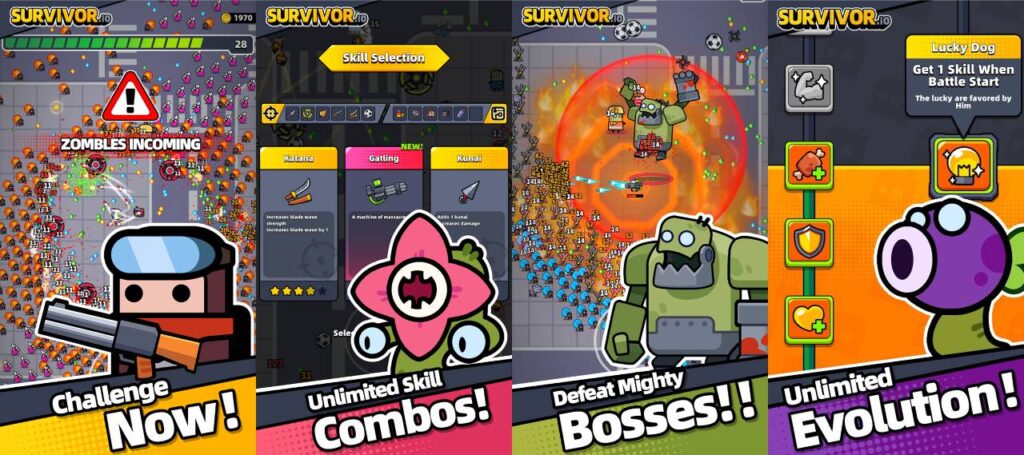
Survivor.io Features
The game includes several systems that keep battles active and rewarding. Each feature supports a different part of character growth and combat.
Massive Screen-Clearing Swarms
More than 1,000 monsters may appear on the screen at the same time. These large groups create constant pressure throughout each stage.
At first, the character may struggle against even small enemy packs. However, upgraded weapons can soon clear hundreds of monsters within seconds.
This change creates a strong feeling of progress. Basic attacks slowly become large explosions, spinning blades, fire zones, and powerful energy effects.
Players must still watch their position. Strong weapons help control crowds, but poor movement can lead to quick damage. Therefore, open paths should always remain nearby.
Intuitive One-Hand Controls
The movement system uses a simple virtual joystick. Players only need one finger to move around the battlefield.
Most weapons attack automatically. As a result, there is no need to press an attack button again and again.
This control style lets players focus on dodging, collecting gems, and finding safe spaces. It also makes the game easy to learn.
Even so, later stages still require careful timing. Enemy projectiles, fast monsters, and bosses can quickly block escape routes.
Deep Roguelite Skill Combinations
Every battle offers several possible skill builds. Players can combine main weapons with extra attacks and passive effects.
Main weapon choices include the Kunai, Katana, and Baseball Bat. Other attack skills include the Molotov, Guardian, Forcefield, Lightning Emitter, and RPG.
Some skills work better together. For example, a wide attack can control normal monsters. Meanwhile, a focused weapon can deal strong damage to bosses.
Survivor.io also includes EVO weapons. These stronger forms appear after meeting certain upgrade rules.
First, an active weapon must reach Level 5. Next, the matching passive skill must be owned. The evolved weapon can then appear through a chest or suitable upgrade.
EVO weapons offer higher damage and improved effects. Therefore, players should plan passive choices instead of selecting random upgrades.
Continuous Chapter & Mode Progression
The game includes many main chapters, challenge stages, daily activities, and event modes. Each mode offers different goals and rewards.
Main chapters form the core progress path. Later chapters introduce tougher enemies, stronger bosses, and more difficult map layouts.
Challenge modes add extra rules. Some may increase enemy speed or reduce player healing. Others may place limits on movement or skill choices.
Daily activities can provide coins, upgrade items, gear, and other useful rewards. Seasonal events may also include special missions and limited items.
New content gives players more reasons to return. However, steady progress still depends on regular gear upgrades and careful use of resources.
Gear Customization and Character Growth
Players can equip items in six main gear slots. These slots include Weapon, Chest, Necklace, Gloves, Belt, and Boots.
Each equipment piece improves one or more stats. Common bonuses include attack, health, movement speed, healing, and damage effects.
Gear rarity also affects its strength. Equipment can move from Common quality to higher grades through upgrades and merging.
Rare items often include extra skills. For example, one item may improve damage against bosses. Another may help control large enemy groups.
Survivor.io also lets players improve characters outside battle. Permanent upgrades increase starting strength and make harder stages more manageable.
Resources should be spent with care. Upgrading every item can waste coins and materials. Instead, focus on the main weapon and the best gear set available.
How To Install Survivor.io on LDPlayer
Playing on a desktop or laptop gives users a larger screen and keyboard movement. It also removes concerns about mobile battery use during long sessions.
Follow these steps to install the game through LDPlayer.
Step 1: Download LDPlayer
Open the official LDPlayer website through a trusted web browser. Find the latest emulator installer for the computer.
LDPlayer 9 is a suitable option for modern Windows systems. Save the installer in an easy-to-find folder.
Step 2: Install the Emulator
Open the downloaded installer file. Read the setup options before continuing.
Follow the instructions shown on the screen. Choose the installation folder and complete the setup process.
After installation, launch LDPlayer from the desktop shortcut or Start menu.
Step 3: Open the Google Play Store
The emulator home screen includes the Google Play Store. Select its icon to open the store.
The first launch may take a little longer. This happens because the emulator must load its main services.
Step 4: Sign In to Google
Enter a valid Google account to access the Play Store. Use the normal Google sign-in steps.
Account access allows the emulator to download apps and store game data. Always protect the account with a strong password.
Step 5: Search for the Game
Select the Play Store search bar. Type Survivor.io and press Enter.
Check the game name, icon, and publisher before opening the store page. This helps avoid unrelated apps.
Step 6: Install the Game
Select the Install button on the official game page. The Play Store will download and install the required files.
Download time depends on the internet speed. Keep the emulator open until the process finishes.
Step 7: Configure Keymapping
Launch the game from the LDPlayer home screen. Then select the Keymapping tool from the side menu.
Assign WASD or arrow keys to movement. Place the control area over the virtual joystick.
Save the new key settings after testing them. Adjust key positions when movement does not feel smooth.
Step 8: Start Playing
Open Survivor.io and allow the game to finish any extra updates. Review the display and performance settings before starting a chapter.
A larger screen can make enemy attacks easier to see. Keyboard controls may also help with exact movement during crowded battles.
How To Play Survivor.io
Good equipment helps, but battle choices remain very important. The following methods can improve survival during difficult chapters.
Prioritize High-Impact AOE Early
Choose area-of-effect skills during the first few minutes. Molotov, Guardian, and Forcefield can help control nearby enemies.
These attacks create safer space around the character. Therefore, collecting experience gems becomes easier.
Early crowd control also prevents weak monsters from forming a large wall. Once trapped, the player may lose health very quickly.
Still, avoid choosing only close-range skills. A balanced build should include damage for both crowds and bosses.
Aim for Weapon Evolutions (EVO)
Plan EVO combinations from the start of each battle. Select the passive skill required by the main weapon or chosen attack skill.
An active skill usually needs to reach Level 5 before evolution. The matching passive skill must also be active.
After meeting these conditions, collect a boss chest or elite chest. The upgraded form may then become available.
Do not fill every passive slot too early. Keeping one slot open can prevent a useful EVO path from becoming blocked.
Maintain Constant Movement
Standing still for too long creates danger. Enemy groups can surround the character from every side.
Move around the edge of the crowd instead. This method keeps enemies grouped and creates a clearer escape path.
Circular movement works well against many normal monsters. However, boss attacks may require sudden direction changes.
Watch the ground for warning signs and projectiles. Also, avoid moving into corners unless an open route remains available.
Collect Chests and Bombs Strategically
Elite enemies and bosses may drop chests. These chests can offer several skill upgrades at once.
A chest does not always need to be collected immediately. Leaving it nearby can help when an EVO weapon becomes ready.
Bombs remove many normal enemies from the screen. Therefore, saving one can help during a heavy wave or elite fight.
Green healing items should also remain on the map until needed. Collecting them at full health wastes their healing value.
Good item timing can turn a difficult moment into a safe recovery. So, always remember where useful drops remain.
Safety and Legality
Survivor.io is an official mobile game developed and published by Habby. Players should download it through trusted and approved platforms.
The Apple App Store and Google Play Store provide official mobile versions. PC users should also get LDPlayer from its official website.
Avoid modified APK files, unofficial cheats, and unknown download pages. These files may contain harmful software or stolen account tools.
Using cheats may also break the game rules. As a result, an account could lose access to online features or saved progress.
Always install game updates through official digital stores. Official updates include new content, fixes, and important security changes.
Account progress should also connect to an approved login service. Available options may include Google Play, Apple ID, or Facebook.
Linked progress can help after changing devices or reinstalling the game. However, login details should never be shared with other people.
Use a strong password and enable extra account security when available. These steps help protect purchases, progress, and personal data.
Survivor.io FAQ
Is Survivor.io free to play?
Yes. The game is free to download and play.
Players can complete chapters, collect gear, join events, and improve characters through normal gameplay. Progress does not require a purchase.
Optional in-game purchases are available. These purchases may provide items, passes, cosmetic content, or faster progress.
Players should review all prices before making a payment. Children should ask a parent or guardian before buying anything.
Can I play Survivor.io offline?
Some basic chapter content may work without a steady internet connection. However, many features need online access.
Daily rewards, events, cloud saving, shops, and account services often require a connection. Updates also need internet access.
For the safest progress, connect online before and after important battles. This helps the game save new rewards and account changes.
What is the best weapon in the game?
The best weapon depends on the stage, available gear, and preferred play style.
Void Power can help control large groups. Lightchaser offers wide attacks and strong crowd damage. The evolved Kunai works well against single targets.
Some weapons perform better against normal waves. Others provide stronger damage during boss battles.
Therefore, players should test several options. A well-upgraded weapon often performs better than a rare weapon with low upgrades.
Is playing Survivor.io on LDPlayer allowed?
LDPlayer lets users run Android games on a Windows computer. Many players use Android emulators for larger screens and keyboard controls.
The normal game version should be downloaded through the Google Play Store inside the emulator. Modified game files should not be used.
Players must also follow all game rules. An emulator should improve controls, not provide unfair tools or automated gameplay.
Final Words
Survivor.io offers quick battles, simple controls, large enemy waves, and many upgrade choices. Each stage asks players to move carefully and build useful skill sets.
Strong progress comes from several areas. Players need upgraded gear, correct EVO pairs, good item timing, and safe movement.
Mobile users can enjoy easy one-hand controls. Meanwhile, PC users can use LDPlayer for a bigger display and keyboard movement.
New players should focus on learning enemy patterns before chasing high damage. Staying alive gives more time to collect gems and complete upgrades.
Experienced players can improve results by planning builds before each chapter. They should also save healing items, bombs, and chests for key moments.
Most importantly, use official download sources and protect account details. Safe installation helps keep game progress and device data secure.
Enter the city, prepare the equipment, and face the next zombie wave with a clear plan.