CSR 2 Realistic Drag Racing brings fast and detailed drag races to mobile devices. The game focuses on short races where timing, tuning, and car power decide the result. Every gear change matters, and even a small mistake can cost the race.
NaturalMotion and Zynga have created a racing game with detailed cars, realistic movement, and many tuning choices. Players can collect licensed vehicles, improve engine parts, adjust car settings, and race against other players.

What is CSR 2 Realistic Drag Racing?
CSR 2 Realistic Drag Racing is a mobile drag racing simulator based on straight-line competition. Each race usually takes place over a quarter-mile or half-mile distance. The main goal is to reach the finish line before the other car.
Players do not need to control normal steering during most races. Instead, the main controls include the throttle, launch timing, gear shifts, and nitrous. Because of this design, the game places more focus on reaction time and vehicle setup.
At the start of a race, the player must control the engine speed. The tachometer shows whether the engine is within the best launch range. Holding the engine speed too low can cause a slow start. However, holding it too high may create wheelspin and reduce grip.
After the launch, players must change gears when the shift meter reaches the correct area. A late shift may push the engine beyond its best power range. On the other hand, an early shift may reduce acceleration. Therefore, clean timing can make a clear difference.
The game includes more than 200 licensed vehicles from well-known car makers. These brands include Ferrari, McLaren, Bugatti, Lamborghini, Porsche, Ford, Chevrolet, Toyota, Nissan, BMW, and many others.
Cars are divided into different tiers based on their starting performance. Early tiers include slower street cars that help players learn the main controls. Later tiers include sports cars, supercars, and hypercars with much higher speed.
Progress does not depend only on buying a faster car. Players must also install upgrades, add fusion parts, tune the vehicle, and learn its best shift pattern. Because every car behaves differently, one setup may not work well for another model.
CSR 2 Realistic Drag Racing also includes story races, daily challenges, limited events, crew seasons, live races, and restoration tasks. These modes give players several ways to earn cash, keys, upgrade parts, and new vehicles.
CSR 2 Realistic Drag Racing Features
Next-Gen Visuals and Manufacturer License Fidelity
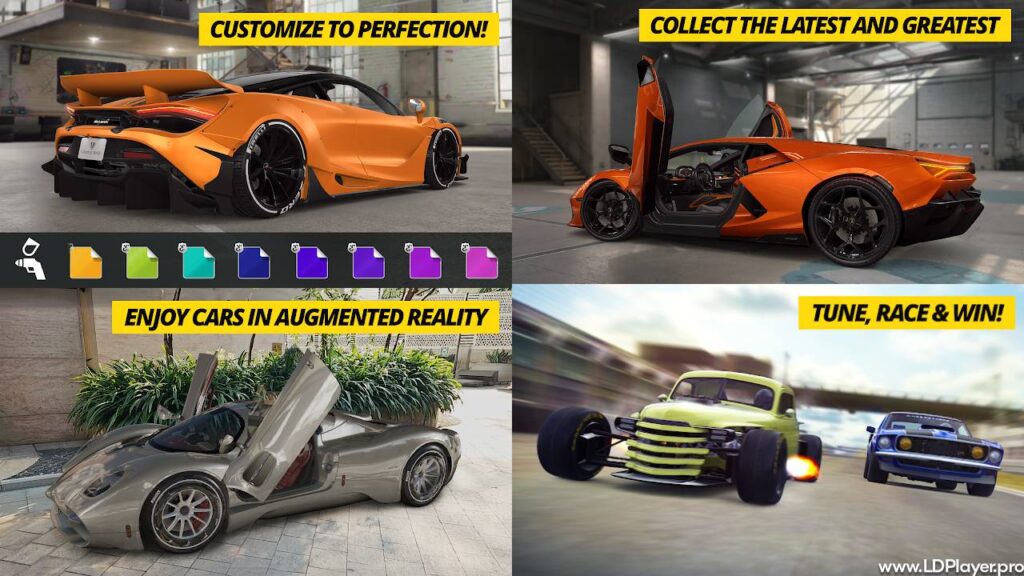
The game uses detailed 3D car models to show each vehicle from many angles. Paintwork, wheels, lights, body panels, windows, and interior parts have clear visual details.
Players can view vehicles inside the garage before entering a race. Many cars allow close inspection of the doors, hood, trunk, seats, dashboard, engine bay, and brake parts. This helps each model feel closer to its real design.
Licensed vehicles also use familiar badges, body shapes, wheel designs, and factory colors. Therefore, fans can often recognize a car before reading its name.
Lighting also changes how vehicles look. Reflections move across the paint, while shadows help show the shape of each panel. In addition, race locations include city streets, industrial areas, event tracks, and night settings.
CSR 2 Realistic Drag Racing uses these details to make the garage feel like a digital car collection. Players can spend time viewing their vehicles, changing their appearance, and arranging their favorite models.
Still, graphics are not the only focus. The visual effects also help during races. Shift lights, launch indicators, speed displays, and nitrous effects give useful information without making the screen hard to read.
Deep Mechanical Tuning & Customization
Upgrading a car improves its basic performance. However, tuning helps players use those upgrades in a better way. A strong car may still lose races when its setup does not match the track distance.
Several main upgrade areas affect vehicle performance. These may include the engine, turbo, intake, nitrous, body, tires, and transmission. Each area has several stages that increase the car’s Performance Points.
After installing enough parts, players can adjust important tuning settings.
Final Drive Ratios:
The final drive setting changes how quickly the car moves through its gears. A shorter ratio may improve early acceleration. However, it may also reduce top speed. A longer ratio can support higher speed, but the car may accelerate more slowly.
Players should adjust this setting based on the race distance and the car’s power. Quarter-mile races often need fast early movement. Meanwhile, half-mile races may need a better balance between acceleration and top speed.
Tire Pressure:
Tire pressure affects grip and wheelspin. More grip can help a powerful car leave the starting line with better control. However, the wrong setting may reduce speed later in the race.
A small change can affect the launch and the overall race time. Therefore, players should test several settings instead of choosing one value for every event.
Nitrous Oxide Timing:
Nitrous gives the car a short power increase. Players can adjust its strength and duration through the tuning menu.
A strong, short nitrous burst may help during a key gear. In contrast, a longer but weaker burst may give smoother power over more of the race. The right option depends on the car’s grip, gearing, and shift pattern.
Fusion Parts & Stage 6 Upgrades:
Fusion parts add extra performance to installed upgrades. These parts usually match a certain vehicle maker and come in different levels.
Stage 6 upgrades are special parts that can greatly improve one area of a vehicle. A car can have Stage 6 parts for systems such as the engine, turbo, intake, nitrous, body, tires, and transmission.
Performance Points show the value of the main installed hardware. Evo Points show extra gains from fusion parts and tuning. As a result, two cars with similar Performance Points may produce very different race times.
CSR 2 Realistic Drag Racing encourages players to test each change on the Dyno. The predicted time gives a useful starting point. Still, the final result also depends on launch quality, gear changes, and nitrous timing.
Customization also includes visual changes. Depending on the vehicle, players may change the paint, wheels, brake calipers, interior color, and other design parts. These changes usually focus on appearance rather than race speed.
Real-Time Live Street Races & Crew Battles
Live Races allow players to compete against real opponents. These races can feel less predictable because every opponent may use a different car setup and shift method.
Before entering a Live Race, players should check the car’s tune and test its normal race time. A stable setup often works better than one that only produces a good result once.
Some players also use Live Races to earn cash, keys, or Respect Points. Respect Points help with crew progress and seasonal rankings.
Crews are groups of players who work toward shared goals. Crew members earn Respect Points through races and events. These points help the group reach milestone rewards during each season.
Milestone rewards may include cash, keys, parts, and special vehicles. Therefore, active crews often ask members to meet a basic Respect Point target.
Good crew teamwork can make progress easier. Members may share tuning tips, event advice, and information about upcoming goals. In addition, crew leaders can help organize participation during important seasons.
CSR 2 Realistic Drag Racing also includes crew battles as part of career progress. These battles place players against groups of opponents. Each race becomes harder, so car upgrades and better timing are often required.
Legends Restoration Workshop
The Legends mode focuses on classic vehicles from earlier years of car history. Instead of receiving every vehicle in perfect condition, players restore damaged or incomplete cars.
Restoration takes place through several tasks. Players collect restoration parts by completing Legends races and related events. These parts unlock sections of the vehicle over time.
A car may need work on its body, engine area, interior, wheels, or paint. As each section is restored, the vehicle slowly returns to its finished condition.
This process gives the mode a different pace from normal car upgrades. Players cannot always finish a classic car at once. Instead, steady progress is needed.
The Legends collection includes famous muscle cars, sports cars, and rare performance models. Vehicles linked to this mode may include the Lamborghini Countach, McLaren F1, Saleen S7 Twin Turbo, and other classic machines.
Restored cars can be used in normal races and special events. In addition, completing more restoration work can open new parts of the Legends story.
CSR 2 Realistic Drag Racing uses this workshop to give older vehicles an important place in the garage. Therefore, the game does not focus only on new supercars and hypercars.
How To Install CSR 2 Realistic Drag Racing on LDPlayer
Playing on a PC through LDPlayer can provide a larger display and keyboard controls. Performance will depend on the computer’s hardware and emulator settings.
Follow these steps to install the game.
1. Download and Install LDPlayer
Visit the official LDPlayer website and download a current installer. LDPlayer 9 may provide suitable support for modern Android games.
Open the downloaded setup file. Then, follow the instructions shown by the installer. Choose the installation location and allow the setup to finish.
After installation, open LDPlayer and wait for the Android home screen to load.
2. Enable Hardware Virtualization (VT)
Hardware virtualization can help the emulator use the computer’s processor more effectively. Intel systems may call this feature Intel VT-x. AMD systems may call it AMD-V or SVM Mode.
First, check whether virtualization is already enabled. The emulator may show a warning when the feature is turned off.
To enable it, restart the computer and enter the BIOS or UEFI menu. The required key may differ by computer maker. Common keys include Delete, F2, F10, or Esc.
Find the CPU, Advanced, Security, or System Configuration section. Then, enable the virtualization setting and save the changes.
Take care when changing BIOS settings. Only adjust the required option.
3. Sign In to Google Play Store
Launch LDPlayer and open the System Apps folder. Next, select the Google Play Store.
Sign in with an active Google account. Complete any account checks shown on the screen.
Using a connected account helps with app installation and available cloud features.
4. Search and Install the Game
Open the search bar inside the Google Play Store. Enter “CSR 2 Realistic Drag Racing” and review the search results.
Select the official game published by NaturalMotionGames Ltd. Check the game title and publisher before starting the download.
Click the Install button. The required files will download and install inside the emulator.
Once the process finishes, open the game from the Play Store or LDPlayer home screen.
5. Configure Emulator Settings & Keymapping
Open the LDPlayer settings menu by selecting the gear icon.
Under Display settings, choose a resolution that matches the monitor and computer power. A 1920×1080 resolution can provide a clear image. However, a lower resolution may improve performance on older computers.
Set the DPI to 280 or 320 for a balanced screen size. Then, open the Advanced section.
A system with enough resources may use four CPU cores and 4096MB of RAM. Do not assign all available computer resources to the emulator. Windows and other programs also need memory and processor power.
Save the settings and restart LDPlayer when required.
Next, open the keymapping tool. Assign keys for important actions such as launch, nitrous, and gear shifts. For example, the Spacebar can control launch or nitrous, while the Up Arrow can control upshifts.
Choose keys that feel easy to reach. After that, test them in a low-risk race before entering an important event.
CSR 2 Realistic Drag Racing may need extra game files during its first launch. Keep a stable internet connection active until the setup finishes.
How To Play CSR 2 Realistic Drag Racing
Winning depends on more than owning a fast car. Players must understand the launch, shift points, nitrous use, and tuning screen.
Nail the Launch
The launch begins during the countdown. Press or pulse the throttle to move the tachometer needle toward the green target area.
Try to keep the needle inside that area when the countdown ends. A Perfect Launch can help the car move quickly without wasting grip.
However, not every car uses the same launch method. Some vehicles perform better with a lower starting RPM. Others need a fast throttle drop just before the race starts.
Practice the launch during test runs. Then, use the most stable method during important races.
Execute Perfect Shifts
Watch the shift meter as the car gains speed. Change gears when the indicator enters the green area.
A Perfect Shift keeps the engine close to its useful power range. Still, some cars produce better times with an early shift or a slightly late shift.
Therefore, do not depend only on the green indicator. Compare different shift points through repeated test runs.
Keep a steady rhythm during the race. Random tapping can cause missed shifts and slower times.
Optimize Nitrous Deployment
Nitrous timing can change the final result. Using it too early may create extra wheelspin. Using it too late may waste part of the boost.
Cars with weak grip may perform better when nitrous starts in second or third gear. Meanwhile, high-grip vehicles may use it soon after the first shift.
The tuning setup also matters. A short, strong nitrous setting needs accurate timing. A longer setting may feel easier to control.
Test nitrous in several gears. Then, compare the final race times instead of judging only by the first burst of speed.
Use the Dyno Test
The Dyno gives an estimated race time based on the current upgrades and tune. Use it after changing the transmission, tires, or nitrous settings.
Change one setting at a time. This makes it easier to see whether the adjustment helped or hurt performance.
For example, move the final drive setting by a small amount. Run the Dyno again and note the result. Then, test the car on the track.
The Dyno estimate does not replace real practice. A setup may show a fast predicted time but require a difficult launch pattern. Another setup may show a slightly slower estimate but produce more stable results.
CSR 2 Realistic Drag Racing rewards careful testing. Small tuning changes can save important fractions of a second.
Safety and Legality
Download the game through official stores and trusted platforms. Official versions receive normal updates and use approved account services.
The Google Play Store and Apple App Store provide the standard mobile versions. When using an Android emulator, install the game through the built-in official Play Store.
Avoid modified APK files, unlimited money tools, key generators, and unofficial game clients. These files may contain harmful software or unsafe code.
In addition, modified files can break the game, damage saved progress, or expose account details. They may also stop working after an update.
Using hacks or unauthorized tools can violate the game’s Terms of Service. Accounts linked to these tools may lose access to Live Races, crew events, rankings, or other online features.
Never share login details with websites that promise free gold, cash, cars, or keys. Real reward systems do not need a player’s private account password.
CSR 2 Realistic Drag Racing should only be installed through a trusted source. This simple step helps protect game progress, device files, and personal information.
CSR 2 Realistic Drag Racing FAQ
Is CSR 2 Realistic Drag Racing free to play?
Yes. The game is free to download and play. Players can complete races, collect cars, improve vehicles, and join events without paying an entry price.
However, optional purchases are available. These purchases may include car packs, keys, currency, parts, or event offers.
Players should review the price and item details before buying anything. Device payment controls can also help prevent unwanted purchases.
Can I transfer my progress between mobile and PC?
Progress may sync when the game uses the same supported account and cloud save system. Android players should use the same Google Play Games account when moving between an Android phone and LDPlayer.
Do not start a new save over an existing profile without checking the account connection. A new local save may create a progress conflict.
Before changing devices, confirm that the current game profile is linked. Also, keep a record of the player ID in case account support is needed.
Transfers between Android and iOS may not work in the same way. These platforms use different account systems.
How do I unlock Stage 6 upgrades in CSR 2 Realistic Drag Racing?
Stage 6 upgrades can come from several game activities. Players may receive them from import crates, event rewards, crew rewards, race cups, or vehicle stripping.
Stripping a duplicate car may provide fusion parts and a chance of receiving a Stage 6 part. However, the reward is not always guaranteed.
Stage 6 parts usually match a specific vehicle. A part made for one car may not work on another model, even when both cars come from the same maker.
Because these parts are rare, players should use keys and resources carefully during important events.
What is the difference between PP and Evo points?
Performance Points, also called PP, show the basic performance value of installed vehicle upgrades. Engine, turbo, intake, nitrous, body, tire, and transmission parts can increase PP.
Evo Points show added performance from fusion parts and tuning. These points appear beside the base PP value.
A high PP number does not always mean the fastest setup. Gear ratios, tire grip, nitrous settings, and fusion parts can make a major difference.
For that reason, players should check both PP and Evo Points. They should also compare actual track times.
Final Words
CSR 2 Realistic Drag Racing offers short, fast races with detailed cars and deep tuning tools. Its controls are simple to learn, but strong results require careful timing and regular practice.
The large vehicle collection gives players many garage goals. Some may focus on modern hypercars, while others may enjoy restoring classic models. Crew seasons, Live Races, story events, and daily tasks also provide different ways to play.
Good progress comes from smart resource use. Players should upgrade the right cars, save rare keys, test tuning changes, and avoid spending parts without a clear goal.
Most importantly, every car needs its own race method. A shift pattern that works for one vehicle may slow down another. Therefore, regular testing remains an important part of the game.
With licensed cars, detailed visuals, online competition, restoration projects, and PC emulator support, the game gives drag racing fans a full mobile experience. Build the garage, improve each setup, sharpen every shift, and race toward faster times.