Blue Archive brings tactical battles, student stories, team building, and school management into one connected game. The story takes place in Kivotos, a huge academy city filled with different schools and clubs. Players take the role of Sensei, an advisor who helps students solve serious problems.
During missions, Sensei guides student teams through city conflicts, military operations, and personal challenges. Each student has a clear role, weapon type, attack type, and set of skills. Because of this, good team planning matters as much as character strength.
Players can enjoy the game on a mobile device. They can also run the Android version on a Windows PC through LDPlayer. A larger screen, stable controls, and better performance may make long gaming sessions more comfortable.
Learning the main systems helps players clear story missions, collect resources, improve students, and prepare for raid battles.

What is Blue Archive?
Blue Archive is a free-to-play tactical role-playing game set in the academy city of Kivotos. Players lead squads made up of students from several schools. Each school has its own rules, culture, clubs, and internal problems.
The main story starts after the General Student Council President suddenly disappears. Without its leader, the council struggles to control the city. Conflicts begin to grow across Kivotos, and several groups start acting on their own.
Sensei becomes the advisor of SCHALE, an independent investigation group with wide authority. SCHALE works with students from different academies to handle emergencies, investigate unusual events, and restore order.
The basic command structure works like this:
+-------------------------------------------------------+
|                 SCHALE COMMAND STRUCTURE              |
|                                                       |
|                     [ SENSEI ]                        |
|                          |                            |
|             +------------+------------+               |
|             |                         |               |
|      [ STRIKER SQUAD ]       [ SPECIAL SQUAD ]        |
|      - Frontline Combat      - Off-Field Support      |
|      - Cover Mechanics       - Skills, Buffs, Heals   |
+-------------------------------------------------------+
The game uses a gacha system for recruiting students. However, collecting rare students alone does not guarantee success. Players must also understand team roles, enemy armor, terrain, skill timing, and squad balance.
As a result, careful planning often gives better results than using only high-level characters.
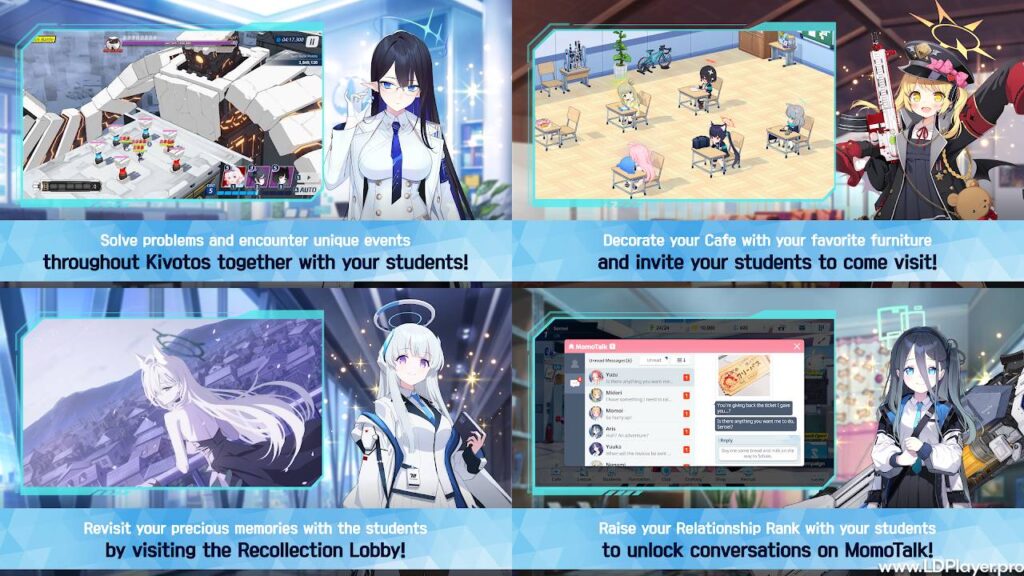
Blue Archive Features
Real-Time 3D Tactical Combat
Battles take place on active 3D maps. Students move forward, attack nearby enemies, and use available cover without direct movement commands.
Meanwhile, a Skill Cost meter fills during combat. Players spend this cost to activate EX Skills. These skills can deal damage, heal allies, place shields, improve team stats, or control enemy movement.
Skill timing can change the result of a mission. For example, using a healing skill too early may waste its effect. On the other hand, waiting too long may cause a frontline student to fall.
Players should also watch enemy groups and boss attack patterns. A strong area attack works best when several enemies stand close together. Likewise, a shield becomes more useful before a powerful enemy attack.
MomoTalk and Relationship System
MomoTalk is the in-game messaging system. It allows Sensei to receive messages from students and learn more about their daily lives.
As relationship levels increase, new student stories become available. These stories show each student’s goals, worries, friendships, and school duties. Some relationship events also unlock Live2D Memory Lobby scenes.
Higher relationship levels may also provide extra stats. Therefore, relationship growth supports both story progress and combat power.
Players can improve bonds by visiting students in the café, giving suitable gifts, and completing available relationship stories. Regular café visits can slowly raise bond levels without using battle resources.
Dynamic Faction and Academy Lore
Kivotos contains several major academies. Each one has its own style, history, student groups, and leadership system.
Trinity General School follows strict traditions and has several powerful student groups. Gehenna Academy has a more chaotic culture, with many clubs that often create trouble. Millennium Science School focuses on technology, research, engineering, and new inventions.
Smaller clubs also play a major role in the story. These include the Foreclosure Task Force, Gourmet Research Society, Game Development Department, and many others.
Because each group has different goals, conflicts often grow from misunderstandings, school rules, or personal choices. This gives the story both serious moments and light comedy.
Diverse Game Modes and Raids
Blue Archive includes several modes that support story progress, resource farming, and competitive play.
Main Story and Normal Campaigns:
These stages introduce major events and characters. Normal missions also unlock new areas, features, and farming stages.
Hard Campaigns:
Hard stages offer student fragments and other useful rewards. However, daily entry limits control how often players can clear them.
Total Assault:
This raid mode features powerful bosses with special skills and battle rules. Players build teams that match the boss armor, terrain, and attack pattern. Scores depend on clear time and chosen difficulty.
Tactical Challenge:
This mode uses automatic battles against teams created by other players. Team position, attack type, terrain strength, and skill order can affect the result.
Bounty Operations:
Bounty stages provide materials needed for student skills. Different stages reward different school or area materials.
Commission Operations:
Commissions provide Activity Reports and Credits. These resources help players raise student levels and pay upgrade costs.
How To Install Blue Archive on LDPlayer
LDPlayer allows the Android version of the game to run on a Windows PC. Follow these steps in order.
1. Download and Install LDPlayer
Visit the official LDPlayer website and choose a current 64-bit version. A 64-bit build usually offers better support for modern Android games.
After the installer finishes downloading, open the file. Follow the setup instructions and select an installation folder with enough free space.
Once installation ends, launch LDPlayer and allow it to complete its first-time setup.
2. Enable Virtualization Technology
Virtualization Technology helps the emulator use the processor more efficiently. Intel systems may call this setting VT-x. AMD systems may call it AMD-V or SVM Mode.
Restart the computer and open the BIOS or UEFI menu. The required key depends on the computer maker. Common keys include Delete, F2, F10, or Esc.
Find the CPU, Advanced, Security, or System Configuration section. Then enable the virtualization setting, save the changes, and restart the computer.
Avoid changing other BIOS settings without knowing their purpose.
3. Configure Emulator Performance Settings
Open LDPlayer and select the settings menu. Then adjust the performance options based on the computer’s hardware.
A useful starting setup includes:
- CPU: 4 cores
- RAM: 4096 MB or more
- Resolution: 1920 × 1080
- DPI: 160 or higher
- Frame rate: 60 FPS, when supported
Do not assign every CPU core or all available memory to the emulator. Windows and other programs also need system resources.
After changing the settings, save them and restart LDPlayer.
4. Install the Game Through Google Play Store
Open the Google Play Store inside LDPlayer. Sign in with a Google account and search for Blue Archive.
Check the app name and publisher details before selecting Install. This step helps prevent the use of copied or unsafe apps.
The download size may increase after installation because the game needs extra data. Make sure the computer has enough free storage.
5. Launch and Set Keybindings
Open the game from the LDPlayer home screen. Allow all required game files to download before entering the main menu.
Next, open the LDPlayer keyboard mapping tool. Add keys for common actions, such as selecting EX Skills, changing battle speed, or using menu controls.
Keep the layout simple. Too many shortcuts can cause mistakes during battles.
Finally, link the game account to a supported login method. Account linking protects progress if the emulator must be reinstalled.
How To Play Blue Archive
Squad Formation
A normal combat team contains six students. Four students work as Strikers, while two work as Specials.
Strikers:
Strikers enter the battlefield. They attack enemies, use cover, receive damage, and activate combat skills.
Specials:
Special students remain off the main battlefield. They support the team with healing, buffs, shields, damage skills, or passive stat bonuses.
A balanced team usually needs damage, survival, and support. For example, a squad may include one tank, two damage dealers, and one healer or support Striker. The Special slots can then add healing, cost support, or extra damage.
However, the best setup depends on the mission. Some stages need strong area damage, while boss fights may require focused single-target attacks.
Terrain and Damage Types
Every battle uses one of three main terrain types:
- Urban
- Outdoor
- Indoor
Each student has a terrain rating for these locations. A strong terrain rating can improve damage and combat performance. A weak rating may lower effectiveness.
For this reason, players should check terrain before building a raid or challenge team.
Attack type must also match enemy armor. The correct match can greatly increase damage.
| Attack Type | Strong Against | Neutral Against | Weak Against |
|---|---|---|---|
| Explosive | Light Armor | Heavy Armor | Special Armor |
| Penetration | Heavy Armor | Special Armor | Light Armor |
| Mystic | Special Armor | Light Armor | Heavy Armor |
| Sonic | Elastic Armor | Light or Special Armor | Heavy Armor |
Enemy details appear before most missions. Check the armor icon, terrain, suggested level, and possible rewards before starting.
Skill Use and Cost Control
EX Skills use points from the Skill Cost meter. Strong skills often need more cost, so players cannot activate every skill at once.
Start by learning which skills support the main damage dealer. For example, a defense reduction skill can make the next attack stronger. A cost recovery skill can also help the team use important EX Skills more often.
Avoid pressing skills without a clear reason. Instead, save enough cost for healing, shields, or boss attack phases.
During normal missions, area attacks can clear groups quickly. During raids, support skills and attack timing often matter more.
Student Growth and Equipment
Students gain power through levels, skills, equipment, stars, and relationship bonuses.
Activity Reports increase student levels. Credits cover many upgrade costs. Skill materials improve Normal, Passive, Basic, and EX Skills.
Equipment adds more stats. Different equipment slots may increase health, attack, healing, critical damage, or defense.
Upgrade the main team first. Spreading resources across too many students can slow early progress. Later, build extra teams for raids, special missions, and different armor types.
Safety and Legality
Download Blue Archive only through supported app stores. When using LDPlayer, get the emulator from its official website.
Avoid unknown APK files, modified clients, and unofficial download pages. These files may contain harmful software or changed game data.
Account Security
Link guest progress to a supported account provider as soon as possible. A linked account makes recovery and device transfer easier.
Use a strong password that does not appear on other websites. Also, protect the linked email or account with two-step verification when available.
Never share login codes, account passwords, or recovery details with another person.
Fair Play Guidelines
Do not use memory editors, modified game files, automation tools, or programs that change normal gameplay.
Unauthorized tools can harm other players and may break the game’s Terms of Service. They may also lead to account limits or a permanent ban.
Standard emulator controls should only copy normal screen actions. Avoid scripts or macros that play battles without regular player input.
Blue Archive FAQ
Is the game free to play?
Yes. The game is free to download and play. Optional purchases include Pyroxenes, monthly packs, and other paid items.
Players can still clear story stages and build strong teams without paying. However, progress may take more time because free resources have limits.
What are Pyroxenes used for?
Pyroxenes serve as the main premium currency. Players mainly use them to recruit students through banners.
They can also refresh AP, expand some storage limits, or buy certain shop items. New players should avoid spending large amounts without checking current goals.
Saving Pyroxenes for planned recruitment banners can improve resource control.
Can progress be transferred between mobile and PC emulator?
Yes. A linked account allows the same progress to load on another supported device.
First, connect the account through the in-game account settings. Then use the same login method on the mobile device or LDPlayer.
Do not create a new guest account by mistake. Always check the linked account details before changing devices.
What are the minimum PC system requirements for running LDPlayer?
A basic setup may include:
- Operating System: Windows 7, 8, 10, or 11, 64-bit
- Processor: Intel or AMD processor with virtualization support
- Memory: At least 8 GB of system RAM
- Storage: At least 10 GB of free space
- Graphics: A graphics driver that supports current emulator features
- Internet: A stable connection for updates and game data
Better hardware may provide smoother frame rates and shorter loading times. An SSD can also improve startup and update speed.
Final Words
Blue Archive combines tactical combat, student collection, school stories, and long-term team growth. Its battle system may look simple at first, but armor types, terrain ratings, skill costs, and squad roles add deeper planning.
New players should focus on a small main team, clear daily missions, collect upgrade materials, and save important resources. In addition, account linking should happen early to protect game progress.
LDPlayer gives Windows users another way to access the Android version on a larger display. Correct emulator settings can improve control, image quality, and general performance.
Most importantly, steady progress works better than rushing every upgrade. Learning each student’s role and building teams for specific battles will make Kivotos easier to manage.