Utopia: Origin is an open-world sandbox survival MMORPG developed by HK Hero Entertainment Co., Limited. The game takes place on the magical continent of Beia. Players gather materials, build shelters, tame creatures, explore new areas, and fight dangerous enemies. At the same time, they can meet other players, join clans, and build large homes together.
What is Utopia: Origin?
Utopia: Origin is an open-world crafting and survival game set in Beia. New players begin by learning the basic rules of survival. The NPC Xiaxia helps explain early tasks and important game systems.
At the start, players collect food and simple materials. Wood, stone, plants, and ores become important very quickly. These materials help players make tools, prepare meals, and build a safe place.
Nighttime can become more dangerous because hostile creatures appear. Skeleton soldiers, demons, and other threats can attack players who are not prepared. Therefore, building shelter and keeping useful equipment nearby can help during the early stages.
Exploration is also a major part of the game. Beia contains forests, deserts, snowy areas, islands, ruins, and other locations. Each region provides different materials and enemies. As players move farther from beginner areas, the risks and rewards increase.
Social features also play an important role. Players can join clans, share certain resources, work together, and take part in larger activities. This mix of solo survival and group play gives players several ways to progress.
Utopia: Origin Features
Open-World Exploration
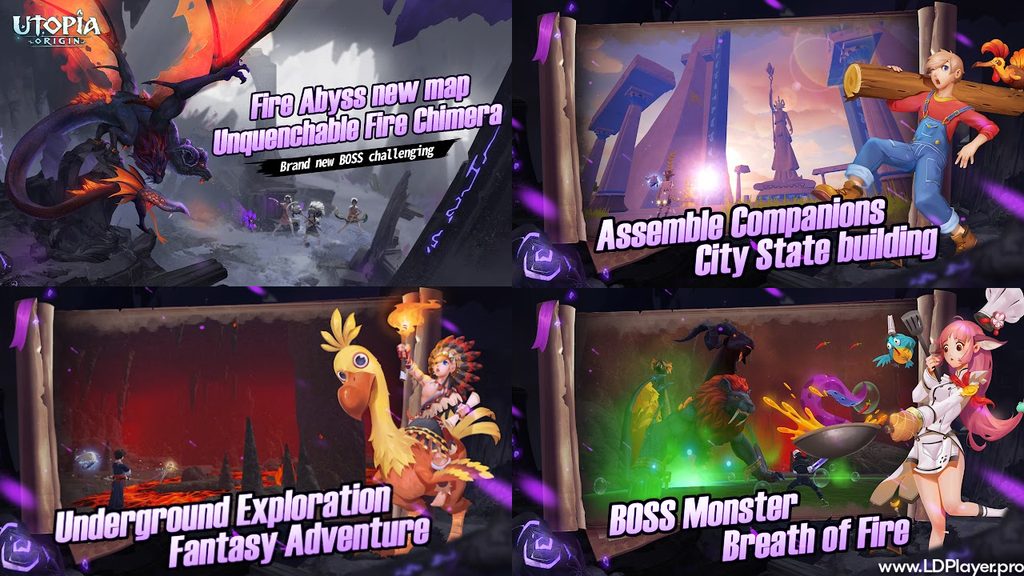
Beia contains several types of environments. Players can travel through green forests, snowy mountains, dry deserts, coastal zones, and ocean islands. Because each area has different materials, exploration becomes an important part of crafting.
Rare creatures and stronger enemies can also appear in special regions. Some places include ruins and hidden locations linked to the wider game world. As a result, players have a reason to travel beyond their starting area.
Exploring also helps players find better gathering spots. Certain ores, plants, animals, and other useful materials may only appear in specific zones. Planning routes can save time during long resource runs.
Crafting and Building
Crafting allows players to turn basic materials into useful equipment. A worktable can help create tools, weapons, armor, building parts, and other items.
At first, players may build a small wooden shelter. Later, they can collect better materials and create larger structures. Homes can include several rooms, floors, walls, storage areas, and useful crafting stations.
Clan members can also work together on bigger building projects. This makes it possible to create large shared bases instead of simple starter homes.
Building is not only about appearance. A well-made shelter can provide storage space and a safer place to prepare for the next trip. Therefore, planning the layout can help players manage items more easily.
Mount and Pet Taming
Utopia: Origin includes many wild creatures that players can capture or tame. Some become mounts, while others can help during combat.
Taming usually requires preparation. Players may need to create a certain feed before approaching the target creature. These feeds can use ingredients such as carrots, wheat, meat, or other materials.
Different animals prefer different feed recipes. Because of this, collecting ingredients in advance can save time.
After a creature reaches the correct condition, players can use the required item to complete the taming process. A saddle may be needed for mounts. A pet collar may be required for certain combat pets.
Faster mounts can make travel easier across large areas. Stronger pets can also support players during harder fights.
Strategic Real-Time Combat
Combat happens in real time, so players need to move, aim, attack, and react quickly. The game offers different weapon types, including bows, swords, and magic wands.
Each weapon works better in certain situations. A bow can help from a distance, while close-range weapons may work better when enemies move near the player.
Stronger areas include powerful enemies, Hearth Bosses, and world bosses. These fights may require better equipment and more careful planning.
Teamwork can become important during difficult boss battles. Players may need to divide roles, avoid dangerous attacks, change weapons, and support each other.
Guild and Social Systems
Players can create or join clans. These groups allow several players to work toward shared goals.
Clan members can gather materials, build shared structures, and take part in events together. Group play can also make difficult battles easier.
A clan can help newer players learn the game more quickly. Experienced members may share information about locations, crafting, pets, and equipment.
Large clan projects can require many materials. Therefore, teamwork can reduce the amount of work required from one player.
How To Install Utopia: Origin on LDPlayer
Playing Utopia: Origin through LDPlayer gives players access to mouse controls, keyboard mapping, and PC display settings. The setup process is simple.
Step 1: Download LDPlayer
Visit the official LDPlayer website. Download the latest suitable version of LDPlayer for the PC. LDPlayer 9 is designed for modern 64-bit Android games.
Step 2: Install the Emulator
Open the downloaded setup file. Follow the installation steps shown on the screen. Select the storage location if the installer gives that option.
Step 3: Launch LDPlayer
After installation, open LDPlayer. Allow the emulator to finish its first setup process.
Step 4: Open Google Play or LDStore
Go to the system apps section inside LDPlayer. Open Google Play Store or LDStore.
Step 5: Sign In
Sign in with a Google Account when using Google Play. This allows access to Android app downloads.
Step 6: Search for the Game
Type Utopia: Origin into the store search bar. Check the game name and publisher before starting the download.
Step 7: Install the Game
Select the game page and choose the Install option. Allow the download and installation process to finish.
Step 8: Launch the Game
Open the game from the LDPlayer home screen after installation.
Step 9: Set Up Keyboard Controls
Open the Keyboard Mapping tool from the LDPlayer side toolbar. Assign keys for movement and common actions. WASD can be used for movement if preferred.
Players can also assign separate keys for attacks, inventory access, jumping, and other actions. Testing the controls before long play sessions can help improve comfort.
How To Play Utopia: Origin
Progress usually changes as players gain better equipment and reach new areas. Each stage has different goals.
| Game Phase | Key Objectives | Essential Survival Actions |
|---|---|---|
| Early Game | Basic Survival and Shelter | Gather wood and stone, craft a worktable, build a campfire, and make a small shelter before night. |
| Mid Game | Expansion and Taming | Improve tools, prepare useful food, tame a faster mount, and consider joining a clan. |
| Late Game | Boss Hunts and High-Tier Crafting | Make stronger gear, explore harder areas, improve pets, and work on larger clan buildings. |
Managing Survival Stats
Players should watch hunger and hydration while exploring. Running out of basic supplies can make travel more difficult.
Food can come from berries, mushrooms, meat, and cooked meals. Keeping extra food in the inventory can help during long trips.
A hearth or other cooking tool can turn raw materials into better meals. Some cooked foods may provide more useful effects than simple ingredients.
Therefore, players should prepare food before entering dangerous areas.
Taming Mechanics
Taming often follows several clear steps.
Step 1: Find the creature that needs to be tamed.
Step 2: Prepare the correct feed before starting.
Step 3: Lower the creature’s health carefully.
Step 4: Use a wooden club when the creature reaches the required condition.
Step 5: Feed the preferred food until the taming signs appear.
Step 6: Use the correct final item, such as a saddle or pet collar.
The exact feed depends on the creature. Because of this, players should gather enough ingredients before traveling to a rare target.
Night Safety
Nighttime can bring extra danger, especially for new players. Small demons and other hostile creatures may appear after dark.
A campfire can provide a safer place during early survival. A closed shelter can also reduce the risk of being attacked while preparing equipment.
New players should avoid traveling too far at night without supplies. Instead, nighttime can be used for crafting, cooking, sorting items, and planning the next trip.
Safety and Legality
LDPlayer works by creating an Android environment on a Windows PC. Players can then install the Android version of Utopia: Origin and control it through the emulator.
For safer use, download LDPlayer from its official source. The game should also come from an official app store or other approved source.
Account Binds
Players should link their game progress with a supported account option when available. Using the same linked account can help keep access to the same character and saved progress across supported devices.
Before changing devices, check that the game account has been linked correctly. Guest accounts may carry more risk if the app gets removed or the device changes.
Terms of Service
Players should use normal game controls and official game files. Third-party cheats, modified APK files, unauthorized scripts, and unfair automation tools can cause account problems.
An emulator should be used for normal gameplay only. Players should also follow the current game rules and account policies.
System Integrity
Always use official installation files for both LDPlayer and Utopia: Origin. Avoid unknown download pages that offer changed versions of the emulator or game.
PC security tools should remain active during downloads and installations. Keeping Windows, graphics drivers, and LDPlayer updated can also help reduce technical problems.
Utopia: Origin FAQ
Can I run Utopia: Origin on low-end PCs using LDPlayer?
Yes, some lower-end PCs may run the game by reducing emulator settings. Players can lower the resolution, frame rate, CPU allocation, or RAM use inside LDPlayer.
However, performance depends on the hardware. Closing unused PC programs can also free more memory and processing power.
Is Utopia: Origin cross-platform between Android and PC?
LDPlayer runs the Android version of the game on a PC. Therefore, the emulator does not create a separate native PC version.
Players who use the same supported linked account can access their Android game account through the emulator. Account access and progress depend on the game’s available login and server system.
How do I get feed recipes for high-level mounts in Utopia: Origin?
Rare mounts often need special feed made from several ingredients. Players first need to collect the required materials. After that, they can combine them using the correct cooking or crafting method.
Some recipes use common materials, while others require harder-to-find ingredients. Keeping extra crops, meat, and gathered materials can make future taming easier.
Players can also record recipes they discover during play. This makes it easier to prepare another feed batch later.
Final Words
Utopia: Origin gives players a large survival world filled with crafting, building, taming, exploration, and combat. Beia offers many areas to visit, so progress can continue far beyond the first shelter.
Playing on a PC through LDPlayer can make long sessions more comfortable. A larger screen helps players view more of the environment, while keyboard mapping can improve movement and menu control.
Good preparation remains important at every stage. Early players should focus on food, tools, shelter, and basic safety. Later, stronger gear, mounts, pets, clans, and boss fights become more important.
With the right setup and steady progress, Utopia: Origin can offer many different ways to explore, build, fight, and play with others across Beia.