Pixel Car Racer brings retro pixel graphics, drag racing, deep car tuning, and garage building into one simple racing game. It mixes an old-school visual style with detailed performance upgrades and hands-on race controls. As a result, players can build cars, test setups, improve engines, and race for faster times.

What is Pixel Car Racer?
Pixel Car Racer is an arcade-style racing and car-building game developed by Studio Furukawa. The game uses RPG-like systems for vehicle upgrades, money, parts, racing progress, and garage development.
Players can collect more than 100 vehicles inspired by Japanese, European, and American car culture. These include tuner cars, muscle cars, sports cars, supercars, trucks, and older models.
However, collecting cars is only one part of the game. Each vehicle can become a separate project. Players can buy parts, change the engine setup, improve grip, adjust gearing, and create a different visual style.
Races mainly focus on timing and vehicle performance. Instead of complex steering on a race circuit, drag events require careful launches and fast gear changes. Street racing also gives players a different type of challenge.
Money earned from races can support future upgrades. Therefore, winning events helps players improve current cars or start new garage projects.
The game can run on supported mobile devices. Players may also use an Android emulator on a PC when they want keyboard controls and a larger screen.
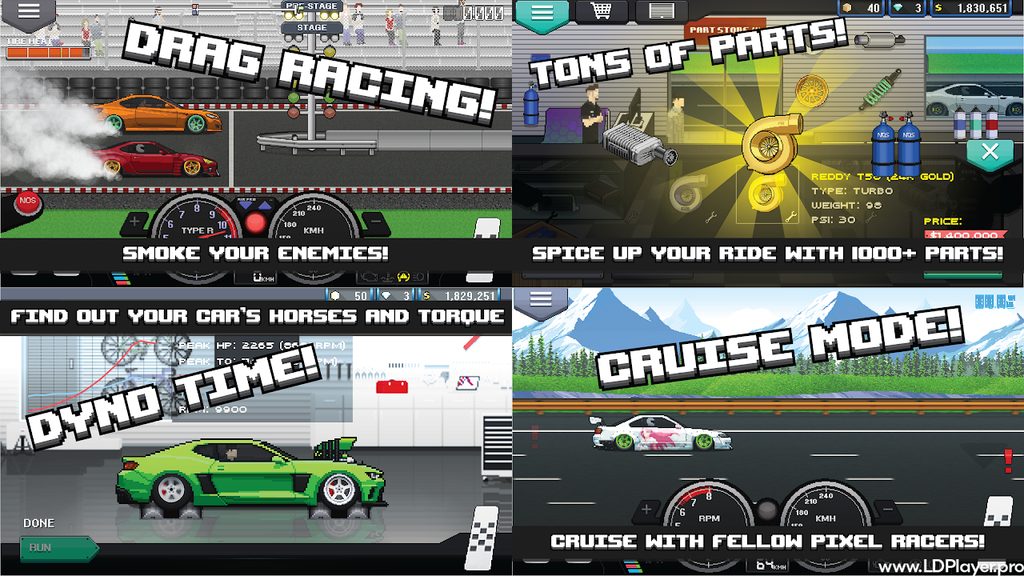
Pixel Car Racer Features
Pixel Car Racer offers many systems for players who enjoy building and racing cars. Each feature connects closely with vehicle performance, garage progress, and personal style.
Instead of giving every vehicle the same upgrade path, the game lets players try many combinations. For example, one car may use a turbo setup, while another may use a different engine and transmission tune.
The main features include vehicle collecting, engine tuning, visual changes, dyno testing, custom liveries, and several driving modes.
Massive Vehicle Garage
Players can collect more than 100 different vehicles. The available choices cover several parts of global car culture.
Japanese tuner cars work well for players who enjoy compact performance builds. Meanwhile, American muscle cars give the garage a different style. European performance cars and older vehicles add even more choice.
Each car can receive its own parts and visual changes. Therefore, players can build separate cars for drag racing, street racing, cruising, or garage display.
A large garage also makes long-term progress more interesting. Instead of upgrading one vehicle forever, players can save money and start another project.
Pixel Car Racer also allows players to experiment with different vehicle types. A lightweight car may behave differently from a heavier high-power build. Because of this, each new project can require another tuning approach.
RPG-Style Engine Tuning and Dyno Testing
Performance tuning forms a major part of the game. Players can choose from more than 1,000 aftermarket parts for different vehicle builds.
Engine upgrades can change horsepower and racing performance. Turbochargers and superchargers can increase power, while ECU upgrades can support stronger engine setups. Intake, exhaust, tires, suspension, and other parts can also affect a build.
Engine swaps give players another way to change performance. Popular choices include engines such as the F20C, 2JZ, and VR38.
However, adding power alone does not always create the fastest car. Gear ratios also matter. A poor transmission setup may waste power or cause slow acceleration.
For that reason, dyno testing becomes useful. Players can check horsepower and improve a setup before returning to the drag strip.
Pixel Car Racer rewards testing because small adjustments can change how a car launches and moves through each gear.
Custom Livery Designer
The custom livery system lets players create their own car designs with pixel-based editing tools.
Players can change colors, build patterns, place graphics, and create race-inspired designs. Therefore, two cars with the same performance parts can still look completely different.
Some players may prefer simple street styles. Others may create detailed racing liveries, sponsor-style graphics, or designs inspired by famous cars.
The editor also works well with other visual upgrades. Wheels, ride height, paint, body styling, and livery work can combine into one complete build.
Because customization plays such a large role, Pixel Car Racer gives players many ways to create a garage that feels personal.
Dynamic Racing Modes
Different game modes give players different goals and driving styles.
| Game Mode | Key Objective | Primary Challenge |
|---|---|---|
| Drag Race | Win 1/4-mile or 1/2-mile races | Launch timing, tire preparation, and fast gear changes |
| Street Racing | Race through highway traffic | Maintaining speed while avoiding traffic |
| Cruising | Drive with less pressure | Testing builds and enjoying vehicle sounds |
Drag racing focuses heavily on preparation and timing. Players must warm the tires, stage the car, launch correctly, and shift at the right RPM.
Meanwhile, street racing requires more awareness because traffic creates extra risk. Cruising gives players a calmer way to test a finished car.
These modes help keep the game from feeling limited to one type of race.
How To Install Pixel Car Racer on LDPlayer
Playing Pixel Car Racer through LDPlayer can provide a larger display and keyboard controls. The emulator also allows players to change key bindings for important race controls.
Follow these steps to set up the game.
1. Download and Install LDPlayer
First, check whether hardware virtualization is active on the PC. This setting can help an Android emulator run more smoothly.
Next, get the current LDPlayer installer from its official source. Open the installer and follow the normal setup instructions.
After installation finishes, launch LDPlayer.
2. Sign In to Google Play Store
Open the Google Play Store inside LDPlayer.
Then, sign in with an active Google account. This step allows the emulator to access available Play Store applications.
Make sure the sign-in process finishes before searching for the game.
3. Search for the Application
Use the Play Store search bar and enter “Pixel Car Racer.”
Check the application name and developer information before installing it. This helps avoid choosing another app with a similar name.
4. Install and Launch the Game
Select the correct game from the search results.
Then, choose the Install option and allow the process to finish. After installation, the game icon should appear inside LDPlayer.
Click the icon to start the game.
5. Configure Keymapping Controls
Open the LDPlayer Keymapping panel.
Next, assign keyboard or gamepad buttons for the gas pedal, brake, clutch, up-shift, and down-shift controls.
Choose keys that feel easy to reach during a race. Good key placement can make gear changes and launches easier to control.
Finally, test the controls before entering an important event.
How To Play Pixel Car Racer
Pixel Car Racer rewards good preparation, careful tuning, and accurate race timing. A powerful vehicle can still lose when the launch or gear changes are poor.
The following steps can help new players understand the basic race process.
1. Choose a Starter Vehicle
Start by visiting the Dealership.
Choose an affordable first car instead of spending all available money immediately. A vehicle in the lower price range can leave more cash for useful upgrades.
Then, save part of the remaining money for basic performance parts.
2. Install Basic Upgrades
Begin with simple parts that can improve engine performance.
Intake and exhaust upgrades can provide a useful starting point. After that, stronger parts can become more important as race earnings increase.
Avoid buying every expensive item at once. Instead, improve the car in stages and test each change.
3. Warm the Tires
Before a drag race begins, prepare the tires with a burnout.
Hold the brake and use the throttle to increase tire temperature. Watch the temperature display carefully.
Try to keep the tire reading inside the useful range. Proper tire preparation can improve grip during the launch.
4. Prepare for the Launch
Move into the correct staging position and watch the starting lights.
Keep the engine ready without launching too early. An early start can cause a false start.
When the lights signal the start, release the clutch and apply power at the correct moment.
5. Shift at the Right Time
Watch the tachometer and shift indicator during acceleration.
Change gears when the engine reaches the correct RPM range. Shifting too early can reduce acceleration. However, shifting too late may also hurt the run.
Consistent timing usually produces better results than random gear changes.
6. Upgrade and Tune the Build
Use race earnings to improve the vehicle over time.
Better engines, forced induction systems, ECU parts, tires, and other upgrades can increase performance. However, tuning should match the available power.
Adjust gear ratios when needed and use the dyno to check the setup.
As the build becomes faster, small tuning changes can become more important.
Safety and Legality
Players should get Pixel Car Racer through trusted and official distribution sources.
Using a normal app store or a trusted Android emulator reduces the risk of damaged files or unwanted software. In contrast, modified APK files from unknown websites may include unsafe changes.
Unlimited money versions, unofficial hacks, and altered game files can also cause other problems. Save data may stop working correctly, and modified files may become unstable.
Therefore, players should avoid unknown download sources.
Account and save information should also receive proper care. When a game offers supported cloud saving, using the correct account can help protect progress.
A clean installation provides the safest way to enjoy the game.
Pixel Car Racer FAQ
Is Pixel Car Racer free to download?
Yes. The game can be downloaded and played without an initial purchase on supported platforms. It also includes optional in-app purchases.
Players can still race, build vehicles, tune cars, and make progress through normal gameplay.
Can the game be played offline?
Core game features can work without a constant internet connection.
For example, players can use garage features, tune vehicles, create designs, and access supported racing content offline. However, online services may still need an internet connection.
Store actions or cloud-related features may also require network access.
Can progress sync between mobile and LDPlayer?
Progress syncing depends on the account and cloud-save options available inside the game.
When supported account linking is active, players may use the same save data across compatible installations.
Before changing devices, check that game progress has saved correctly.
What is the best engine for drag racing?
There is no single answer for every build.
Engines such as the 2JZ, VR38, F20C, and other high-power options can work well in strong drag setups. However, the engine is only one part of the car.
Gear ratios, tires, forced induction, ECU tuning, vehicle weight, and launch timing also affect the final quarter-mile time.
Therefore, players should test complete setups instead of focusing only on maximum horsepower.
How can quarter-mile times improve?
Start with better tire preparation and more accurate shifting.
Next, improve engine power and check gear ratios. A strong launch can save valuable time at the beginning of the race.
Dyno testing can also help identify how the engine produces power.
Finally, repeat runs after each major change. Testing one adjustment at a time makes it easier to understand what improves the car.
Final Words
Pixel Car Racer gives car fans a mix of retro graphics, drag racing, garage building, and detailed vehicle tuning. Its simple visual style makes the game easy to understand, while deeper tuning systems give players many things to learn.
Building a fast vehicle takes more than installing the most expensive parts. Good gear ratios, tire setup, engine upgrades, and accurate shifting all work together.
At the same time, racing is only part of the experience. Players can collect vehicles, create custom liveries, build different garage projects, and test new engine combinations.
The game also gives new players room to improve slowly. Early upgrades can lead to stronger race results, while later tuning can focus on smaller performance gains.
For players who enjoy cars, tuning, drag racing, and pixel-style games, Pixel Car Racer offers a clear path from a basic starter vehicle to a highly tuned garage build.