Dragalia Lost is a real-time action role-playing game published by Nintendo with development support from Cygames. The game mixes quick combat, team building, character growth, and dragon transformation systems.
What is Dragalia Lost?
Dragalia Lost is an action RPG set in the kingdom of Alberia. Humans and dragons have a close connection within this world.
The story follows Euden, the Seventh Prince of Alberia. He begins the Dragon’s Trial to form a pact with a powerful dragon.
However, his journey soon becomes much larger. Dark forces begin threatening Alberia and the people living across the kingdom.
As the story moves forward, Euden meets many adventurers. Some become close allies, while others bring their own goals and problems.
Combat uses a top-down isometric view. Players control one adventurer directly while other party members fight beside that character.
Teams can contain up to four adventurers. Players may switch between available characters during many battles.
Each adventurer has different weapons, skills, elements, abilities, and combat roles. Therefore, team choice can greatly affect battle results.
A major part of Dragalia Lost is the dragon system. Adventurers can equip dragons that provide extra stats and special effects.
During combat, the Dragon Gauge fills as certain actions take place. Once ready, the active character can transform into the equipped dragon.
The official live service is no longer active. However, community server projects may allow access through unofficial setups.
These projects may restore story missions, older events, boss battles, and multiplayer functions. Availability can depend on the chosen server.
Dragalia Lost Features
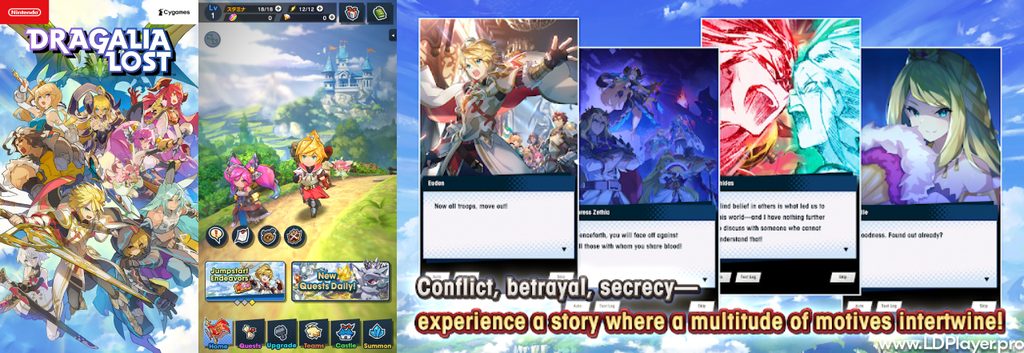
Dragalia Lost combines several gameplay systems that support both casual play and harder endgame battles.
Characters grow through upgrades, weapons, dragons, abilities, equipment, and other progression systems. As a result, party building becomes more important later.
Real-Time Dragon Transformation Combat
Dragon transformation is one of the main combat systems.
During battle, players build the Dragon Gauge by fighting enemies and meeting certain battle conditions. Once filled, transformation becomes available.
The active adventurer then changes into the equipped dragon for a limited time. This form provides different attacks and stronger combat options.
Dragons can deal heavy damage during boss battles. Some dragons also provide buffs, healing effects, or useful elemental abilities.
Timing the transformation also matters. Using it too early may leave the party without dragon power during a harder battle phase.
For that reason, experienced players often save the transformation for specific boss patterns or Break phases.
Deep Element and Weapon Affinity System
The game uses five main elements: Fire, Water, Wind, Light, and Shadow.
Fire, Water, and Wind follow a basic advantage system. Water is strong against Fire, while Fire is strong against Wind.
Wind is strong against Water. Light and Shadow mainly interact with each other.
Element choice affects both damage dealt and damage received. Therefore, players should build teams around the enemy’s element.
Several weapon types are also available. These include Swords, Blades, Daggers, Axes, Lances, Bows, Staves, and Manacasters.
Each weapon type has its own attack style. Some focus on close-range damage, while others work better from a distance.
Staff users often focus on healing. Meanwhile, other weapons may focus on damage, buffs, debuffs, or quick attacks.
Equipment choices can further improve a team. Dragons, weapons, and Wyrmprints can increase damage or support special builds.
The Halidom Base Building
The Halidom acts as the player’s main base.
Inside this area, players can build and upgrade several structures. Many structures provide permanent bonuses to characters.
Some buildings improve adventurers using certain weapon types. Others increase the power of characters from specific elements.
The Halidom can also produce useful resources. These resources help with upgrades, crafting, and general progression.
Upgrading buildings takes time and materials. Therefore, steady Halidom progress can make later quests easier.
It also gives players another form of progression outside direct combat.
Extensive Campaign and Co-op Gameplay
Dragalia Lost includes a long main campaign with story scenes and major battles.
The main story follows Euden and his allies as new threats appear across Alberia and nearby regions.
Besides the campaign, the game includes event stories and harder combat content. Many activities introduce unique enemies and battle rules.
Endgame encounters include powerful bosses that require better team planning. Advanced Dragon Trials are one example of this harder content.
The Agito Rebellion also offers difficult boss fights. These battles require strong equipment, good movement, and careful skill timing.
Co-op gameplay allows several players to fight together in supported quests. Each player normally controls one main adventurer.
Good teamwork becomes important during harder co-op battles. Players need to avoid attacks while keeping damage and healing under control.
How To Install Dragalia Lost on LDPlayer
Running the game through LDPlayer allows Android gameplay on a Windows PC.
The emulator also supports keyboard controls, gamepad settings, screen resolution options, and performance settings.
Because the original service has ended, installation may require extra tools and an unofficial server connection.
1. Download and Install LDPlayer
Start by checking whether hardware virtualization is enabled on the computer.
Virtualization helps Android emulators run more smoothly. It can usually be enabled through the computer’s BIOS or UEFI settings.
Next, download the 64-bit version of LDPlayer from its official source.
LDPlayer 9 is generally suitable for modern 64-bit Android applications.
Run the installer after the download finishes. Complete the standard installation process and open the emulator.
Next, check the emulator settings.
Enough CPU cores and memory should be assigned for smooth performance. However, available hardware should always guide these settings.
2. Prepare the Game Client APK
The original game client is needed before server patching can begin.
The commonly used base client version is Dragalia Lost v2.19.0.
Because the application is no longer distributed through its old store page, an APK file may be required.
Only use APK files from sources that can be trusted. Unknown files can contain changed code, malware, or unwanted software.
Once the APK file is ready, open LDPlayer.
Drag the APK file into the emulator window. LDPlayer should then begin installing the application.
After installation finishes, the game icon should appear on the Android home screen.
Do not launch into normal gameplay yet if a private server patch is required.
3. Configure Server Patching (Dawnshard)
A community server setup needs a patching tool because the original game servers are no longer active.
One community option mentioned in preservation setups is Dawnshard.
Install the required Dragalipatch utility inside the emulator.
Open Dragalipatch after installation. Then enter the community server address required by the selected server project.
After entering the address, choose the option to patch the application.
The patch changes how the local client connects to backend services. It does not restore Nintendo’s original online servers.
Wait until the patch process finishes successfully.
If an error appears, check the client version and patching tool version before trying again.
Community server instructions can change. Therefore, only use setup files provided by the project being used.
4. Set Up Keyboard Controls and Launch
Open the patched game after the server setup is complete.
LDPlayer includes a control editor in its side menu. This tool can map touchscreen actions to keyboard buttons.
For example, movement can be mapped to the WASD keys.
A normal attack can be mapped to the Spacebar. Skills may also be assigned to number keys.
Players using a controller can create gamepad bindings instead.
After the controls are ready, launch the game and allow the required data files to download.
The first download may contain a large amount of game data.
Once that process finishes, the game can load into the selected community server environment.
How To Play Dragalia Lost
Understanding movement, attacks, skills, and party roles makes combat much easier.
Movement and Dodging
Movement plays a major role during combat.
Characters can move freely around the battle area. On touchscreen devices, dragging controls character movement.
A quick swipe performs an evasive roll.
Dodging helps characters avoid many enemy attacks. Proper timing can also provide short invincibility frames, often called i-frames.
Enemy attacks often show colored warning areas before they land.
Red attack markers can often be avoided through movement, rolling, or well-timed skills.
Purple attacks usually work differently. Players should not assume normal invincibility frames will block every purple attack.
Instead, moving outside the marked area is usually the safer choice.
Executing Combo Attacks
Normal attacks form the basic damage system.
Repeated taps perform a normal attack combo. Each weapon type uses its own combo pattern and attack speed.
Holding the attack input performs a Force Strike.
Force Strikes can help against shields and certain enemy mechanics. They can also reduce an enemy’s Overdrive Gauge.
Strong bosses may enter an Overdrive state during combat.
Dealing enough damage to the Overdrive Gauge forces the enemy into Break.
During Break, the boss becomes easier to attack for a short period. This creates a good chance for heavy damage.
Skill Management
Adventurers have combat skills that become available after their Skill Gauges fill.
Normal attacks usually charge these gauges.
Once a skill becomes ready, selecting its icon activates the ability.
Skills can deal damage, restore health, provide buffs, or apply effects to enemies.
Some skills also give temporary invincibility during their animation.
That feature can help avoid certain red attacks when used at the correct time.
However, skill timing remains important. Using every skill immediately can leave a character without protection during dangerous boss patterns.
Saving important healing or defensive skills can make difficult battles safer.
Team Composition
Party setup has a major effect on battle performance.
A balanced team often includes strong damage dealers, support units, and healing when needed.
One adventurer may act as the main DPS character. Another can provide buffs or lower enemy defenses.
A Staff adventurer can provide healing during longer battles.
However, not every quest needs the same setup.
Short battles may benefit from more damage. Harder fights may require healing, support, or special defensive abilities.
Element choice also matters.
Players should normally use adventurers with an element that has an advantage against the quest enemy.
Matching dragons and equipment with the team’s element can further improve performance.
Safety and Legality
Using community servers and Android emulators requires extra care.
Intellectual Property
The characters, game assets, music, artwork, story, and original software remain connected to their original rights holders.
Community servers are separate projects. They are not the same as the original official game service.
Players should understand this difference before installing server patches or modified connection tools.
Security and File Sources
Only install software from trusted sources.
APK files, patchers, scripts, and emulator installers can create security problems when downloaded from unknown websites.
Avoid random pre-patched files.
A clean base APK and a known patching tool provide more control over what gets installed.
Antivirus software should remain active during downloads and installation.
It is also wise to avoid giving unnecessary Android permissions to third-party tools.
No Monetization
Community servers may use different progression systems from the original service.
Private servers should not require players to enter payment card details for old game currencies.
Never provide banking details or other sensitive financial information to unknown community portals.
Any server that asks for unusual payments should be treated carefully.
Dragalia Lost FAQ
Can I retrieve my old official game save data?
Old official account data is generally not available through community servers.
Players using private servers normally create a new profile.
Some servers may provide save templates or progression options. These can help players access later content faster.
However, a community profile is separate from the original Nintendo-linked game account.
Is LDPlayer safe for running the game?
LDPlayer is an Android emulator used to run mobile applications on Windows computers.
Downloading the emulator from its official source reduces the risk of modified installation files.
Still, players should follow normal computer security practices.
Keep Windows updated, use security software, and avoid installing unknown APK files.
The emulator should also receive only the permissions needed for normal operation.
Can I play cooperative multiplayer on LDPlayer?
Co-op can work when the selected fan server supports multiplayer functions.
Players using LDPlayer may join users running compatible clients on other supported devices.
However, everyone normally needs to connect through the same community server setup.
Client versions may also need to match.
Connection quality can affect multiplayer performance, especially during fast boss encounters.
Do I need a high-end PC to run the game on an emulator?
A very expensive gaming computer is not always required.
Dragalia Lost was originally designed for mobile hardware, so moderate PCs may handle emulation well.
A setup using around two CPU cores and 4GB of assigned RAM may work for many systems.
However, performance depends on the processor, graphics hardware, background applications, and emulator settings.
Enabling virtualization can also improve emulator speed.
For smoother play, close heavy background programs and avoid setting the emulator resolution higher than needed.
Stable frame rates are more useful than extremely high display settings during difficult combat.
Final Words
Dragalia Lost remains known for its fast action combat, large character cast, dragon system, and story-focused design.
Its battle system mixes simple controls with deeper mechanics. Dodging, Force Strikes, skills, elements, and Dragon-shifts all affect difficult fights.
Team building also becomes more important as quests become harder.
The Halidom adds long-term upgrades, while campaign chapters and boss battles provide many different goals.
Since the original online service has ended, current access may depend on community preservation projects.
Players who choose these setups should take extra care with APK files, patching tools, and server information.
Using trusted files and avoiding unknown downloads can reduce security risks.
LDPlayer also gives PC users another way to run the Android client with keyboard or controller support.
With the correct setup, Dragalia Lost can still provide its familiar combat, character progression, story content, and co-op experience.