Geometry Dash Lite is a free rhythm-based platform game that has attracted millions of players across the world. Created by RobTop Games, the game combines fast action, music, and precise timing into one exciting experience. Every level challenges players to react quickly while moving through colorful stages filled with spikes, moving platforms, and other dangerous obstacles.
Although the controls are very simple, every level requires focus, practice, and good timing. Players can enjoy short gaming sessions or spend hours improving their skills and reaching higher completion rates. This guide explains the main features, gameplay, installation process on LDPlayer, safety information, and frequently asked questions about the official game.
What is Geometry Dash Lite?
Geometry Dash Lite is the free version of the original Geometry Dash game. It gives players access to a selection of official levels without paying for the full version. As a result, new players can experience the main gameplay before deciding whether they want to upgrade later.
The main goal is simple. Players guide a customizable icon through side-scrolling levels while avoiding every obstacle. Each level follows the beat of its music track. Therefore, good timing is just as important as fast reactions. Even one small mistake sends the icon back to the beginning of the level. Because of this, every successful run feels rewarding and encourages players to improve with each attempt.
Geometry Dash Lite Features
Iconic Rhythm Action Levels
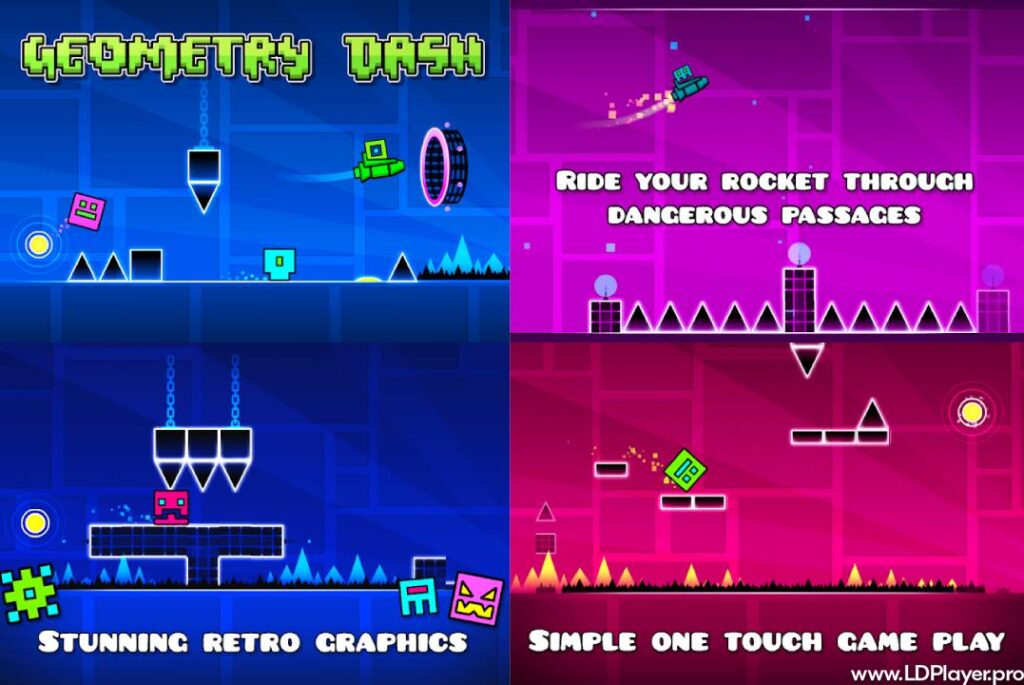
The game includes several official levels that introduce players to different mechanics and increasing difficulty. Early stages such as Stereo Madness, Back On Track, and Polargeist help players learn the basics. Later levels become much harder and require stronger memory, better timing, and faster reactions.
Every stage introduces new obstacles and movement patterns. As players continue, they become more familiar with each challenge and gradually improve their skills.
Dynamic Soundtracks
Every level has its own electronic music track. The gameplay and music work together throughout the entire stage. Spikes, jump rings, portals, and other obstacles appear in rhythm with the soundtrack.
Because of this design, listening carefully can help players prepare for upcoming jumps. After several attempts, many players naturally remember both the music and the obstacle patterns at the same time.
Character Customization and Icon Kit
Players can unlock different customization options by completing achievements. The Icon Kit includes various cube designs, ships, UFOs, colors, and other appearance options.
These customization choices do not change the gameplay. However, they allow players to create a unique style while completing different levels.
Practice Mode for Skill Development
Practice Mode helps players learn difficult sections more easily. Instead of restarting from the beginning after every mistake, players can place checkpoints throughout the level.
Whenever the icon crashes, it returns to the last checkpoint. This makes it much easier to practice hard sections repeatedly until the movements become familiar. After enough practice, many players can complete the same sections successfully in Normal Mode.
How To Install Geometry Dash Lite on LDPlayer
Playing on a computer can provide more precise controls because many players prefer using a keyboard. An Android emulator such as LDPlayer makes this possible. Follow these steps to begin.
1. Download and Install LDPlayer
Visit the official LDPlayer website and download the latest version for your computer. After the download finishes, open the installer and complete the installation by following the on-screen instructions.
2. Launch the Emulator and Access the Store
Open LDPlayer after the installation is complete. From the home screen, open the Google Play Store or the built-in LD Store that comes with the emulator.
3. Search for the Game
Type Geometry Dash Lite into the search bar exactly as written. Then select the official game developed by RobTop Games from the search results.
4. Install the Application
Click the Install button. The emulator downloads and installs the game automatically. Wait until the installation finishes before continuing.
5. Configure Controls and Play
Launch the game from the LDPlayer home screen. Then open the keyboard mapping tool and assign the jump action to a preferred key, such as the Spacebar or the Up Arrow. After saving the controls, start playing.
How To Play Geometry Dash Lite
The objective is to reach the end of every level without crashing into obstacles. The controls remain simple throughout the game. On mobile devices, players tap the screen. On a computer, players click the mouse or press the assigned keyboard key.
While the controls are easy to learn, mastering the gameplay takes practice. Different objects behave in different ways. Yellow jump pads launch the icon automatically. Yellow jump rings need an extra tap while the icon is in the air. Learning when to use each object is an important part of improving.
As players move through later stages, portals introduce new mechanics. Some portals reverse gravity, while others change the direction of movement or transform the icon into a flying ship. During ship sections, players must control altitude by tapping continuously with accurate timing.
Success depends on learning level patterns, reacting quickly, and moving in rhythm with the music. Each attempt helps players remember the layout better, making future runs more consistent.
Safety and Legality
Downloading Geometry Dash Lite from official stores is the safest way to play. Official versions do not contain harmful software or unwanted programs. They also receive updates directly from the developer.
The game is free to download and play on supported platforms. Advertisements help support the free version without changing the main gameplay experience.
Modified APK files from unknown websites should always be avoided. These unofficial versions may create security problems, affect game performance, or violate the developer’s terms of service. Installing only official releases helps protect both devices and personal information.
Geometry Dash Lite FAQ
Is Geometry Dash Lite completely free to play?
Yes. The game is free to download and play on supported platforms. The free version is supported through advertisements.
Can progress be transferred from the Lite version to the full game?
The Lite version and the full version do not automatically share progress. However, the skills learned in the free version help players prepare for the complete game.
Does Geometry Dash Lite include user-created levels?
No. The Lite edition focuses on official levels only. The complete version includes access to online features and user-created content.
Why does the game sometimes lag?
Performance issues usually happen when the device is running too many background applications or has limited available memory. Closing unnecessary programs or using an optimized emulator setup can improve performance.
Final Words
Geometry Dash Lite continues to be one of the most popular rhythm platform games because it combines simple controls with challenging gameplay. Every level encourages players to improve their timing, memory, and precision while enjoying energetic music and colorful environments.
The free version offers a great introduction to the official experience without requiring a purchase. By following the installation steps above, players can also enjoy smooth gameplay on a PC through LDPlayer with customized keyboard controls. Keep practicing, learn every pattern, and enjoy the challenge that makes the game so memorable.