Girls’ Frontline is a tactical strategy RPG with anime-style art, team building, and detailed battle planning. The game takes place in a damaged future where order has started to break down. Players lead a private military team and fight dangerous machine forces.
Each mission needs more than fast taps or high-level units. Players must choose the right team, place units on the correct tiles, and manage supplies. Careful planning often matters more than raw power.
The game also offers a large story, many units, regular events, and several ways to improve each squad. As a result, it suits players who enjoy strategy, collection systems, and long-term progress.

What is Girls’ Frontline?
Girls’ Frontline is a tactical role-playing game developed by MICA Team, also known as Sunborn Network. Players take the role of a Commander working for Griffin & Kryuger, a private military company.
The Commander leads special android soldiers called Tactical Dolls, or T-Dolls. Each T-Doll represents a real-world firearm and has a set combat role. These roles include Assault Rifle, Submachine Gun, Rifle, Handgun, Machine Gun, and Shotgun.
Battles depend on squad design, tile placement, skills, and map control. Therefore, players cannot rely only on rare units. A well-built team with clear roles can often defeat a stronger but poorly planned group.
Story missions also introduce new enemies, allies, and military groups. Over time, the plot grows into a larger conflict involving artificial intelligence, secret projects, and political struggles.
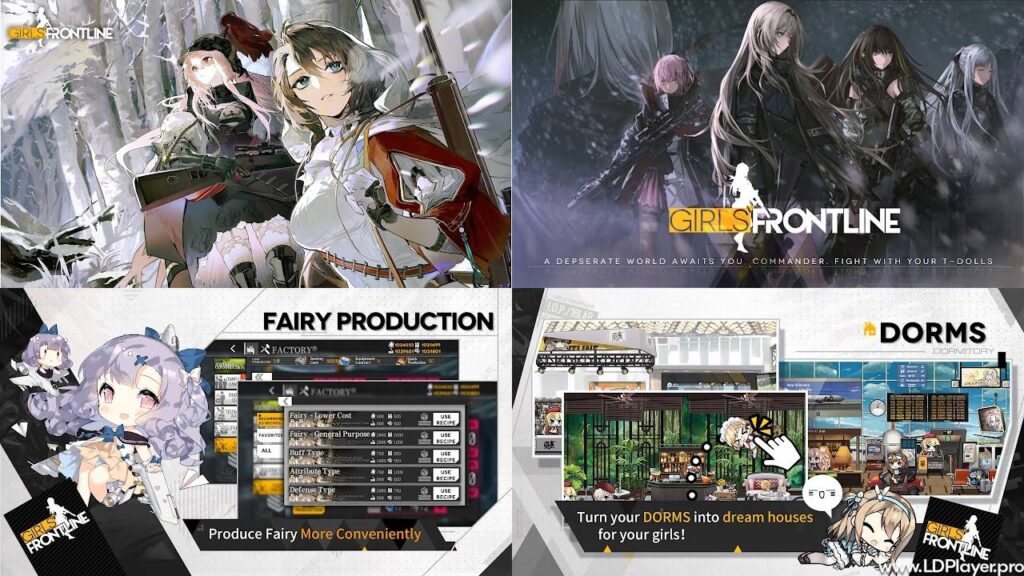
Girls’ Frontline Features
Tactical Grid Combat System
Combat uses a 3×3 tactical grid. Players can place up to five T-Dolls on this grid before battle begins.
Each unit gives tile buffs to certain nearby allies. For example, an Assault Rifle may improve a Submachine Gun’s damage or accuracy. However, the effect depends on the unit and its tile pattern.
Good placement can increase damage, attack speed, defense, or skill power. Because of this, players should check every T-Doll’s tile effect before building an Echelon.
During battle, units can move between grid spaces. This helps avoid enemy attacks, change targets, or protect a damaged T-Doll.
Extensive T-Doll Collection & Crafting
The game includes hundreds of T-Dolls based on different firearms. Each one has unique art, stats, tile buffs, and combat skills.
Players can create new units through the construction system. This system uses four main resources:
- Manpower
- Ammunition
- Rations
- Parts
Different resource amounts can affect the type of T-Doll produced. Still, construction results include random elements.
Girls’ Frontline does not require paid currency for every unit attempt. Players can earn resources through missions, logistics, events, and daily tasks. Therefore, steady play can build a strong collection over time.
Duplicate T-Dolls also have value. They can support Dummy Linking or other upgrade needs. This means extra copies do not always go to waste.
Deep Storyline and Lore
The main story follows a serious science-fiction conflict. It includes military action, artificial intelligence, hidden plans, and difficult choices.
Several groups have different goals, so the story does not present every conflict as simple good against evil. Instead, players learn how each group affects the larger world.
Major events add new chapters and important story details. These events may also include harder maps, special enemies, and limited rewards.
Players who care about the plot should read mission scenes in order. Later chapters often depend on facts and characters introduced earlier.
Base Customization and Dormitory System
Outside combat, players can manage dormitory rooms for their T-Dolls. Furniture, themes, and decorations can change the room’s look and comfort level.
Higher comfort can help produce batteries, which support several base systems. Dormitories also allow players to interact with units and improve affection.
Affection can rise through regular use, gifts, and successful battles. However, heavy damage or repeated defeats may reduce it.
Cosmetic outfits can also change a T-Doll’s appearance. These outfits do not replace the need for proper upgrades, team balance, or battle planning.
How To Install Girls’ Frontline on LDPlayer
Playing Girls’ Frontline on a PC can provide a larger screen, steady performance, and custom keyboard controls. Follow these steps to install it through LDPlayer.
1. Download and Install LDPlayer
Visit the official LDPlayer website and download the current 64-bit installer.
Open the installer after the download finishes. Then, follow the setup steps shown on the screen.
Choose a storage location with enough free space. The emulator, game files, and updates may need several gigabytes.
After installation, launch LDPlayer and allow it to complete its first setup.
2. Enable Virtualization Technology
Virtualization can improve emulator speed and reduce lag.
Restart the computer and enter the BIOS or UEFI settings. The required key may differ by computer brand.
Look for Intel VT-x, Intel Virtualization Technology, AMD-V, or SVM Mode. Enable the matching option.
Save the changes and restart the computer. Then, open LDPlayer again.
Avoid changing unrelated BIOS settings. Incorrect changes may affect system performance.
3. Access Google Play Store in LDPlayer
Open LDPlayer and select the System Apps folder.
Launch the Google Play Store and sign in with a Google account.
Complete any security checks shown by Google. After that, wait for the store page to load fully.
4. Search and Install the Game
Enter Girls’ Frontline in the Google Play search bar.
Select the official game page and check the publisher name before installing.
Click Install and allow the download to finish. The total time depends on internet speed and computer performance.
After installation, open the game from the LDPlayer home screen. Extra game files may download during the first launch.
5. Configure Keybindings & Graphics
Open the LDPlayer settings menu before starting long missions.
A system with enough resources can use four CPU cores and 4096 MB of RAM. Lower settings may work better on older computers.
Choose a screen resolution that matches the monitor. Also, select a frame rate that the computer can handle without overheating.
Use the keymapping tool on the right toolbar to create simple controls. Set keys only for actions used during normal manual play.
Test the controls in an easy mission. Then, adjust key positions if any action feels slow or unclear.
How To Play Girls’ Frontline
Progress depends on two main areas: map strategy and real-time combat. Both need careful resource use and team planning.
Echelon Construction
An Echelon can include up to five T-Dolls.
A common beginner team uses three Assault Rifles and two Submachine Guns. Place the Submachine Guns in front and the Assault Rifles behind them.
Submachine Guns usually protect the team and take most enemy fire. Assault Rifles deal steady damage from the back row.
Players should also check tile buffs before saving the formation. A strong unit may perform poorly when its buffs miss the correct allies.
Later missions may require Rifle-Handgun or Machine Gun-Shotgun teams. Therefore, one team cannot handle every enemy type.
Node Capture Strategy
Map movement takes place through connected nodes.
Each Echelon uses Action Points when moving. Capturing more command areas can provide additional movement options on later turns.
Protect the friendly Command Post at all times. Losing it may cause mission failure.
Some missions require the enemy Command Post to be captured. Others ask players to defeat a target, rescue a unit, or survive several turns.
Supply Nodes restore ammunition and rations. Plan routes carefully, since a team without supplies cannot fight well.
Active Combat Management
Most attacks happen automatically, but players still control movement and skill timing.
Move units away from marked enemy attacks when possible. Boss attacks often give a short warning before dealing heavy damage.
Retreat a badly damaged T-Doll when keeping it active may cause a complete loss. This can reduce repair time and resource costs.
Manual skill control helps during difficult fights. Save strong damage skills for bosses, armored enemies, or large enemy groups.
Also, check team health after each battle. A damaged Echelon may fail during the next fight, even after winning the current one.
Safety and Legality
Using an Android emulator does not always create a problem by itself. However, players should follow the game’s rules and avoid tools that create unfair play.
Account Security
Link game progress to a supported account system. This may include a Sunborn, Google, or Facebook account.
Use a strong password and avoid sharing login details. Also, keep recovery information updated.
Never buy accounts from unknown sellers. Purchased accounts may be stolen, blocked, or recovered by the original owner.
Fair Play
Use keyboard controls only for normal manual actions.
Do not use scripts, bots, modified files, or automatic farming tools. Such tools can create an unfair advantage and may place an account at risk.
Avoid programs that change game memory, battle speed, resources, or construction results.
Official Downloads
Download Girls’ Frontline and LDPlayer from official sources.
Unknown APK files may contain harmful code or changed game data. They may also steal login details.
Keep the emulator, game, and computer security tools updated. Regular updates can fix bugs and reduce common security risks.
Girls’ Frontline FAQ
Is Girls’ Frontline free to play?
Yes. Players can access the main story, battles, construction system, and many T-Dolls without paying.
Optional purchases may include cosmetic outfits, storage space, or other account upgrades. Spending can add convenience, but it does not replace good strategy.
Can Girls’ Frontline be played on PC?
Yes. An Android emulator such as LDPlayer can run the mobile version on a Windows computer.
PC play can offer a larger screen, keyboard controls, and more stable performance. Results still depend on the computer’s hardware and settings.
What is the best Echelon build for beginners?
A team with three Assault Rifles and two Submachine Guns works well for many early missions.
Place the Assault Rifles in the back row. Then, place the Submachine Guns in front to protect them.
Players should still check tile buffs, enemy types, skill levels, and equipment. Team balance matters more than following one fixed layout.
Does progress transfer between mobile and PC?
Yes, progress can transfer when both devices use the same linked account.
Log in through the same supported account method on mobile and PC. Avoid using a guest account when moving between devices.
Check that progress has synced before removing the game from any device.
Final Words
Girls’ Frontline combines tactical combat, unit collection, team planning, and a detailed science-fiction story. Each battle rewards players who study enemy types and manage resources with care.
New Commanders should begin with a balanced AR-SMG team. Then, they can build other Echelons for armor, bosses, and special missions.
PC play through LDPlayer can make maps easier to view and controls easier to manage. Still, safe downloads and fair manual play remain important.
Build each Echelon with a clear purpose. Improve skills, equipment, links, and formation tiles over time. With steady planning, every Commander can make strong progress through the campaign.