Hypic gives creators a simple way to edit photos with smart tools, clean controls, and fast results. Today, people post photos every day. So they need an editor that saves time but still gives clear and neat images. This app helps with portraits, filters, backgrounds, templates, and AI tools in one place.
Creating clean photos no longer needs hard software or long editing work. Many creators now want quick tools that still give a polished look. Hypic helps with that need by offering smart photo editing on mobile devices.
However, a small phone screen can feel tight during detailed work. For this reason, many users run the app on a PC through LDPlayer. A larger screen makes face edits, object cuts, and color changes easier. Also, a mouse gives better control than a finger tap.
This setup helps creators work faster. It also makes batch editing easier because users can manage more images at once.

What is Hypic?
Hypic is an AI photo editing app made for modern content creation. It helps users improve photos, adjust portraits, remove backgrounds, and apply ready-made styles.
The app uses AI to study a photo before applying changes. So the results often look natural instead of heavy or fake. Users can fix light, sharpen details, smooth skin, change backgrounds, and build social media designs with simple tools.
It works well for influencers, small business owners, designers, and everyday users. Also, the app supports many editing needs without forcing users to learn complex desktop software.
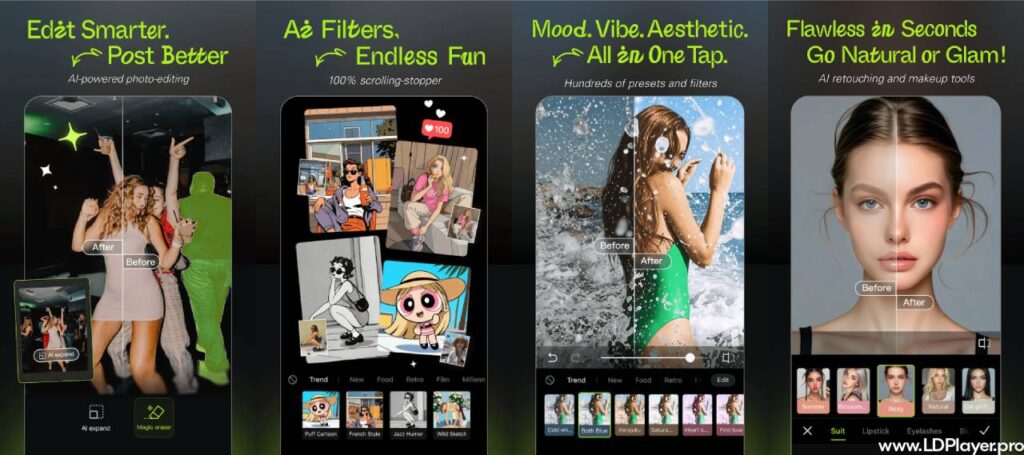
Hypic Features
AI Magic and One-Tap Enhancements
The AI tools help users improve photos with only a few taps. The app can adjust light, shadows, contrast, sharpness, and color balance. As a result, dull photos can look brighter and cleaner.
The AI Flash tool helps with dark images. It adds light in a soft way, so the photo does not look too harsh. Also, artistic tools can change simple pictures into drawings, paintings, or cartoon-style images.
These tools save time for creators who post often. Instead of fixing every part by hand, users can start with one-tap edits and then fine-tune the result.
Smart Portrait and Precision Retouching
Portrait editing needs care because faces should still look real. Hypic offers tools for skin, eyes, lips, eyebrows, jawline, and nose shape. Users can make small changes without making the face look unnatural.
The concealer tool helps cover spots and small marks. At the same time, it keeps skin texture visible. This matters because too much smoothing can make a portrait look flat.
Users can also adjust face shape with care. For example, they can lift eyebrows slightly or soften jawlines. However, small changes usually give the best result.
Trending Filters and Aesthetic Templates
Social media styles change fast. So creators need filters that match current photo trends. The app includes styles such as film grain, soft glow, clean looks, and digicam effects.
Templates also help users build posts faster. A creator can arrange several photos into a collage or photo dump layout. Then, the same colors and text style can make the whole design feel matched.
This feature works well for lifestyle posts, product photos, travel shots, and daily updates. Also, templates reduce the time needed to plan each design from the start.
Advanced Object and Background Manipulation
Background tools help users separate the subject from the image. Hypic can cut out people, objects, and products with AI. After that, users can blur the background, remove it, or replace it with another one.
This feature helps product sellers, content creators, and profile photo users. For example, a seller can place a product on a clean background. Also, a creator can blur a busy background to make the subject clear.
The zoom view helps with fine edges like hair, clothes, and small objects. With a mouse on PC, users can make these edits more carefully.
Streamlined Batch Editing
Batch editing helps when users need to edit many photos together. Instead of applying the same filter again and again, users can make one style and use it across many images.
This saves time for social media managers, bloggers, and creators with large photo sets. Also, it keeps posts looking consistent. A matched color style can make a profile look more organized.
Batch editing works best for event photos, product sets, travel albums, and daily content plans. Therefore, it helps users finish more work in less time.
How To Install Hypic on LDPlayer
Installing the app on LDPlayer gives users a desktop editing setup. Follow these steps carefully.
- Download and Setup LDPlayer:
Visit the official LDPlayer website. Download LDPlayer 9 or a newer version. Then, open the installer and complete the setup on the computer. - Launch the Emulator Environment:
Open LDPlayer from the desktop. Let the emulator load fully. Next, open settings and assign enough system power. For smoother editing, use at least 4 CPU cores and 4GB RAM when available. - Access the Application Store:
Open the System Apps folder on the LDPlayer home screen. Then, click Google Play Store. Sign in with a Google account to access the app store safely. - Search and Locate the App:
Type Hypic in the Play Store search bar. Then, choose the official app from Bytedance Pte. Ltd. Check the app name and developer before installing. - Install Hypic:
Click Install. LDPlayer will download and install the app. After installation, the app icon will appear on the LDPlayer home screen.
How To Use Hypic
Using the app on a computer is simple. The larger screen gives more space, and the mouse helps with accurate edits.
Importing Media Content:
Open the app from the LDPlayer home screen. Then, move photos from the computer into the emulator. Users can use the shared folder tool or drag and drop images into the window.
Navigating the Workspace:
Click New Project and choose a photo. Use the mouse to move sliders, open filters, and select tools from the editing panel. Also, the larger display makes menus easier to see.
Executing Multi-Layer Edits:
For face edits or background work, zoom into the photo with the mouse wheel. Then, adjust small areas with better control. This helps when editing hair edges, product outlines, or tiny face details.
Exporting the Final Design:
After finishing the edit, click the Export icon. Choose the preferred image quality. Then, save the photo and move it to the computer folder for posting, sharing, or storage.
Safety and Legality
Using Hypic is legal when users download it from official app stores. The app comes from Bytedance Pte. Ltd., so users should avoid copied files or modded versions from unknown sites.
LDPlayer also gives a normal way to run Android apps on a computer. Still, users should download the emulator only from the official LDPlayer site. This helps avoid unsafe files.
Some AI tools may need cloud processing. That means the app may send photo data to servers to complete advanced edits. Therefore, users should read the privacy terms and avoid uploading sensitive images when they feel unsure.
Safe use depends on simple habits. Download from trusted sources, update apps often, and avoid unknown APK files.
Hypic FAQ
Is Hypic completely free to use?
The app uses a freemium model. Many filters, portrait tools, and basic AI features are free. However, some premium styles and advanced AI tools may need a paid plan.
Can Hypic run on PC without an emulator?
The app mainly supports Android and iOS. So Windows users need an emulator such as LDPlayer to run it on a desktop or laptop.
Does exporting photos from the app leave a watermark?
Many edits can export without a required watermark. However, some templates or premium designs may include branding or special export rules. Users should check the export screen before saving.
Is Hypic good for beginners?
Yes. The app uses simple tools and ready-made styles. Beginners can start with one-tap edits. Then, they can learn more detailed tools over time.
Can users edit product photos?
Yes. Background removal, object cutout, light tools, and templates help with product images. These tools can make items look cleaner for online posts.
Final Words
Hypic helps creators edit photos faster without making the process hard. It brings AI tools, portrait edits, filters, templates, background tools, and batch editing into one simple app.
Running it on LDPlayer can make the editing process even better. A bigger screen helps users see details clearly. Also, mouse control helps with small changes and clean cutouts.
For creators who post often, this setup can save time. For beginners, the simple tools make photo editing easier to learn. For businesses, the app can help create clean product and social media images.
Learn More About Desktop Photo Editing
Desktop photo editing gives users more space and better control. When used through LDPlayer, Hypic can feel easier for detailed work. Users can zoom in, move sliders with care, and manage many files faster.
A desktop setup also helps during long editing sessions. The screen is larger, the controls feel steady, and the workflow becomes cleaner. As a result, creators can spend less time fighting the screen and more time improving the photo.