SAKURA School Simulator gives players a large virtual town where they can create their own stories. The game does not force players to follow one fixed path. Instead, players can go to school, meet people, explore shops, drive vehicles, or fly with a jetpack. They can also start battles, visit unusual places, and build custom scenes.
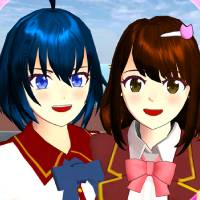
What is SAKURA School Simulator?
At its core, SAKURA School Simulator is an open-world simulation game based around a Japanese high school town. Players can move freely across the map and choose how they want to spend each in-game day.
For example, players can attend school lessons, visit restaurants, buy food, explore homes, or spend time at an amusement park. However, the game also includes many unusual fantasy events. Players may find aliens, magic areas, dangerous groups, and other strange situations.
There is also no permanent character death. When characters take too much damage, they may faint or become unable to move. However, they can return later. This system keeps the action less serious and allows players to continue their stories.
Relationships can also change based on player actions. For example, helping someone may increase their affection. On the other hand, attacking or upsetting a character may affect how that person reacts later.
As a result, players can create many different situations without following a fixed story.
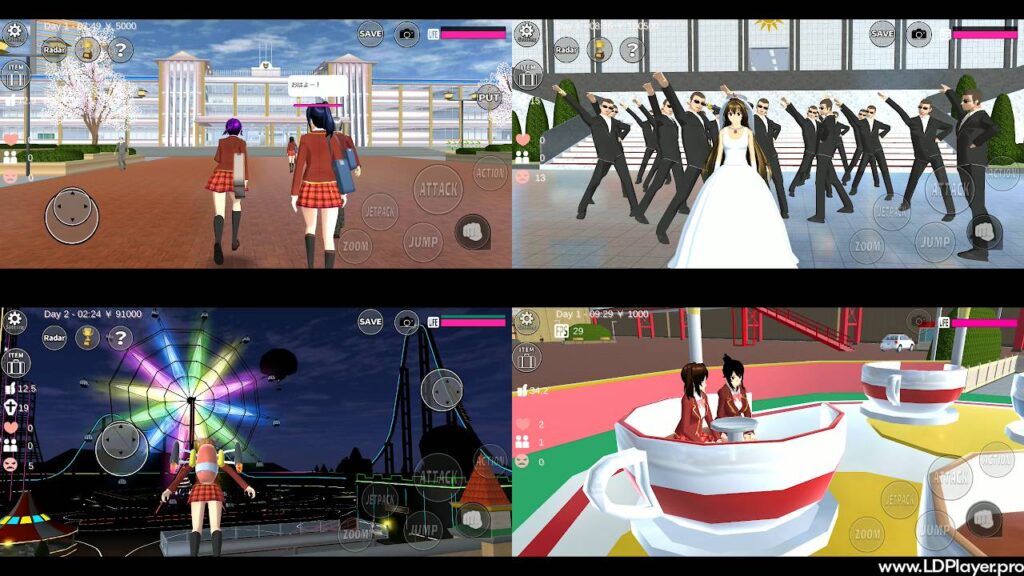
SAKURA School Simulator Features
The game includes many tools and activities that give players freedom. These features support school life, exploration, social events, action, and custom building.
Sprawling Sakura Town Sandbox
Sakura Town contains many areas that players can explore. These include Sakura High School, family homes, stores, restaurants, shrines, a harbor, wedding locations, and other buildings.
Each area can support different activities. For example, the school offers classrooms and sports areas. Shops allow players to buy useful items. Meanwhile, homes and public places can work as locations for custom roleplay scenes.
Players can travel around the map without following one required route. Therefore, exploring the town becomes a major part of the experience.
Character Customization
Players can change how their characters look through several appearance options. Hair styles, clothes, eye colors, glasses, makeup, and accessories can all change the final look.
The game includes school uniforms and simple everyday clothes. However, players can also use fantasy outfits, maid costumes, hero clothing, and other special styles.
These options help players create characters for different scenes. For example, one outfit may suit a normal school day. Another may work better for a custom action scene or fantasy story.
Dual Dynamic Gameplay Modes
SAKURA School Simulator supports two main styles of play. Players can focus on peaceful daily activities or create action-based situations.
In peaceful play, characters can attend classes, speak with friends, go on dates, visit local places, and complete simple social activities. Players can also arrange meetings and spend time with different characters.
Action-focused play works differently. Players can use weapons, fight strong enemies, face rival groups, and create larger battles across the town.
Since the game does not force one style, players can switch between calm and action-based gameplay whenever they want.
Multi-Character Control System
Players can control several main characters during one game session. Switching characters makes it easier to build larger scenes and manage different parts of a custom story.
For example, one character may wait at school while another travels across town. Players can then switch between them when needed.
This system also helps during roleplay. Several characters can take part in the same event without requiring other real players. In addition, character switching can help during battles or planned scenes.
Jetpacks and Vehicle Navigation
Travel is an important part of exploring Sakura Town. Players can use different vehicles, including cars, bicycles, and police vehicles.
However, the jetpack gives players another way to move around. It allows a character to fly above roads and buildings. Therefore, players can reach rooftops and cross parts of town without staying on the ground.
Flying can also help players look at Sakura Town from above. As a result, hidden or harder-to-reach areas may become easier to find.
Prop Editing and Custom Construction
The Item and Prop Editor gives players tools for making custom areas. Furniture, objects, vehicles, and other props can be placed around the map.
Players can use these tools to create houses, small stages, obstacle courses, meeting areas, or movie-style sets. Items can also help turn normal locations into completely different scenes.
Because of this system, SAKURA School Simulator can work as more than a school game. It can also act as a simple creative space for building and roleplay.
How To Install SAKURA School Simulator on LDPlayer
Players who want to use the game on a Windows PC can run it through the LDPlayer Android emulator. A PC setup can provide keyboard controls, a larger screen, and settings made for desktop play.
Follow these steps to install the game.
1. Download LDPlayer Installer
First, use a Windows PC that meets the emulator requirements. Hardware virtualization, also known as VT, should be enabled when supported.
Next, get the LDPlayer installer from its official source. LDPlayer 9 can be used for running supported Android games on Windows.
2. Install LDPlayer Emulator
Open the downloaded setup file.
Read the setup options and choose the installation location. Then, continue through the installer until LDPlayer finishes installing on the computer.
3. Launch Emulator and Sign In
Open LDPlayer after installation.
Then, find the Google Play Store inside the emulator. Sign in with a Google account so the Play Store can download apps.
4. Search and Install the Game
Open the Play Store search box and type “SAKURA School Simulator.”
Choose the official game listing from Garusoft LLC. Then, select the install option and allow the download to finish.
5. Configure Keymapping and Play
Open the game after installation.
LDPlayer includes keyboard mapping tools that can connect touch controls to keyboard keys. For example, movement controls can be assigned to WASD. Other keys can control jumping, actions, attacks, or the jetpack.
Finally, adjust the controls until they feel comfortable and begin playing.
How To Play SAKURA School Simulator
New players can start without following a long set of missions. The game gives direct controls and allows free movement from the beginning.
Character Selection
Start by choosing a playable character. Character options can also be managed through the character editing menu.
Players can change characters later when they want to create different scenes or stories.
Navigating the Controls
On mobile devices, the left-side joystick controls movement. Buttons on the right side handle actions such as jumping, attacking, interacting, and using other features.
When playing on a PC through an emulator, these controls can be linked to keyboard and mouse inputs.
Interacting with NPCs
Walk close to a non-player character and use the Talk option.
Different social actions may become available. Players can talk, give gifts, offer compliments, or ask characters to follow them.
Friendly actions can improve relationships. However, negative actions may change how characters react later.
Attending Classes and Events
The in-game clock helps players follow the school schedule.
During school hours, players can enter classrooms or take part in available school activities. Gym areas, swimming areas, and other locations can also support different school scenes.
However, attending class is not required. Players can leave the school and explore other parts of town instead.
Acquiring Items and Costumes
Items can be found or obtained from different places around Sakura Town. Stores and restaurants provide useful objects and food, while other locations may offer special items.
Players can also use clothing options to change a character’s appearance. Different outfits can help match a school event, social scene, fantasy setting, or action event.
Safety and Legality
SAKURA School Simulator is designed as a game with fantasy action and school-life simulation. Players should get the game through official or trusted distribution sources.
The game may include fighting, weapons, and other action-based situations. However, its character damage system does not focus on graphic blood or gore.
Characters can become stunned or faint during fights. Therefore, the action has a less realistic style than many combat games.
Parents should still review the game’s content before allowing younger players to use it. Age ratings can also help families decide whether the game suits a player.
Players should also avoid unknown third-party download websites. Unofficial files may be changed, outdated, or unsafe. Using trusted app stores and emulator sources helps lower this risk.
SAKURA School Simulator FAQ
Is SAKURA School Simulator free to play?
The game can be downloaded and played without a required purchase. Some parts of the experience may involve optional ads or platform-based features.
Can characters die in SAKURA School Simulator?
Characters do not follow a normal permanent-death system. After taking heavy damage, they can faint or become stunned instead.
This allows players to continue their stories without permanently removing important characters.
Does SAKURA School Simulator support multiplayer mode?
The main game experience focuses on single-player sandbox play. However, players can switch between several playable characters.
This feature makes it possible to set up scenes involving more than one controlled character.
Can I play SAKURA School Simulator offline?
Many normal gameplay activities can work without a constant internet connection. However, online access may still be needed for features such as updates, advertisements, or store-related services.
What are the minimum system requirements?
Performance depends on the device, Android version, available memory, processor, and graphics hardware.
Players should use a device with enough free storage and memory for stable gameplay. Closing other apps can also help improve performance on some devices.
PC players should also make sure their emulator settings match their computer hardware.
Final Words
SAKURA School Simulator gives players a flexible mix of school life, exploration, social interaction, building, and fantasy action. Instead of pushing everyone through the same story, the game allows each player to decide what happens.
One day can focus on attending school and meeting friends. Another can involve flying over Sakura Town, driving vehicles, building custom areas, or creating large action scenes.
The character tools and prop editor also give players more ways to create their own ideas. Meanwhile, the open map makes it easy to move between peaceful activities and unusual events.
For players who enjoy open-ended games, SAKURA School Simulator offers many ways to play without strict goals. Its simple structure makes it easy to start, while its sandbox tools give players plenty of room to create new stories.