Vanguard ZERO is a digital card battle RPG based on the popular Cardfight!! Vanguard series. It brings card fights, deck building, story content, and player battles into a mobile-friendly format. Players can collect cards, create clan-based decks, follow familiar characters, and take part in tactical matches.

What is Vanguard ZERO?
Vanguard ZERO is a mobile card battle RPG developed by Bushiroad and GameStudio. It is based on the Cardfight!! Vanguard trading card game and uses characters, clans, cards, and ideas from the wider series.
The game follows Aichi Sendou and other well-known characters from the original anime story. Players meet rivals such as Toshiki Kai and Ren Suzugamori while moving through different chapters. Each chapter includes battles, story scenes, and rewards.
Instead of copying every physical TCG rule, the game uses a changed battle system made for mobile play. Several calculations happen automatically. These include parts of shield handling, attack results, Trigger checks, and skill effects.
Because of this design, players do not need to manage every small rule by hand. However, good decisions still matter. Choosing when to ride, where to place Rear-guards, which unit to attack, and when to use skills can change the result of a match.
Deck building is also an important part of Vanguard ZERO. Each clan has its own cards, skills, and common play style. Some clans focus on strong attacks, while others depend more on card draw, unit control, or special skill combinations.
As players collect more cards, they can improve existing decks or create new ones. This makes progression closely connected to both card collection and strategy.
Vanguard ZERO Features
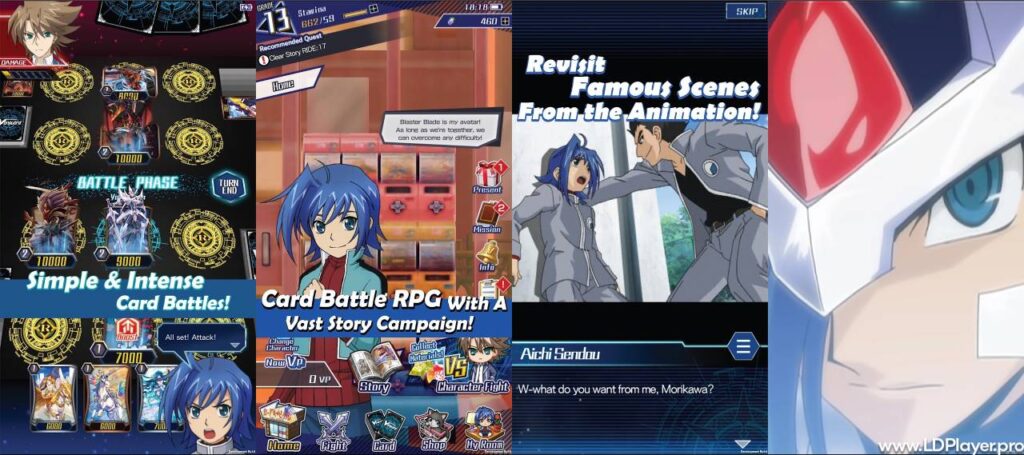
The game includes several systems for story players, card collectors, and competitive players. Each feature supports a different part of the overall experience.
Immersive Story Mode
Story Mode lets players follow events based on the Cardfight!! Vanguard anime series. Chapters include character conversations, important story moments, and card fights against familiar opponents.
Completing these stages can provide card packs, crafting items, and other useful rewards. Therefore, Story Mode can help new players build a starting card collection.
It also gives players time to learn the game at a steady pace. Early battles introduce important ideas without immediately placing players against experienced online opponents.
Later chapters become more challenging. As a result, players may need stronger decks, better card choices, and a clearer understanding of clan skills.
Streamlined Card Battle Mechanics
The battle system uses simplified rules that fit mobile devices. Many actions happen automatically, which helps matches move at a steady speed.
For example, Vanguard ZERO handles several battle checks and card effects without requiring long manual steps. Trigger effects also appear clearly when the right cards are revealed.
Players still make the key choices. They decide which unit becomes the Vanguard, where Rear-guards are placed, what targets to attack, and how to use available skills.
Front-row and back-row positions also matter. A well-placed unit can support an attack, create pressure, or help prepare the next turn.
Because of these systems, matches remain easy to follow while still giving players many tactical decisions.
Player versus Player (PVP) Arena
The PVP mode allows players to fight other users in real-time card battles. This mode is useful for players who want to test their decks outside Story Mode.
Ranked battles usually require more careful planning because opponents may use stronger cards and more focused strategies. Therefore, a deck that works well against story enemies may need changes before entering competitive play.
Players can improve by studying common clan strategies, watching attack patterns, and learning when to protect important units.
Competitive matches may also provide seasonal rewards, card sleeves, titles, and other items linked to ranked progress.
A good PVP deck should not depend on only one perfect card combination. Instead, it should offer several useful plays so the player can respond to different opponents.
My Room Customization
My Room gives players a space outside normal card fights. It works as a personal digital room that can be changed with different items.
Players can place furniture, change the room layout, and use decorative objects. Favorite characters may also appear in smaller chibi-style forms.
This feature does not replace the main card battle system. However, it gives players another way to use collected items and interact with characters from the series.
Room items can also make progression feel more personal. Instead of focusing only on decks and battles, players can spend time creating a layout they enjoy.
Deck Building and Card Crafting
Deck building is one of the most important parts of Vanguard ZERO. Players create decks around a selected clan and choose cards that work well together.
Major clans include Royal Paladin, Kagero, Oracle Think Tank, and Nova Grappler. Other clans can also provide very different strategies.
For example, one clan may focus on strong direct attacks. Another may help players draw extra cards or control units on the field.
Players should consider Grade balance when building a deck. Too many high-Grade cards can make early turns difficult. On the other hand, too many lower-Grade cards may reduce late-game power.
The crafting system gives players another way to obtain useful cards. Duplicate cards can provide clan materials. These materials can then be used to craft certain cards directly.
This system can reduce the need to depend only on random card packs. Therefore, players can work toward important cards needed for a planned deck.
How To Install Vanguard ZERO on LDPlayer
Playing Vanguard ZERO on a PC through LDPlayer can provide a larger screen, mouse controls, keyboard options, and access to emulator settings. The setup process is simple when each step is followed in order.
1. Download and Install LDPlayer
First, check whether hardware virtualization is enabled on the PC. This feature can improve Android emulator performance.
Next, open the official LDPlayer source and download the correct installer for the computer.
Run the installation file after the download finishes. Then follow the instructions shown by the installer.
Allow the program to complete the setup before opening it.
2. Launch LDPlayer and Sign In
Open LDPlayer after installation.
Once the emulator loads, find the Google Play Store inside the Android interface.
Open the Play Store and sign in using a valid Google Account.
The account is needed to access apps available through Google Play.
3. Search for Vanguard ZERO
Use the search bar inside the Play Store.
Type Vanguard ZERO and review the search results.
Choose the official game listing before starting the installation.
Checking the app name and developer details can help avoid installing an unrelated application.
4. Install the Game
Select the Install button on the game page.
The Play Store will begin downloading the required files.
Download time may depend on internet speed and the size of the game files.
Keep enough free storage available on the PC and inside the emulator.
After installation finishes, the game icon should appear on the LDPlayer home screen.
5. Configure Keymapping and Launch
Open the game from the LDPlayer home screen.
After it loads, use the emulator toolbar to review control and keymapping settings.
Mouse controls are often enough for card selection. However, keyboard shortcuts can also be assigned to useful actions if needed.
Adjust display settings based on the computer’s hardware. Lower settings may help older systems run more smoothly.
Once the setup is complete, start the game and continue with the normal account or tutorial process.
How To Play Vanguard ZERO
Learning the basic turn structure makes battles easier to understand. Players should first learn deck setup, riding, Rear-guard placement, Trigger checks, and victory conditions.
Understand Deck Composition
A deck contains 40 cards.
The deck includes units from different Grades, including Grade 0, Grade 1, Grade 2, and Grade 3 cards.
A starting Grade 0 Vanguard is also needed.
Trigger cards play an important role in battles. These may include Heal, Draw, Critical, or Stand effects, depending on the deck and game rules.
A balanced deck should provide useful cards during each stage of a match. Therefore, players should avoid filling the deck with only high-power units.
Execute Rides Sequentially
The Vanguard is the main unit on the field.
Players normally improve this unit by riding a card with a higher Grade as the match develops.
The usual order is Grade 0, Grade 1, Grade 2, and then Grade 3.
Choosing the right ride can affect later turns. Some cards provide useful skills when ridden, while others work better as Rear-guards.
Because of this, players should think about future turns before using an important card as the Vanguard.
Call Rear-guards to the Field
Rear-guards are units placed around the Vanguard.
These units can attack, support another unit, or activate special skills.
Front-row Rear-guards often take part directly in attacks. Meanwhile, back-row units may provide support depending on their abilities.
Field placement should match the deck strategy. Strong cards placed without a clear plan may not provide full value.
It is also useful to think about the opponent’s next turn. A Rear-guard that creates strong pressure may become an early target.
Manage Damage and Trigger Checks
Damage is one of the main parts of each battle.
When certain checks happen, the top card of the deck is revealed. If that card has a Trigger effect, the effect can change the battle.
For example, a Trigger may increase power, help with healing, provide another card, or support another combat effect.
Players cannot control every Trigger result. However, good deck building and smart turn planning can reduce the effect of bad luck.
It is also important to watch the opponent’s damage and possible Trigger effects before choosing an attack order.
Achieve Victory
The main goal is to deal enough damage to the opponent’s Vanguard.
A player wins after the opponent reaches 6 damage points.
However, rushing every attack is not always the best choice.
Sometimes, removing an important Rear-guard can weaken the opponent’s next turn. In other cases, attacking the Vanguard directly can create more pressure.
Good players consider the current field, cards in hand, available skills, and possible Trigger results before making the final attack.
Safety and Legality
Players should use official and trusted sources when installing or managing Vanguard ZERO. Using safe software sources helps reduce the risk of account theft, harmful files, or unwanted changes.
When using an Android emulator, install it from its official source. The same rule applies to game files and updates.
Modified APK files should be avoided because they may contain changed code or unsafe software.
Account Security
Account protection is important for players who have collected cards or made progress.
Use available account linking, transfer, or sign-in options when supported.
Keep transfer details private and do not share passwords or account access information with other people.
It is also helpful to keep recovery details in a secure place.
If a device is changed, proper account linking can make it easier to restore progress.
Fair Play Terms
Third-party cheats, modified clients, automated bots, and other unauthorized tools can create unfair gameplay.
They may also break the game’s terms of service.
Players should use the normal game client and approved features only.
Fair play protects both account security and the competitive experience.
Suspicious tools may also request account details. Therefore, players should avoid software that promises free currency, automatic wins, or unlocked cards.
In-App Purchases
The game uses a free-to-play model with optional purchases.
Players may be able to buy gems, card packs, or other items through supported payment systems.
Purchases should always be completed through official store payment methods.
Avoid websites or tools that offer unusually cheap game currency. These services may be unsafe or unauthorized.
Parents or guardians can also use device payment controls when younger players use the game.
Vanguard ZERO FAQ
Can Vanguard ZERO be played on PC?
Yes. Vanguard ZERO can run on a compatible PC through an Android emulator such as LDPlayer.
Using an emulator can provide a larger display and access to mouse or keyboard controls.
PC performance depends on the computer’s hardware, available memory, emulator settings, and virtualization support.
Is Vanguard ZERO free to play?
Yes. The game follows a free-to-play model.
Players can progress by completing story stages, missions, events, and other available activities.
Optional purchases can provide access to extra in-game items or currency. However, normal gameplay systems also provide ways to collect cards and materials.
How does card crafting work?
Card crafting uses materials linked to different clans.
Duplicate cards can provide crafting materials. Players can collect these resources and use them to create selected cards through the crafting system.
This gives players a more direct path toward cards needed for a deck.
Instead of waiting only for a random card pack result, players can save the required materials and work toward a specific card.
Which clans are available in the game?
The game includes several clans from the Cardfight!! Vanguard series.
Examples include Royal Paladin, Kagero, Oracle Think Tank, Nova Grappler, Shadow Paladin, Dark Irregulars, and Pale Moon.
Different clans use different card effects and battle ideas.
Because of this, players may want to try several clans before choosing a main deck.
A clan that works well for one player may not suit another player’s preferred style.
Final Words
Vanguard ZERO brings Cardfight!! Vanguard card battles into a digital format built around quicker matches and simpler rule handling. It combines story content, deck building, card collecting, PVP battles, crafting, and room customization in one game.
The changed battle system makes many actions easier to manage on mobile devices. At the same time, players still need to understand deck balance, attack order, unit placement, riding, and Trigger effects.
Story Mode gives new players a clear starting point, while ranked PVP offers more challenging battles. Card crafting also gives players another way to work toward important deck pieces.
For PC users, LDPlayer can provide another way to access the Android version on a larger screen. Following the correct installation steps and using trusted software sources helps keep the setup safe.
Learning the basic rules first can make every match easier to understand. After that, testing different clans and improving deck choices can lead to stronger results.
With careful deck building, smart attacks, and good use of clan skills, Vanguard ZERO gives card game players many ways to plan, compete, and enjoy the Cardfight!! Vanguard world.