Building Quiz is a puzzle and trivia game about buildings, landmarks, and basic civil engineering. It helps players learn while they solve questions. Also, it gives a simple way to test memory, logic, and visual skill on PC.

What is Building Quiz?
Building Quiz is an interactive educational game. It asks players to identify famous buildings, bridges, towers, and monuments. Also, it includes questions about design styles, building materials, and structure basics.
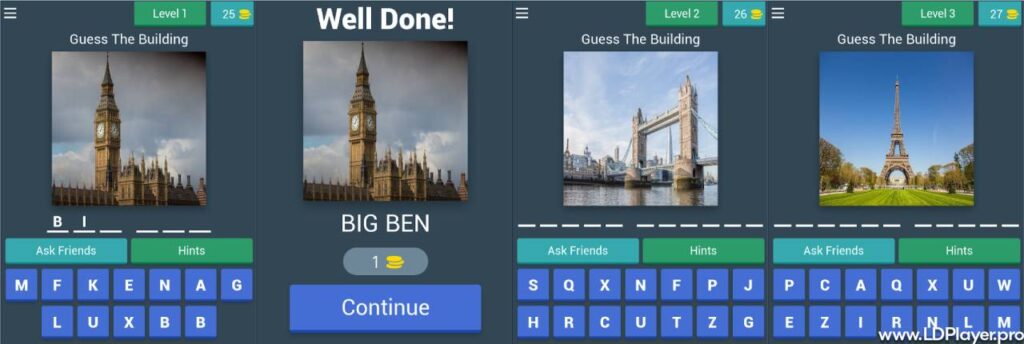
The game mixes quiz tasks with light puzzle play. So, players do more than pick answers. They also study images, read short clues, and compare details. For example, a question may show a landmark photo. Then the player must choose its name, country, or style.
Building Quiz is made for casual players, students, and trivia fans. It keeps the learning process simple. However, it still uses real technical terms like blueprint, load path, foundation, beam, and column.
Building Quiz Features
Landmark Database
Building Quiz includes many questions about well-known landmarks. These can include skyscrapers, bridges, old temples, museums, towers, and public buildings. Also, the game covers both modern and ancient designs.
Players may see questions about Art Deco buildings, glass towers, stone monuments, and steel bridges. As a result, each session can teach something new.
Progressive Difficulty Modes
The game starts with easy questions. New players can answer simple multiple-choice quizzes about famous places. Then, harder stages add more detail.
Later rounds may ask about materials, shapes, structure parts, or engineering logic. Therefore, players can improve step by step without feeling lost.
Interactive Construction Mini-Games
Some modes go beyond normal trivia. Players may need to complete a blueprint, spot a weak structure point, or balance a load. These tasks help players understand how buildings work.
Also, these mini-games make learning more active. Instead of only reading facts, players use logic to solve small building problems.
Daily Challenges and Leaderboards
Building Quiz also has daily tasks for players who enjoy regular practice. These challenges may test speed, accuracy, or topic knowledge. In addition, leaderboards let players compare scores with others.
This feature gives extra motivation. So, players can return each day and improve their quiz results.
How To Install Building Quiz on LDPlayer
Running the game on LDPlayer gives a larger screen and smoother controls. Also, it helps players read clues and view building images more clearly.
1. Download LDPlayer Emulator:
Step 1. Visit the official LDPlayer website.
Step 2. Download the latest LDPlayer installer for PC.
Step 3. Open the installer file.
Step 4. Follow the setup instructions on the screen.
Step 5. Finish the installation and open LDPlayer.
2. Launch the Emulator and Access App Store:
Step 1. Start LDPlayer on the computer.
Step 2. Wait until the home screen loads.
Step 3. Open Google Play Store or LD Store.
Step 4. Sign in with a valid account when asked.
3. Search for the Application:
Step 1. Click the search bar in the store.
Step 2. Type Building Quiz.
Step 3. Check the app name and icon carefully.
Step 4. Open the correct app page.
4. Install and Synchronize Data:
Step 1. Click the install button.
Step 2. Wait until the download and setup finish.
Step 3. Open the game from the LDPlayer home screen.
Step 4. Allow needed permissions only when they are required.
Step 5. Sign in or continue as a guest, based on available options.
How To Play Building Quiz
Building Quiz is easy to start. A question appears on the screen with an image, clue, blueprint, or short problem. Then players choose the correct answer before the timer ends.
Some questions focus on landmark names. Others may ask about countries, dates, styles, building parts, or materials. Therefore, players should read each question with care.
The mouse can select answers on PC. Also, LDPlayer key mapping can help during fast rounds. Players can set keys for answer choices and menus. This may reduce mistakes in time-based modes.
Hints can help with difficult questions. However, hints should be used with care. Saving hints for hard civil engineering questions is often a better choice.
Good play depends on three habits. First, study the image before answering. Next, read all options. Finally, use logic when memory is not enough.
Safety and Legality
Building Quiz should be downloaded only from trusted stores or official sources. This keeps the device safer and helps avoid harmful files.
Using LDPlayer to run Android games on PC is a normal method for desktop play. Also, it does not require changing the game files. Players should avoid modified APK files from unknown sites.
Unknown files can carry unsafe code. They may also cause login issues, data loss, or broken updates. Therefore, official installation is the safer path.
The game may use online features like cloud save, rankings, and events. So, players should use a secure internet connection when using these features.
Building Quiz FAQ
Can the game run offline without an active internet connection?
Some basic quiz modes may work offline. However, online features need internet access. These can include leaderboards, daily tasks, updates, and multiplayer features.
Is there a cost associated with downloading or playing the game?
The main download may be free, based on the official store page. However, optional in-game purchases may exist. These can include hints, cosmetic items, or extra unlocks.
What are the recommended PC specifications for LDPlayer emulation?
A modern multi-core processor is helpful. Also, 8GB RAM gives smoother play. A graphics card or integrated graphics with DirectX 11 support can improve performance.
Enough storage space is also important. In addition, closing heavy programs can help LDPlayer run better.
Can beginners enjoy the game?
Yes. Building Quiz starts with simple questions. Then it adds harder topics slowly. Because of this, new players can learn without pressure.
Does the game teach real building concepts?
Yes, it can introduce basic ideas. These include columns, beams, foundations, loads, materials, and design styles. Still, it works as a learning game, not a full engineering course.
Final Words
Building Quiz gives a simple and useful way to learn about architecture, landmarks, and construction ideas. It mixes fun quiz play with helpful building facts.
Also, LDPlayer makes the PC experience more comfortable. A larger screen helps with photos, blueprints, and text clues. Better controls can also help during timed rounds.
For players who enjoy buildings, puzzles, and general knowledge, this game offers steady practice. It can improve visual memory, reading focus, and structural thinking.
Building Quiz is a good choice for learning through play. It keeps the topic clear, useful, and easy to follow.