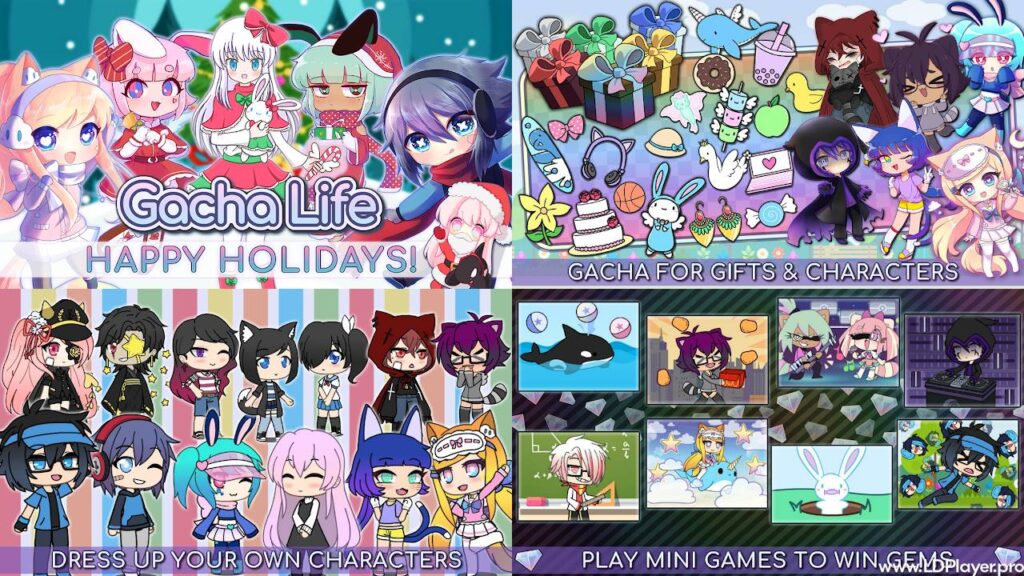
Gacha Life is a popular anime-style dress-up and role-playing game made for creative players. It lets users create original characters, choose outfits, build scenes, and tell personal stories. Players can also explore different places, meet game characters, collect gifts, and play simple mini-games.
The game gives users many tools without making the controls hard to understand. As a result, both new and experienced players can start creating within a few minutes. It works well for people who enjoy fashion, anime art, short stories, character design, or casual games.

What is Gacha Life?
Gacha Life is a free dress-up and role-playing game for mobile devices and computers. It uses a chibi anime art style, which gives characters small bodies, large heads, and clear facial expressions.
The word “gacha” comes from Japanese capsule toy machines. In the game, players use Gems to receive random gifts. These gifts come in different rarity levels and can be collected or given to non-player characters.
Unlike many role-playing games, the game does not focus on long battles or difficult missions. Instead, it focuses on character design, scene creation, exploration, and simple mini-games.
Players can create up to 20 main characters and store more designs in backup slots. Each character can have a different hairstyle, face, outfit, pose, color set, and personality.
Several game modes are available. Dress Up Mode supports character creation. Studio Mode helps users build scenes. Life Mode lets players visit locations and talk to characters. The Games section includes short activities that reward players with Gems.
Because each mode has a clear purpose, users can quickly move from one task to another.
Gacha Life Features
The game includes many creative tools and simple gameplay options. Each feature helps players design characters, build stories, or collect rewards.
Extensive Character Customization
Character creation is one of the main parts of Gacha Life. Players can change almost every visible part of a character.
Hairstyles and Colors
Users can select front hair, back hair, ponytails, side hair, and other hair parts. They can also choose different colors for the main hair, tips, highlights, and shadows.
This system makes it possible to create natural hair designs or bright fantasy styles. For example, a character may have black hair with blue tips or pink hair with purple highlights.
Facial Features
Players can choose from many eye shapes, pupils, eyebrows, mouths, and facial marks. These options help show different moods and personalities.
A smiling mouth can make a character look friendly. Narrow eyes may create a serious look. Tears, blush marks, or face symbols can add more emotion to a scene.
Wardrobe and Accessories
The clothing menu includes shirts, jackets, skirts, pants, dresses, shoes, gloves, hats, capes, and other items. Users can also add weapons, bags, books, food, musical items, and handheld objects.
Colors can be changed for many clothing parts. Therefore, the same outfit can look very different after a few color changes.
Presets and Slots
The game includes preset characters for users who want a quick starting point. These presets can be edited and saved as new designs.
There are 20 active main character slots. Extra characters can also be moved into backup slots. This makes it easier to manage a large cast for stories or videos.
Studio Mode and Skit Maker
Studio Mode turns character designs into full scenes. It works like a simple digital stage where users control the characters, background, text, and layout.
Multi-Character Scenes
Players can place up to eight characters in one scene. Each character can be moved, resized, rotated, flipped, or placed in front of another character.
These controls help users create group talks, action scenes, classroom moments, or family pictures.
Background Selection
The game includes hundreds of backgrounds. They cover locations such as schools, bedrooms, streets, parks, beaches, cities, forests, and fantasy areas.
A suitable background helps explain where a scene takes place. For example, a classroom background works well for a school story. Meanwhile, a dark forest can support a mystery scene.
Dialogue and Bubbles
Users can add speech bubbles, thought bubbles, and custom text. They can write conversations between characters or explain what is happening.
Text can also help show emotions, jokes, warnings, or story details. As a result, users do not need voice recording to tell a clear story.
Skit Maker
Skit Maker lets users connect several scenes in a set order. Each scene can show different characters, poses, backgrounds, or dialogue.
This tool is useful for short stories and simple animated projects. Creators can plan each scene, save the sequence, and record it for a video.
Life Mode Exploration
Life Mode lets players use their custom characters in an interactive game world. Several locations are available, and each place includes non-player characters.
Diverse Locations
Players can visit areas such as Hometown, School, Park, Beach, Spookyville, and other zones. Every place has a different visual style and set of characters.
Exploring these areas can help users discover new dialogue, character facts, and small rewards.
NPC Interactions
Non-player characters can be selected for conversations. Each one has a name, personality, and personal story.
Players can ask questions and learn more about them. Regular interaction may also raise Friendship XP and improve the relationship level.
Gifting System
Gifts collected through the gacha system can be given to non-player characters. Some characters like certain gifts more than others.
Giving a suitable gift can raise friendship faster. It may also unlock special dialogue or other small rewards.
Engaging Mini-Games
The game includes eight casual mini-games. They provide a simple break from character design and help users earn Gems.
Duck & Dodge
In Duck & Dodge, players move a character to collect falling ducks. At the same time, they must avoid bombs and other dangerous objects.
The controls are simple, but the game becomes faster as the score rises.
Phantom’s Remix
Phantom’s Remix is a music and timing game. Players tap at the correct time while listening to a music track.
Good timing leads to a higher score. Therefore, focus and rhythm are important.
Math Timed
Math Timed gives players short math questions under a time limit. The goal is to answer as many questions as possible before time ends.
This activity combines basic learning with quick gameplay.
Gems Reward
Each mini-game can reward players with Gems. These Gems can be used in the gift collection system.
Because Gems can be earned through play, users do not need to spend real money to use the main collection features.
Gacha Collection Mechanics
The Gacha menu lets players spend earned Gems on random gift pulls. A single pull gives one item, while a larger pull gives several items at once.
More than 100 gifts can be collected. These items appear in different rarity groups, so some are easier to receive than others.
Completing parts of the collection can provide bonus rewards. Players can also use the gifts in Life Mode to improve friendships with non-player characters.
How To Install Gacha Life on LDPlayer
Running the game through LDPlayer allows users to play the Android version on a Windows computer. A larger screen, mouse control, and keyboard support may make character editing easier.
1. Download LDPlayer
Visit the official LDPlayer website and find the download button for the current version. LDPlayer 9 is a suitable choice for many modern Windows computers.
After the file downloads, open the setup program. Follow the instructions shown on the screen and complete the installation.
2. Launch the Emulator
Open LDPlayer from the desktop shortcut or Windows Start menu.
The Android system may need a short moment to load during the first launch. Once the home screen appears, the emulator is ready.
3. Access LD Store or Google Play Store
Open the LD Store from the emulator home screen. The Google Play Store can also be used.
When using Google Play, sign in with a Google Account. This step is needed before downloading apps from the store.
4. Search for Gacha Life
Select the search bar at the top of the store screen.
Type the game name and press Enter. Check the app name, icon, and developer details before opening the store page.
5. Install and Launch
Click the Install button and allow the download to finish.
After installation, return to the LDPlayer home screen. Select the game icon to open it and begin playing.
How To Play Gacha Life
The controls are simple, and most features can be learned through basic practice.
Character Creation First
Open the Dress Up menu from the main screen. Choose one of the active character slots.
Start by selecting a hairstyle, face, outfit, and color set. Then add small details such as glasses, hats, wings, gloves, or handheld items.
Save the design before moving to another slot.
Collect Gems
Open the Games tab and choose one of the eight mini-games.
Play several rounds to earn Gems. Better scores may provide more rewards, so trying different games can help users find the easiest option.
Pull Gacha Rewards
Open the Gacha tab after collecting enough Gems.
Choose a single gift pull or a larger pull. New gifts will be added to the collection and can later be used in Life Mode.
Explore Life Mode
Enter Life Mode and choose a location.
Select nearby non-player characters to start conversations. Ask questions, learn about their stories, and give them suitable gifts to raise Friendship XP.
Direct in Studio Mode
Open Studio Mode and choose a background.
Add one or more saved characters. Adjust their size, position, pose, and direction. Next, add speech bubbles or other text.
More scenes can be created through Skit Maker. Screenshots or screen recordings may also be used to turn the scenes into short videos.
Safety and Legality
Gacha Life is an official game created by Lunime. It is free to download and can be played legally through supported app stores and official versions.
No Direct Online Chat
The main game does not include a public chat room or direct message system. Players cannot use the app to contact random strangers.
This design reduces many risks linked to open multiplayer chat.
Offline Compatibility
Most core features work without an internet connection. Character creation, Studio Mode, mini-games, and other main tools can be used offline after installation.
However, an internet connection may still be needed for the first download or store access.
Content Ratings
The game is generally rated for younger audiences. However, age ratings may differ by store, device, or region.
Parents should still review the game and decide whether it suits the child’s age and needs.
Parental Guidance for External Content
The official game focuses on dress-up, storytelling, and simple activities. However, fan-made videos may include themes not found in the app.
Parents should check videos shared on YouTube, TikTok, or other social platforms. They should also use platform safety settings when younger users watch community content.
Gacha Life FAQ
Is Gacha Life free to play?
Yes. The game can be downloaded and played for free. Gems can be earned by playing mini-games, so the main features do not require payment.
Can I play Gacha Life offline?
Yes. Most core tools work without Wi-Fi or mobile data. These include character design, Studio Mode, and mini-games.
On which platforms is Gacha Life available?
The game is available on Android and iOS devices. A computer version may also be played through supported desktop options or an Android emulator such as LDPlayer.
How many characters can I save in Gacha Life?
Players can use up to 20 main character slots. More designs can be stored in backup slots and moved when needed.
Final Words
Gacha Life gives creative users a simple way to design anime characters and build original scenes. Its clear menus make it easy to change clothes, faces, poses, colors, and backgrounds.
Studio Mode supports visual stories, while Life Mode adds exploration and character interaction. Mini-games also give players a way to earn Gems and collect gifts without required payments.
The game can be enjoyed on mobile devices or on a computer through LDPlayer. In addition, many main features work offline, which makes the app useful in places with limited internet access.
With its mix of character design, storytelling, mini-games, and simple controls, Gacha Life remains a useful creative game for anime fans and casual players.