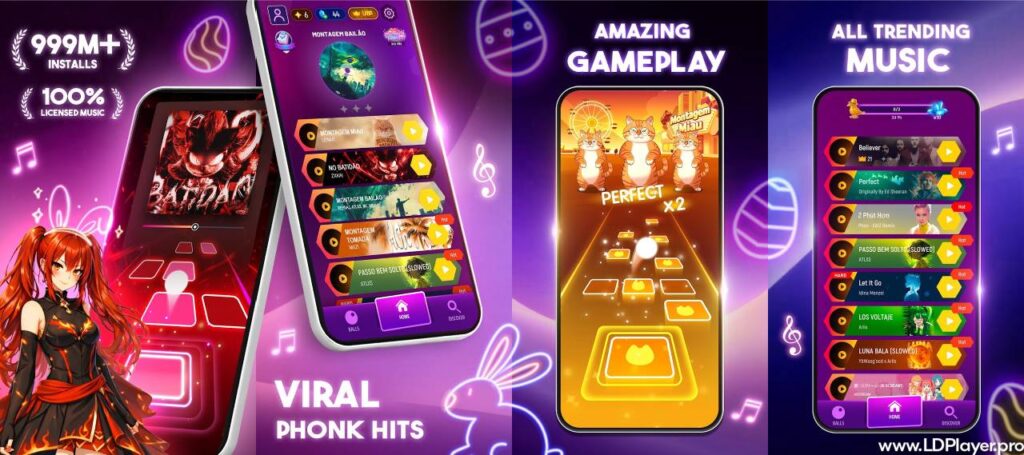
Tiles Hop Music & Ball Game brings music and arcade play together in one simple game. Players control a bouncing ball while moving across floating tiles. At the same time, every jump follows the beat of the selected song.
The game includes colorful 3D scenes, many music styles, different ball designs, and score-based challenges. Players can enjoy it on mobile devices. In addition, Windows users can run it through an Android emulator such as LDPlayer.

What is Tiles Hop Music & Ball Game?
Tiles Hop Music & Ball Game is a rhythm-based arcade game built around continuous ball movement. Instead of tapping notes on fixed lines, players guide a ball from one platform to another.
The ball jumps automatically. Therefore, players only need to control its left and right movement. A finger can control the ball on a phone screen. On PC, the same movement can work through a mouse or mapped keyboard controls.
Each level connects the tile pattern with the rhythm of a song. As the music becomes faster, tile spacing and movement can become harder. Some tracks also use sudden changes that match stronger beats.
The game includes several music styles. These can include EDM, pop, rock, hip-hop, piano music, and other popular genres. As a result, players can choose tracks that match their own music taste.
Visual effects also change during gameplay. Background colors, lights, and effects often react to the song. This helps connect the movement, sound, and level design into one experience.
Tiles Hop Music & Ball Game Features
Expansive and Dynamic Music Library
Tiles Hop Music & Ball Game gives players access to a large music collection. Different tracks offer different speeds, rhythms, and levels of difficulty.
Some songs use slow and steady beats. Others have fast drops and quick changes. Because of this, each track can require a different movement style.
The music selection may also change as new game content becomes available. Therefore, returning players can find new tracks and fresh challenges over time.
Several music types help keep gameplay interesting. Players who like electronic music can choose faster tracks. Meanwhile, those who prefer softer music can select slower songs with easier timing.
Custom Song Upload System
Some game versions or features may support music stored on the device. When this option is available, local audio can be used to create a playable rhythm experience.
The game can study the beat and timing of supported music files. It then creates tile movement that follows the rhythm.
This feature can make the experience more personal. Instead of playing only included songs, users may have another way to enjoy music they already keep on their device.
Available options can depend on the game version, device, region, or current app features. Therefore, players should check the options shown inside their installed version.
Intuitive One-Touch and Drag Controls
The control system stays simple. Players press and hold the screen, then drag left or right.
There is no need to tap every tile. Instead, the main goal is to keep the ball lined up with the next platform.
Continuous movement is important. Lifting the finger too often can make control less smooth. On difficult tracks, small and controlled movements usually work better than large movements.
PC users can use mouse dragging in a similar way. LDPlayer also allows users to create keyboard controls when needed.
Because the basic controls are simple, new players can understand the game quickly. However, accurate movement becomes more important as the song speed increases.
Vibrant 3D Visual Environments and Customizable Themes
Tiles Hop Music & Ball Game uses bright backgrounds, glowing tiles, moving lights, and changing colors. These effects help each track feel more active.
Some scenes may use space-style backgrounds. Others can use winter, neon, city, or fantasy-like designs. Different themes can make repeated play feel less similar.
Visual changes often follow the music. For example, stronger beats may trigger brighter effects or faster background movement.
Although these effects look attractive, the tiles remain the most important part of the screen. Players should keep attention on the ball and upcoming platforms.
A larger PC display can make the path easier to see. This can help during songs with fast tile movement.
Collectible Ball Skins and Visual Trails
Players can unlock different ball designs while making progress. Some skins change the color of the ball. Others may use special shapes, patterns, or visual effects.
Certain designs can also include movement trails. These trails follow the ball while it moves between tiles.
Ball skins mainly change appearance. They do not usually replace the need for good timing or accurate control.
Rewards may come from normal gameplay, tasks, progress systems, events, or other in-game activities. Available rewards can change depending on the current version.
Collecting different designs gives players another goal besides getting higher scores. It can also make favorite songs feel different during repeat sessions.
Offline Playability
Some downloaded or available tracks may work without an active internet connection. This can be useful during travel or when Wi-Fi is not available.
However, some parts of the game may still need internet access. New song downloads, online rewards, account services, advertising, and some events can depend on a connection.
For this reason, players should open required songs before going offline. Doing this can help make sure the needed game data is already stored.
Offline access can depend on the current game version and how each track is provided.
Competitive Leaderboards and Progress Sync
Score systems give players a reason to improve each run. Better timing and longer survival can lead to higher results.
Leaderboards may allow users to compare scores with other players. This adds a competitive part to the normal rhythm gameplay.
Account or platform services may also help save progress. When supported, synced progress can reduce the chance of losing unlocked content after changing devices.
Still, players should use only the sign-in methods shown inside the official app. Account options can change based on platform and region.
How To Install Tiles Hop Music & Ball Game on LDPlayer
Tiles Hop Music & Ball Game can run on a Windows PC through LDPlayer. The emulator creates an Android environment where supported mobile apps can operate.
Using a PC can provide a larger screen, mouse controls, and access to emulator settings. Follow these steps to complete the setup.
1. Get LDPlayer
Open the official LDPlayer website and download the Windows installer.
LDPlayer 9 is commonly used for newer Android apps. However, users should choose the version that works correctly with their system.
After downloading the installer, open the setup file. Follow the instructions shown on the screen.
Choose the installation location if that option appears. Then allow the setup process to finish.
Once installation is complete, launch LDPlayer from the desktop or Start menu.
2. Launch LDPlayer and Access the Google Play Store
Open LDPlayer and wait for the Android home screen to load.
Find the Google Play Store. It may appear directly on the home screen or inside the system applications folder.
Open the Play Store and sign in with a Google account.
A valid account is needed to download apps through Google Play. After signing in, the store will become available inside the emulator.
3. Search for the Official Game Title
Click the Play Store search box.
Enter Tiles Hop: EDM Rush! or search for Tiles Hop Music & Ball Game.
Review the search results carefully. Choose the game published by Amanotes.
Checking the publisher name helps users avoid installing unrelated apps with similar names.
4. Install the Application
Open the correct game page in Google Play.
Click the Install button.
Google Play will download the required files and install them inside LDPlayer.
After installation finishes, the game icon should appear on the emulator home screen.
Click the icon to start the game.
5. Configure Keymapping for PC Controls
Launch the game first.
Next, open the keyboard mapping tool from the LDPlayer side panel.
Players can create controls that match their preferred setup. Left and right movement can be assigned to keys such as A and D. Arrow keys can also work for some setups.
Mouse dragging may feel more natural because it works in a similar way to touchscreen movement.
Test each setup before starting difficult songs. Small control changes can affect timing.
6. Optimize Audio and Frame Rate Settings
Open the LDPlayer settings menu.
Check the performance or display section. Set a stable frame rate that the PC can handle without slowing down.
For many systems, 60 FPS provides smooth gameplay. Higher values may work on supported hardware.
Next, check Windows audio output. Make sure the correct headphones or speakers are selected.
Rhythm games depend heavily on timing. Therefore, stable sound and smooth video can help players react more accurately.
If the game feels delayed, close heavy background programs and test the settings again.
How To Play Tiles Hop Music & Ball Game
The main goal in Tiles Hop Music & Ball Game is simple. Keep the bouncing ball on the tiles for as long as possible.
However, strong scores need more than basic movement. Players must control distance, timing, and direction at the same time.
Continuous Hold & Drag
Press and hold the screen or mouse button.
Move left or right without releasing control after every jump.
Continuous dragging creates smoother movement. It also reduces the chance of losing control between nearby tiles.
On faster songs, avoid making sudden large movements unless the next platform requires them.
Center-Tile Precision
Try to guide the ball toward the middle of each tile.
Center landings give more room for the next movement. In addition, some scoring systems can reward accurate landings.
Looking slightly ahead helps. Focus on the next tile instead of watching only the ball.
This habit gives more time to prepare for sharp changes.
Beat-Listening Alignment
Music is not only background sound. The beat can help predict when the ball will reach the next tile.
Listen for drums, bass hits, or other clear rhythm points.
Strong beats often match important jumps or movement changes. Therefore, learning the rhythm can help during fast sections.
Visual timing and sound timing should work together. Depending on only one can make difficult levels harder.
Endless Mode Survival
Some songs or game modes may continue after the main section ends.
During longer runs, the speed can increase and tile patterns can become harder.
Start with careful movement. Early mistakes can end the run before higher scores become possible.
As the speed rises, use smaller movements and focus on rhythm.
Long survival usually depends on steady control rather than risky movement.
Safety and Legality
Players should install Tiles Hop Music & Ball Game only from trusted and official app sources. Using recognized stores reduces the risk of downloading changed or harmful files.
The game comes from Amanotes. Users should check the publisher name before installation, especially when searching through an emulator.
Running Android apps through an emulator is a normal way to use mobile software on a computer. However, players should still follow the terms shown by the game, Google Play, and the emulator.
Avoid modified APK files from unknown websites. Such files may contain unwanted changes, removed protections, or harmful software.
Privacy also matters. Review the permissions requested by the app before allowing access.
Only connect accounts through sign-in options shown inside the official game. Never give account passwords to unknown websites or third-party tools.
When using LDPlayer, download both the emulator and the game from trusted sources. Keeping Windows, graphics drivers, and security tools updated can also reduce technical and security problems.
Tiles Hop Music & Ball Game FAQ
Is Tiles Hop Music & Ball Game free to play?
Tiles Hop Music & Ball Game can be downloaded and played without an upfront purchase on supported platforms.
However, the game may include optional purchases, ads, subscriptions, or paid content. Available offers can vary by device, country, or app version.
Players can check the store page and in-game menus for current purchase details.
Can I play my own custom music tracks in the game?
Custom music support can depend on the installed version and available game features.
If a local music option appears, supported audio files may be used with the game. The system can then create gameplay based on the rhythm.
When the option does not appear, that version may not support local track use.
Why is using LDPlayer recommended for playing on PC?
LDPlayer allows Android games to run on Windows.
A larger display can make upcoming tiles easier to see. Mouse or keyboard mapping can also give players another control option.
The emulator includes settings for frame rate, resolution, CPU use, memory, and controls. These options can help users adjust performance for their own computer.
Results still depend on the PC hardware and settings.
Can I play the game offline without Wi-Fi?
Some content may remain available after the needed files have already been downloaded.
However, online features can still require internet access. These may include new songs, account syncing, online rewards, updates, ads, or events.
Before playing without Wi-Fi, open the required content while an internet connection is available.
Final Words
Tiles Hop Music & Ball Game offers simple controls while still giving players a real rhythm challenge. The basic goal is easy to understand, yet faster songs require better timing and careful movement.
Different tracks, visual themes, ball designs, score goals, and changing difficulty help keep the game interesting. In addition, PC users can run the game through LDPlayer when they prefer a larger screen and different control options.
For better results, focus on smooth dragging, center landings, and the song beat. Stable frame rates and clear audio can also improve timing.
Always install the official version from trusted sources. Also, check the publisher name before downloading any game files.
With the right setup and regular practice, Tiles Hop Music & Ball Game can offer an easy-to-learn rhythm experience for both new and experienced players.