Craftsman: Building Craft gives players a large world where they can build, explore, and create new ideas. The game uses simple block-based tools, so players can start building without learning complex controls. Houses, farms, roads, towers, and full cities can all take shape one block at a time.

What is Craftsman: Building Craft?
Craftsman: Building Craft is a 3D voxel sandbox game based on building, crafting, and world exploration. Players enter an open block world filled with land, water, trees, stone, and other useful resources.
Each block can support a new idea. For example, players can use wood to create a small home. Stone can form strong walls, paths, or towers. Glass can add windows, while other materials can improve the design.
The game gives players freedom to shape the world around them. There is no single building method that everyone must follow. Instead, each player can test different layouts, colors, materials, and building sizes.
Solo players can work at their own speed. Meanwhile, multiplayer users can share plans and build larger projects together. This makes the game suitable for personal creative work and group building sessions.
The controls are also simple enough for beginners. However, the game still offers enough depth for detailed projects. As a result, players can move from basic homes to complex structures as their skills improve.
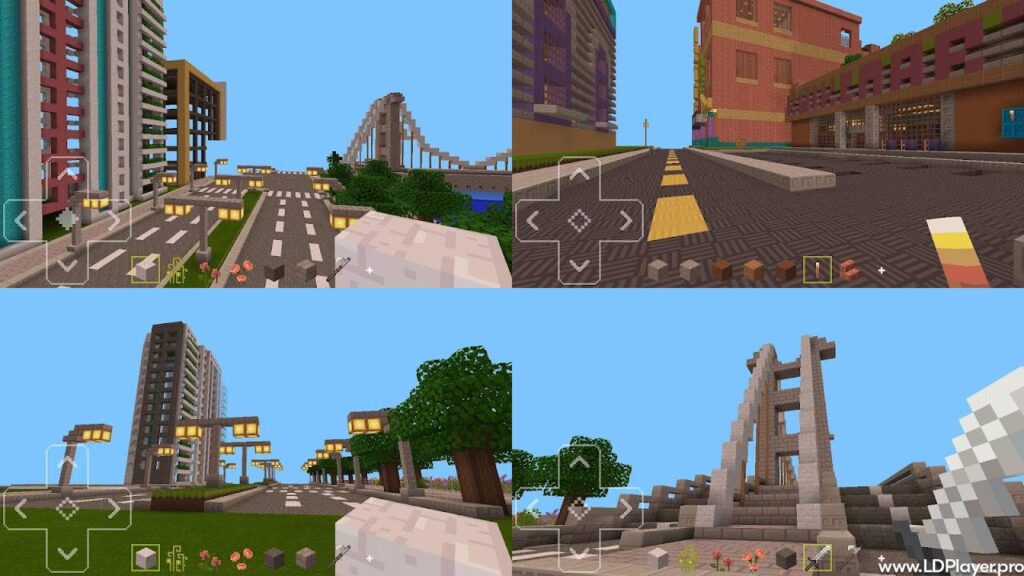
Craftsman: Building Craft Features
Expansive Open World Exploration
The game includes a large open world with many types of land. Players can walk across hills, valleys, forests, beaches, and wide open areas. Each location may offer different materials and building options.
Exploration also helps players find a good place for a new project. A flat field may work well for a city. A mountain can support a castle or lookout point. An island may become a private base.
While exploring, players can gather natural resources from the environment. Wood, stone, sand, and other blocks can support future plans. Therefore, travel and resource collection often become part of the building process.
The open design also gives players room to test ideas. They can start small, change the plan, or expand into a much larger area.
Diverse Crafting and Building Mechanics
Crafting plays an important role in Craftsman: Building Craft. Players can collect materials and use them to make tools, blocks, and useful items.
The building system allows blocks to be placed in many patterns. Walls can rise block by block. Floors can use mixed materials. Roofs can take different shapes based on the project design.
Players can also create decorative parts for indoor and outdoor areas. These details can make a simple building feel more complete. For example, paths can connect houses, while fences can mark farms or gardens.
Resource planning is useful during survival play. Players must think about which materials they need and where to find them. In contrast, Creative Mode makes it easier to focus only on design.
High-Quality Voxel Graphics
The game uses clean voxel graphics with clear block textures. This style makes buildings, land, and materials easy to identify.
The simple visual design also supports steady performance on many devices. Players can move around the world without heavy visual effects getting in the way. Therefore, the building process stays clear and easy to follow.
Lighting and color help separate different areas of the world. Water, grass, stone, and wood each have a clear look. This helps players choose materials that fit their building plans.
The larger screen of a computer can show more detail. As a result, PC players may find it easier to work on wide buildings and detailed layouts.
Interactive Multiplayer Servers
Building can become more enjoyable when friends join the same world. Supported multiplayer servers allow several players to explore, collect materials, and build together.
Team members can divide large projects into smaller tasks. One player may gather wood, while another prepares stone. Other players can work on walls, roofs, roads, or decoration.
Good teamwork can help a large project grow faster. It can also make planning more interesting. For example, a group can create a village where each player builds a different house.
An internet connection is needed for online multiplayer use. However, offline modes remain available for players who prefer solo sessions.
Creative and Survival Game Modes
Craftsman: Building Craft includes Creative and Survival game modes. Each mode offers a different type of experience.
Creative Mode gives players quick access to building materials. This mode works well for large designs, test builds, and detailed structures. Players can focus on shape, color, size, and layout without spending time gathering every block.
Survival Mode adds resource collection and world challenges. Players must search for materials, make tools, and manage available supplies. Therefore, each building project may need more planning.
Both modes support creative thinking. However, Creative Mode focuses on design freedom, while Survival Mode adds progress and challenge.
How To Install Craftsman: Building Craft on LDPlayer
Playing the game on a computer can provide a larger display and more control options. An Android emulator for PC allows the mobile game to run on a Windows computer.
Follow these steps to install the game through LDPlayer.
Step 1: Download the Emulator
Open the official LDPlayer website in a trusted web browser. Find the latest stable version that supports the computer system. Then, select the download option and save the installer file.
Step 2: Install LDPlayer
Open the downloaded installer package. Read the setup details and follow the instructions shown on the screen.
Choose the installation location when required. Then, allow the setup process to copy the needed files onto the computer.
Step 3: Launch the Software
After installation, open LDPlayer from the desktop shortcut or Start menu. Wait for the Android system to load.
For better performance, make sure Virtualization Technology is enabled in the BIOS. This setting may appear as VT-x or AMD-V, depending on the computer processor.
Step 4: Access the Store
Open the LD Store or Google Play Store inside the emulator. A Google account may be required when using Google Play.
Complete the sign-in process carefully. Then, return to the store home screen.
Step 5: Search for the Game
Select the search bar near the top of the store page. Type Craftsman: Building Craft and review the search results.
Check the game name and icon before opening the app page. This helps prevent the installation of an unrelated application.
Step 6: Execute Installation
Select the install button on the game page. LDPlayer will begin downloading the required files.
The process should continue without extra action. However, the download speed may depend on the internet connection.
Step 7: Start Playing
After installation, the game icon should appear on the LDPlayer home screen. Select the icon to open the game.
The first launch may take longer because the application must prepare its files. Once loading finishes, choose a game mode and begin building.
How To Play Craftsman: Building Craft
The game focuses on movement, block placement, mining, crafting, and inventory use. PC controls may feel easier because the keyboard and mouse offer fast input.
Movement
Use the W, A, S, and D keys to move through the world. These keys allow forward, backward, left, and right movement.
The space bar often supports jumping. Players can also adjust movement controls through the emulator keymapping settings.
Camera Control
Move the mouse to look around the world. Smooth camera movement helps players check building height, block position, and nearby land.
A wider view can also make exploration easier. Players can quickly scan the area for materials or suitable building space.
Block Placement
Use the assigned mouse button to place the selected block. In many control layouts, the right mouse button handles placement.
Choose the required block from the quick access bar first. Then, aim at the correct surface and place it carefully.
Mining and Destruction
Use the assigned mining control to break blocks and collect materials. The left mouse button often handles this action.
Some blocks may break faster when the correct tool is used. Therefore, players should prepare suitable tools before collecting large amounts of material.
Inventory Access
Press the assigned inventory key, often E, to open the inventory screen. This area contains collected blocks, tools, and other items.
Players can move items between inventory spaces and the quick access bar. Good item sorting can save time during long building sessions.
Custom Keymapping
LDPlayer includes custom keymapping tools. These settings allow each control to match the player’s preferred layout.
For example, block placement, jumping, inventory access, and tool use can receive different keys. A clear layout can improve control during fast building or resource collection.
Safety and Legality
Craftsman: Building Craft should be downloaded through trusted and approved sources. Official app stores help users receive the correct application files and available updates.
Users should avoid unknown websites that offer changed game files. Modified packages may include unwanted software, damaged data, or unsafe code. They may also cause errors during installation or gameplay.
A trusted Android emulator should also come from its official website. This helps protect the computer from fake installers that copy the names of known programs.
Device protection tools should remain active during downloads and installation. In addition, users should review file permissions before giving an application access to storage or other device features.
Parents may also review online settings before younger players join multiplayer servers. Although block-building games support creativity, public online spaces can include other users. Therefore, basic online safety rules should always apply.
Craftsman: Building Craft FAQ
Is internet access required to play the Craftsman: Building Craft?
No. Single-player Creative and Survival modes can work without an active internet connection after the game files are installed.
However, multiplayer servers require internet access. Store downloads, game updates, and cloud-based features may also need a connection.
Can worlds created on a mobile device be transferred to a PC?
World transfer may be possible through emulator file-sharing tools. The exact method depends on the device, game version, and storage settings.
First, locate the saved world folder on the mobile device. Next, copy the correct data into the shared folder. Then, move it into the matching emulator directory.
Always create a backup before moving saved data. This step helps protect the world if a file becomes damaged or gets placed in the wrong folder.
Is the Craftsman: Building Craft suitable for younger audiences?
Yes, the game can support creative thinking, planning, and basic problem-solving. Players can learn how shapes, space, and materials work together.
However, parents should review multiplayer settings and online access. Solo play may offer a more controlled option for younger users.
Are there hidden fees inside the application?
The main building experience may be available without required payments. However, store pages should be checked for current details about ads, optional purchases, or added content.
Optional payments should always be reviewed before approval. Device purchase controls can also help prevent unwanted spending.
Can the Craftsman: Building Craft run on a low-end PC?
Performance depends on the computer hardware and emulator settings. Lower graphics settings can help the game run more smoothly on weaker systems.
Closing unused programs may also free memory and processor power. In addition, enabling Virtualization Technology can improve emulator performance.
Can keyboard controls be changed?
Yes. LDPlayer allows users to adjust keymapping. Players can assign movement, inventory, jumping, mining, and block placement controls to preferred keys.
Final Words
Craftsman: Building Craft offers a simple and enjoyable way to create block-based worlds. Players can explore wide areas, gather resources, build structures, and test new ideas.
Creative Mode gives quick access to materials, while Survival Mode adds collection and planning. Multiplayer support also allows friends to work on shared projects when an internet connection is available.
Running the game through LDPlayer can provide a larger screen and keyboard controls. Custom keymapping may also make building and movement easier on a PC.
Safe downloads remain important. Therefore, game files and emulator software should come from official or approved sources.
From small homes to large cities, every project can grow step by step. Start with a clear plan, choose the right blocks, and shape the world one block at a time.