Fishdom brings match-3 puzzles and aquarium design together in one colorful game. Players solve tile puzzles, earn rewards, and build personal underwater spaces. Each completed level gives useful coins or other items. These rewards help players buy fish, plants, decorations, and themed objects.
What is Fishdom?
Fishdom is a free puzzle and aquarium design game from Playrix. It combines match-3 puzzle levels with a simple aquarium management system. Players clear puzzle boards and use their rewards to create underwater homes.
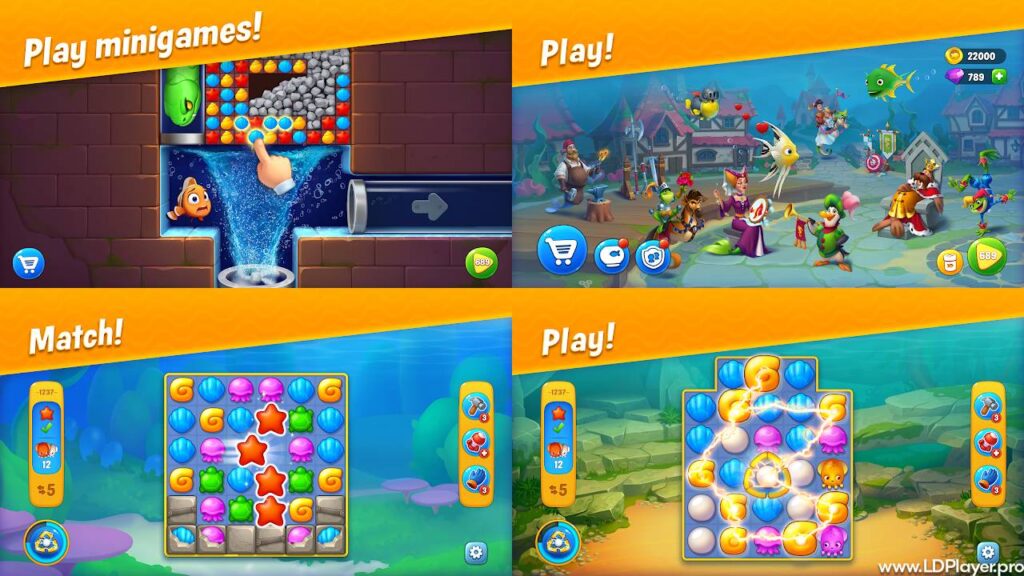
During a match-3 level, players move nearby pieces to form groups. A group must contain at least three matching items. Once matched, the pieces leave the board. New pieces then fall into the empty spaces.
Every level has a clear task. For example, a stage may ask players to collect certain pieces. Another stage may require players to remove boxes, chains, oil, or covered tiles. In addition, each level has a limited number of moves.
Completing levels gives coins and progress rewards. Players can spend these coins on fish and aquarium decorations. Each purchase adds points to the aquarium Beauty Score. When the score reaches a set target, the tank earns a star.
Stars help unlock more content and new aquarium themes. Therefore, decoration choices support game progress instead of serving only as visual items. Players can improve one tank before moving to another themed location.
Fishdom also includes talking fish with different looks and behavior. They comment on events, ask for attention, and react to certain decorations. Because of this, the aquarium feels more active than a basic display screen.
Regular events offer extra tasks and rewards. These events may include puzzle challenges, collection goals, team contests, or exploration activities. However, event content may change during later updates.
Fishdom Features
The Fishdom game includes many features for both short sessions and longer play. Its main systems are easy to understand. Still, later levels add more obstacles and harder goals.
Dynamic Match-3 Puzzle Boards
The main puzzle mode includes many levels with different board shapes. Some boards are open and easy to study. Others include narrow areas, blocked sections, or separated groups of tiles.
Players must match three or more similar pieces. However, random matches do not always help the level goal. Smart players focus on tiles near important objects or blocked spaces.
Many stages introduce special obstacles. Boxes may need several hits before breaking. Chains may lock pieces in place. Oil can spread when players fail to remove it. Therefore, each obstacle needs a different plan.
Move limits make every choice important. A useful move should clear an obstacle, collect a target item, or create a booster. Careful planning can prevent wasted turns near the end of a stage.
Explosive Boosters and Power-Ups
Matching four or more pieces can create special tools. These tools remove more tiles than a normal match. As a result, they help players clear hard areas with fewer moves.
A firecracker removes nearby pieces in a small area. A bomb clears a wider section of the board. Dynamite has an even larger blast area. Meanwhile, the lightning tool can remove many matching pieces at once.
Combining boosters can create stronger effects. For example, placing two explosives together may clear a large part of the board. Therefore, players should check nearby pieces before using a booster.
Pre-level tools may also help with difficult stages. These tools can place useful explosives on the board before the first move. However, players should save them for levels that truly need extra help.
Deep Aquarium Customization
Aquarium design gives players control over the look of each tank. Coins can buy fish, plants, statues, buildings, rocks, and other items. Decorations can then be moved to better positions.
Each item gives Beauty Score points. More costly items often give more points, but price alone should not guide every choice. Players should also consider space, theme, and visual balance.
A tank can hold many objects. However, too many large items may hide fish or make the area look crowded. A clear layout makes each decoration easier to see.
Different aquarium themes include their own backgrounds and object styles. Therefore, players can create tanks with very different moods. One tank may use a city theme, while another may use fantasy objects.
Interactive 3D Marine Companions
The fish do more than swim around the tank. They speak through text bubbles and react to daily actions. Some fish make jokes, while others ask questions or share short comments.
Players can feed the fish and clean the aquarium. These simple tasks may provide small rewards. In addition, they make the tank feel active between puzzle sessions.
New fish can be added as more areas become available. Different species have unique colors, shapes, and movement styles. As a result, players can build a mixed group instead of using one fish type.
Fish may also interact with placed objects. They can swim near decorations or comment on changes. Therefore, adding a new item can make the aquarium feel different.
Time-Limited Seasonal Expeditions
Special events give players extra goals outside the normal level path. These events may run for a limited time. Therefore, players must finish the required tasks before the event ends.
Some events use maps with several locations. Players collect event energy, open new areas, and find hidden rewards. Other events focus on collections, puzzle wins, or team scores.
Seasonal rewards may include decorations, profile items, boosters, or coins. Certain items may only appear during one event period. As a result, regular event checks can help players avoid missing rewards.
Internet access may be required for live events. A stable connection can also help the game load current content and save progress.
How To Install Fishdom on LDPlayer
Playing on LDPlayer allows the Android version to run on a Windows computer. The larger display can improve tile visibility. Mouse input can also make each move more exact.
Follow these steps to install the game:
Step 1: Download LDPlayer
Open the official LDPlayer website in a trusted browser. Find the current installer for the computer. Then, click the download button and save the file.
Check that the device has enough free storage. Also, make sure the Windows version supports the selected emulator release.
Step 2: Start the Installation
Open the downloaded installer file. Windows may ask for permission to run it. Review the message and continue only when the file came from the official source.
Choose an installation folder when needed. Then, follow the setup instructions shown on the screen. Avoid closing the installer during this process.
Step 3: Launch the Emulator
Open LDPlayer after the installation ends. The first launch may take longer than normal. This happens because the emulator must prepare its Android system files.
Allow the setup process to finish. After that, the main Android home screen should appear.
Step 4: Open Google Play Store
Find the Google Play Store icon on the emulator home screen. Click the icon to open it. Then, sign in with a valid Google Account.
Review any account security alerts. Make sure the sign-in request came from the device in use.
Step 5: Search for the Game
Click the search box at the top of the store. Type Fishdom and press the Enter key. The results page will show related apps.
Choose the official title published by Playrix. Check the developer name before continuing.
Step 6: Install the App
Click the Install button on the store page. The download will begin automatically. Keep the emulator open until the process ends.
The installation time depends on internet speed and computer performance.
Step 7: Launch the Game
Return to the emulator home screen after installation. Click the new game icon to open it. Then, allow any required game files to download.
Players can adjust emulator resolution and performance settings when needed. However, settings should match the computer’s available memory and processor power.
How To Play Fishdom
Good progress depends on puzzle planning and careful use of rewards. Players should understand the goal before making the first move.
Puzzle Board Strategy
First, read the level objective shown before the stage begins. The same goal also appears beside the puzzle board. Keep checking it during play.
Next, study the full layout. Look for blocked sections, trapped pieces, and target items. A move near the goal usually gives more value than a random match.
Try to create matches of four or more pieces. These matches produce boosters that can clear larger areas. However, do not use every booster at once without checking its effect.
Save nearby boosters for a possible combination. Two connected power-ups can cause a much larger blast. As a result, one combined move may replace several normal moves.
Work near the lower part of the board when the target allows it. Matches near the bottom can cause more pieces to fall. This may create free matches and useful chain reactions.
Remove spreading obstacles early. Oil and similar objects may cover more spaces after each move. Therefore, waiting too long can make the board harder.
Avoid spending extra moves on pieces that do not support the goal. Every turn matters, especially during harder stages. Before each move, check how it helps the main task.
Aquarium Management Strategy
Spend coins with a clear plan. Start with items that provide a useful Beauty Score increase for their cost. Then, add smaller objects to complete the layout.
Try to keep the tank easy to view. Place large decorations near the back or sides. Smaller plants and objects can fill open spaces without hiding the fish.
Feed fish and clean the tank when those actions become available. These tasks are quick and may offer useful rewards. They also keep the aquarium active.
Focus on earning all available stars in the current tank. Stars support progress and may unlock another aquarium. Once a tank reaches its target, begin saving for the next area.
Do not spend all boosters or coins at once. Later stages may require more help. A small saved supply can prevent long delays during a difficult level.
Safety and Legality
Fishdom is an official game published by Playrix. Players should install it through trusted stores or approved platforms. This helps protect game files, payment details, and account progress.
Use the Google Play Store or Apple App Store on mobile devices. When using an Android emulator, install the game through the emulator’s official Play Store app.
Avoid modified APK files from unknown websites. These files may change the game code without permission. They may also contain unsafe software or lead to account problems.
In-game purchases should only use the payment system provided by the official store. Never share account passwords, bank details, or security codes with other players.
Parents should review purchase settings on devices used by children. Password checks can prevent unplanned payments. Spending limits can also support safer play.
Players should connect the game to a supported account for progress recovery. Cloud saving can help when changing devices or reinstalling the app.
Fishdom FAQ
Can Fishdom be fully enjoyed without spending real money?
Yes. Players can download and play the main game without paying. Levels, tanks, and many decorations can be unlocked through normal progress.
Optional purchases may provide coins, lives, or boosters. However, careful puzzle play can reduce the need for paid items.
Is a constant internet connection required?
Some standard puzzle content may work without a constant connection after required files load. However, many online features need internet access.
Events, team activities, updates, purchases, and cloud saving may require a connection. Therefore, regular online access helps keep all features available.
How can lost progress be recovered?
Open the game and connect it to the account used before. This may include a supported Google, Apple, or Facebook account.
When the correct account contains saved data, the game may offer the stored progress. Choose the higher or correct progress level carefully.
Contact official support when the saved game does not appear. Provide the player ID, device details, and any purchase records available.
Why does a level become difficult?
Later levels use more obstacles, tighter move limits, and complex board shapes. Some stages also depend on the order of moves.
Study the goal and change the approach after each failed attempt. A different opening move may create better tile drops.
How can more boosters be earned?
Boosters may come from events, daily rewards, level progress, team activities, or special tasks. Saving these items for harder levels often gives better value.
Can the same progress be used on another device?
Progress may transfer when both devices use a supported linked account. The game version should also be current on both devices.
Open the game on the new device and sign in with the same account. Then, select the correct cloud save when prompted.
Final Words
Fishdom combines simple match-3 rules with detailed aquarium building. Each puzzle win supports the next design goal. Therefore, puzzle progress and tank progress always feel connected.
The game works well for short sessions, but it also supports long-term play. Players can complete a few levels, improve one tank, or join a timed event.
Smart moves become more important as levels grow harder. Players should focus on the goal, create boosters, and remove dangerous obstacles early. At the same time, careful coin use can improve each aquarium faster.
The fish add life through movement, comments, and reactions. Decorations give every tank a personal look. As a result, no two aquarium layouts need to feel the same.
Mobile devices offer easy access, while LDPlayer provides a larger computer screen. Both options use the same basic puzzle and design systems.
With clear goals, regular rewards, and many design choices, the game offers steady progress. Start solving levels, collect coins, and build a colorful underwater home.