Friday Night Funkin brings fast music battles, bright art, and simple controls into one exciting rhythm game. It started as a small indie project. However, it soon gained a huge group of players around the world.
The game mixes old Flash game style with fresh music and quick action. As a result, both new and experienced rhythm players can enjoy it. Playing on a larger screen can also make arrows easier to see. In addition, keyboard controls may help players react with better timing.
What is Friday Night Funkin?
Friday Night Funkin is a 2D open-source rhythm game made by The Funkin’ Crew. It follows a young character called Boyfriend.
Boyfriend wants to spend time with Girlfriend. However, several strange opponents try to stop him. These opponents include musicians, monsters, dangerous fighters, and guest characters.
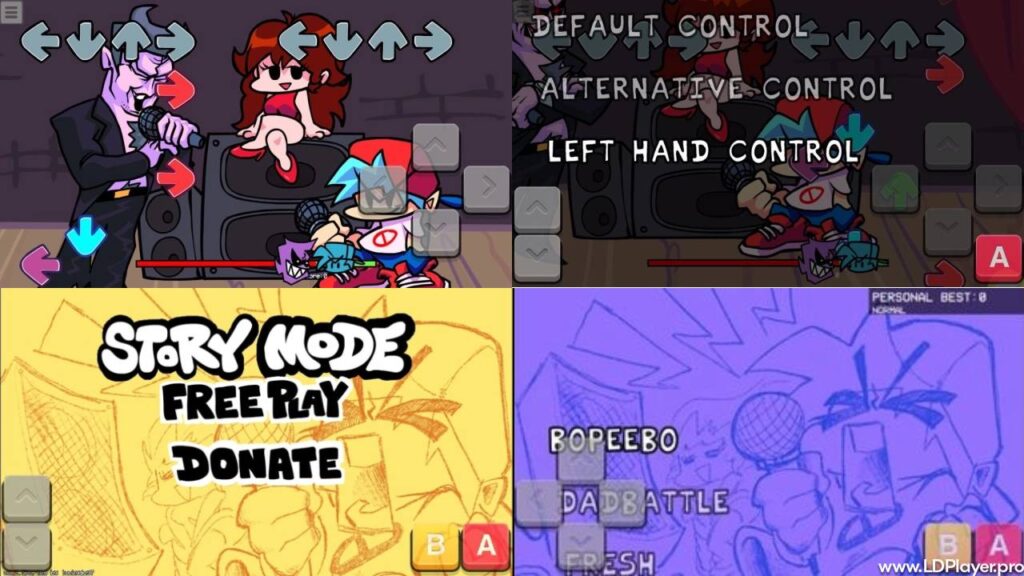
Instead of normal fights, the characters compete through music battles. Each side sings a series of sounds during the song. Players must copy the correct arrow pattern when Boyfriend’s turn begins.
Colored arrows move toward fixed arrow shapes on the screen. Once they line up, the matching key must be pressed. Good timing keeps the performance bar under control. Poor timing moves the bar toward the opponent.
Missing too many notes can empty the health meter. When that happens, the song ends and the player must try again.
The game uses an open-source license. Therefore, developers can study parts of the code and create new content. This open setup helped the community build many songs, characters, stages, and story ideas.
Still, the official game and fan-made projects are not always the same. Players should check the source before installing any extra files.
Friday Night Funkin Features
Dynamic Story Weeks and Levels
The main story is split into sections called Weeks. Each Week includes its own opponents, setting, visual theme, and songs.
At first, players face Daddy Dearest in a music battle. Later Weeks introduce very different characters and locations. Because of this structure, each part feels like a new chapter.
Song patterns also become harder as players move forward. Early levels teach the basic controls. Meanwhile, later tracks use faster notes, longer holds, and sudden pattern changes.
Some updates may also add new remixes or special events. These additions give experienced players fresh challenges. In addition, harder song versions can test timing and memory.
Original Electro-Funk Soundtrack
Music sits at the center of Friday Night Funkin. Every level depends on its beat, speed, and note design.
The soundtrack mixes electronic music, hip-hop, chip sounds, dance beats, and digital vocals. As a result, each opponent has a clear musical style.
Some songs use simple patterns during the opening section. However, the rhythm often changes as the battle continues. This change keeps players alert and makes every track feel active.
The music also supports the story. A strange opponent may use darker sounds. On the other hand, a playful character may have a lighter beat.
Strong headphones or clear speakers can help players hear each beat. Still, watching the arrows remains just as important.
Signature Hand-Drawn Visuals
The game uses a hand-drawn 2D art style. Its look takes clear ideas from older browser games and Newgrounds cartoons.
Characters use bold shapes, clear colors, and strong facial reactions. Therefore, it is easy to understand what happens during a battle.
Small animations also make each song feel more alive. Characters move with the beat. Background objects may react as the music plays.
The screen stays simple enough for rhythm play. Even during busy scenes, the arrows remain the main focus. This balance helps players follow the action without losing sight of the notes.
The visual style also makes custom content easier to notice. Fan-made characters often use new colors, poses, effects, and stage designs.
Unparalleled Modding Compatibility
Friday Night Funkin has a large modding community because its source files are available. Mod creators can build new songs, stories, characters, and note charts.
Some mods only replace the appearance of a character. Others add full campaigns with several stages and original music.
Special game engines may also support extra features. These can include new note types, custom menus, effects, and difficulty settings.
However, mods can work differently depending on the game version. A mod made for one engine may not run on another. Therefore, players should read the setup notes before installing it.
Files should also come from trusted sources. Unknown downloads may contain harmful programs or broken data.
How To Install Friday Night Funkin on LDPlayer
Playing a supported mobile version on a computer can provide a larger screen and keyboard controls. LDPlayer creates an Android-style system inside the computer.
Follow these steps carefully.
1. Download and Install LDPlayer
Approximate time: 3 to 5 minutes.
Open the official LDPlayer website through a trusted browser. Then find the download button for the current installer.
After the file finishes downloading, open it from the downloads folder. Review the setup options before continuing.
Next, choose the install location. The default folder is usually suitable for most users. Then select the install option and allow the setup to finish.
Do not close the installer while files are being added. Once the process ends, open LDPlayer from the desktop shortcut.
2. Launch the Emulator and Initialize Store Services
Approximate time: 1 to 2 minutes.
Start LDPlayer and allow the main screen to load fully. The first launch may take longer because the emulator creates its system files.
Next, check the home screen for LDStore or Google Play Store. Google Play may require a Google account before apps can be installed.
Sign in only through the official store window. Also, avoid entering account details on unknown pages.
After sign-in, wait for the store to complete its first setup.
3. Search for Friday Night Funkin
Approximate time: 1 minute.
Select the search box near the top of the store screen. Then type the full game name into the field.
Review the results carefully because several similar apps may appear. Check the title, developer name, screenshots, ratings, and app details.
The official game website should guide users toward approved versions. Therefore, avoid copies that use unclear names or false claims.
4. Execute the Installation Process
Approximate time: 2 to 3 minutes.
Choose the correct app from the results. Then press the Install button beside the app information.
The store will download and unpack the game automatically. Download time may change based on internet speed.
Keep LDPlayer open during this process. Also, make sure the computer has enough free storage.
Once installation finishes, the game icon should appear on the emulator home screen.
5. Configure Inputs and Play
Approximate time: less than 1 minute.
Open the game from the home screen. Then select the keyboard control icon on the LDPlayer side panel.
Place keyboard buttons over the game’s on-screen controls. Common choices include the arrow keys or WASD.
Save the control layout after every key has been set. Next, open a simple song to test the response.
Adjust the key positions if any button does not work correctly. Also, close other heavy programs when performance feels slow.
How To Play Friday Night Funkin
Friday Night Funkin uses simple controls, but good timing takes practice. Most keyboard layouts use the arrow keys or WASD.
During a song, colored arrows move toward fixed gray arrows. Players must press the matching key when both arrows meet.
Pressing too early or too late lowers the accuracy score. A well-timed input can receive a high rating. Poor timing may receive a lower rating or count as a miss.
Some notes include long tails. These are hold notes. Press the correct key when the note reaches its target. Then keep holding until the tail ends.
Repeated successful notes create a combo. A combo shows that several notes were hit without a miss. Higher combos can improve the final score.
The health bar shows which performer controls the battle. Good inputs push the bar toward Boyfriend’s side. Missed notes move it toward the opponent.
Players should begin with Easy mode when learning a song. Normal mode adds more complex patterns. Hard mode often uses faster and denser note groups.
Looking at the center area can help track several arrows together. In addition, listening to the beat improves timing.
Practice mode can also help with difficult parts. Repeating one song builds memory and hand control.
Safety and Legality
The main Friday Night Funkin project is legal to play through approved channels. Its open-source license also allows developers to study and change permitted code.
However, not every download online is safe. Some websites may offer fake installers, changed app files, or harmful programs.
Use official pages, trusted stores, and approved code sources. Check the website address before downloading anything.
Community mods need extra care. First, read comments and installation notes. Next, check whether the mod supports the current game version.
Security software can scan downloaded folders before they are opened. This step may help find harmful files.
Players should also avoid tools that request passwords, payment details, or full system access without a clear reason.
Backing up game files is another useful step. A backup can restore the game when a mod causes errors.
Open-source access does not make every fan download official. Therefore, users must still check each source.
Friday Night Funkin FAQ
Is Friday Night Funkin completely free to play?
Yes, the base game can be played for free through approved official releases. Some official support options may allow fans to give money voluntarily.
Paid copies on unknown websites should be checked carefully. They may not come from the original team.
Can mods be safely run while playing inside an emulator?
Some mobile versions may support mods. However, support depends on the app, engine, file format, and emulator setup.
A desktop mod may not work inside an Android version. Therefore, players should check the mod instructions before moving any files.
Only use trusted mods from known creators or active communities. Scan every downloaded package before opening it.
What should be checked if input lag ruins key timing?
First, close programs that use a large amount of memory or processor power. Then restart the emulator and test the song again.
Next, open the emulator settings. Add more processor cores or memory when the computer can support it.
A higher frame rate may improve smoothness. However, weak computers may perform better with lower graphics settings.
Players should also test another key layout. Wired keyboards may respond more quickly than some wireless models.
Are there multiple difficulty levels available in the game?
Yes, the game commonly offers Easy, Normal, and Hard modes. Each level changes the number, speed, or pattern of notes.
Easy mode helps new players learn the song. Normal mode gives a balanced challenge. Hard mode tests fast reactions and strong rhythm control.
Some tracks may also include advanced remix versions. These versions are usually made for skilled players.
Final Words
Friday Night Funkin shows how a simple game idea can grow through strong music, clear art, and player support. Its controls are easy to learn. However, the harder tracks can take time to master.
Story Weeks give players different opponents and settings. Meanwhile, the soundtrack keeps each battle active and memorable.
A computer can make the arrows easier to view. Keyboard mapping may also improve control during fast sections. LDPlayer offers one way to run supported Android versions on a desktop system.
Players should always choose trusted downloads. In addition, mods should be checked before installation.
Regular practice is the best way to improve. Start with slower songs, learn the patterns, and move toward harder levels.
With careful setup and safe downloads, Friday Night Funkin can provide many hours of rhythm-based play.