Swagbucks Trivia for Money gives users a simple way to turn general knowledge into real rewards. The app offers live quiz games, daily challenges, SB points, cash rewards, and digital gift cards.

What is Swagbucks Trivia for Money?
Swagbucks Trivia for Money is a free mobile trivia app that rewards players for answering questions. Most games use a ten-question, multiple-choice format.
Questions can cover history, science, geography, sports, films, music, famous people, and popular culture. As a result, every game may test a different type of knowledge.
The app uses SB points as its main reward currency. In general, 100 SB points have a value of $1.00.
This simple point system helps users understand their balance. For example, 500 SB points represent a value of $5.00.
Users can redeem available points through the official Swagbucks rewards area. Common options may include PayPal cash and digital gift cards.
Gift card choices can include major stores such as Amazon, Walmart, and Target. However, available rewards may depend on the user’s country and current marketplace options.
The app does not require players to buy coins before joining a standard trivia game. Therefore, users can begin playing after creating or linking a Swagbucks account.
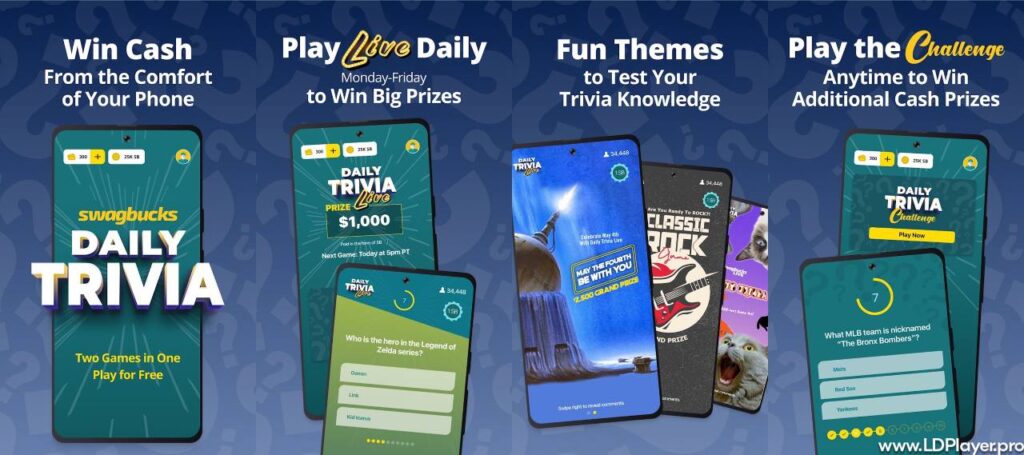
Swagbucks Trivia for Money Features
The platform includes several game modes and reward tools. Each feature gives users another way to answer questions and collect SB points.
Daily Trivia Live Game Shows
Live trivia shows allow many players to join the same game at the same time. A real host presents questions and guides players through each round.
Most live games include ten multiple-choice questions. Each question has a short answer timer, so players must respond quickly.
Players who answer every question correctly may share the final prize pool. The total reward is normally divided among all remaining winners.
Some live games may offer prize pools worth hundreds or thousands of dollars. However, the amount each winner receives depends on the number of winners.
For example, a large prize may result in a smaller payment when many players reach the final question. Still, bonus SB points may increase the total reward.
Live shows also create a more social game experience. Players answer together, watch the host, and follow the results in real time.
24/7 Daily Trivia Challenge Mode
The Daily Trivia Challenge gives players a more flexible option. It does not require users to wait for a live show.
Instead, players can open the game and answer questions at a suitable time. Therefore, this mode works well during breaks or free moments.
A standard challenge normally includes ten questions. Players receive SB points based on correct answers and current reward rules.
This mode does not include a live host. However, the same basic rules still apply, including timers and locked answers.
Daily challenges can help users practise before joining live events. They can also help players learn how quickly each round moves.
Since the mode is available throughout the day, users can play without changing their normal routine.
Rejoin Mechanics and Lifelines
A wrong answer can remove a player from the main prize competition. However, the rejoin feature may allow that player to return.
Players may use available SB points to activate a rejoin. In some cases, they may also receive a free rejoin opportunity.
A sponsored video may provide one free return during a game. The video must usually play before the rejoin becomes active.
Rejoins can be useful after an early mistake. However, players should check the cost before spending SB points.
Using too many paid rejoins may reduce the final value of the reward. Therefore, it is wise to save them for larger games.
The exact rejoin rules can change between events. Players should read the instructions shown before each live match begins.
Bonus SB Earning Opportunities
Swagbucks Trivia for Money may award bonus SB points during selected questions. These rewards can appear even when a player misses another question.
A bonus question usually shows a clear SB value. Answering it correctly adds the stated amount to the player’s game balance.
This system gives eliminated players a reason to continue. Although they cannot win the main prize, they may still collect smaller rewards.
Bonus questions can appear at different stages of a live game. Therefore, players should stay until the final round whenever possible.
At the end of the game, users may need to claim their earned SB points. Missing this step could delay the transfer.
How To Install Swagbucks Trivia for Money on LDPlayer
LDPlayer allows users to run Android apps on a Windows computer. A larger screen and stable connection may improve the quiz experience.
However, users should make sure their computer can run the emulator smoothly. They should also use official download sources.
1. Download and Setup LDPlayer
Open the official LDPlayer website through a Windows computer. Then, find the latest supported version of the emulator.
Download the installer file and open it after the download finishes. Follow the setup instructions shown on the screen.
Choose an installation folder with enough free storage space. Next, allow the setup process to install the required files.
After installation, open LDPlayer from the desktop shortcut. Wait until the Android home screen finishes loading.
2. Access the Google Play Store
Find the Google Play Store icon on the LDPlayer home screen. Open it to begin the account login process.
Sign in with a valid Google account. Users may also create a new Google account when needed.
Enter the requested login details carefully. Then, complete any security checks shown by Google.
After login, the Play Store should display its normal search page. The emulator can now install supported Android apps.
3. Search for the Application
Select the search bar at the top of the Google Play Store. Type Swagbucks Trivia for Money using the full app name.
Check the spelling before starting the search. A correct title makes it easier to find the official listing.
Review the search results and locate the app published by Prodege, LLC. Avoid installing apps from unknown publishers.
Open the official app page and review the basic information. Check the name, publisher, icon, and listed features.
4. Install the Mobile Game
Click the Install button on the official application page. The Google Play Store will begin downloading the required files.
Keep LDPlayer open while the download continues. A slow connection may make this process take longer.
The Play Store will install the app automatically after downloading it. No manual file movement should be needed.
Once installation finishes, an Open button will appear. The app icon should also appear on the LDPlayer home screen.
5. Launch and Sync Your Profile
Open Swagbucks Trivia for Money from the emulator home screen. Allow the app to load its login page.
Enter the details for an existing Swagbucks account. New users can follow the registration steps shown inside the app.
Use correct account details so points can sync with the main Swagbucks balance. Avoid creating several accounts for one person.
After login, check the profile and reward balance. The app should now be ready for live games and daily challenges.
How To Play Swagbucks Trivia for Money
Swagbucks Trivia for Money uses simple controls, but each question has a strict time limit. Learning the rules can reduce avoidable mistakes.
Be Mindful of the 10-Second Clock
Players normally receive ten seconds to answer each question. The timer begins as soon as the question appears.
Read the full question before selecting an answer. However, do not wait too long, because the timer moves quickly.
Look at every answer choice when possible. Then, select the best option before time runs out.
A late tap may not register. Therefore, answer with at least one second left whenever possible.
The Elimination Process
A wrong answer may remove a player from the main live prize pool. Letting the timer finish can cause the same result.
Still, elimination does not always end the whole game. Players can continue answering bonus questions and collecting smaller rewards.
A rejoin may also return the player to the main competition. The app will show whether that option is available.
Players should remain focused after one mistake. Later questions may still provide useful SB points.
Submitting and Locking Answers
Tap one answer choice directly on the screen. The selected answer will normally lock immediately.
Once locked, the answer cannot be changed during that round. Therefore, avoid tapping before reading every choice.
The app will reveal the correct answer after the timer ends. It may also show how many players selected each option.
Reviewing wrong answers can improve future results. Many quiz topics appear again in different forms.
Claiming Your Earned Balance
After a game ends, look for the Claim Earnings button or message. Tap it to move earned SB points into the account.
Do not close the app before checking this screen. Some rewards may require a manual claim.
After claiming, open the account balance and confirm the new points. The update may take a short time.
Keeping the app updated can also prevent claim errors. In addition, a stable internet connection helps the transfer finish correctly.
Safety and Legality
Swagbucks Trivia for Money operates through Prodege, LLC and the Swagbucks rewards system. It does not ask for an entry deposit for standard games.
Users should download the app only from official app stores. They should also avoid unofficial APK files or copied websites.
Account passwords should remain private. A strong password can help protect SB points and personal account details.
Users may need to provide basic information during account creation and reward redemption. However, trivia play does not require a credit card.
The platform uses account security systems to protect login and reward information. Still, users should never share verification codes with another person.
Age rules can depend on location and current service terms. Therefore, users should review the official account requirements before joining.
Reward availability may also differ by country. Some cash and gift card options may not appear in every region.
Players should follow local laws, account rules, and game terms. Using false details or several accounts may lead to account limits.
Swagbucks Trivia for Money FAQ
How much do 100 SB points convert to in USD?
In general, 100 SB points convert to $1.00 in reward value. This rate makes balance tracking simple.
For example, 1,000 SB points usually represent $10.00. However, some reward options may have special prices or discounts.
Users should check the redemption page before choosing a reward. The displayed value confirms the current exchange amount.
Are there any upfront costs to join a trivia match?
No standard payment is required to download the app or join normal trivia games. Users do not need a paid subscription.
However, optional rejoin features may use earned SB points. Players can decide whether that cost is worth using.
Sponsored videos may also provide free rejoin chances. Watching them remains optional unless a player wants that benefit.
What is the minimum payout amount for cashing out?
Some digital gift cards may start at 100 SB points, which normally equals $1.00. Available minimums can differ by reward.
PayPal cash rewards may begin at 500 SB points, which normally equals $5.00. Higher payment choices may also appear.
Before redeeming, users should confirm their account details. PayPal information must match the required reward and identity rules.
When do the live trivia game shows take place?
Live games are commonly scheduled from Monday through Thursday at 8:00 PM Eastern Time. However, schedules may change.
The app usually shows the next live event on its main page. Therefore, players should check the displayed time before joining.
Time differences can also affect users outside the Eastern Time zone. Setting a reminder can help prevent missed games.
Final Words
Swagbucks Trivia for Money offers a simple mix of trivia, entertainment, and real reward options. Players can join live shows or play daily challenges.
The app uses clear multiple-choice questions and short timers. As a result, each game moves quickly and stays easy to follow.
Users can earn SB points without making an initial payment. They can later exchange eligible points for cash or supported gift cards.
Live prize amounts depend on the event and the number of winners. Therefore, players should see trivia rewards as extra value, not fixed income.
A mobile phone gives the most direct way to play. However, LDPlayer can provide a larger display on a Windows computer.
Careful answers, quick decisions, and regular play may improve results. Bonus questions can also help users earn after elimination.
Most importantly, players should use official apps, protect account details, and follow all platform rules. These steps support a safer experience.
For people who enjoy quiz games, the platform offers a practical way to test knowledge and collect useful rewards.