SCRABBLE is one of the most famous word games in the world. People of many ages have enjoyed it for decades. The game started with letter tiles, wooden racks, and a square board. Today, players can also enjoy the same word-building experience on phones, tablets, and computers.
The main goal is simple. Players use letter tiles to build words and earn points. However, winning takes more than knowing many words. Players must also plan each move, protect useful spaces, and use bonus squares at the right time.

What is SCRABBLE?
SCRABBLE is a word-building board game for two to four players. Each player receives seven letter tiles. Every tile has a point value based on how common or rare the letter is.
For example, common letters such as A and E have low values. Rare letters such as Q and Z have higher values. Players place the tiles on a 15×15 board to create words.
Words must follow a crossword-style pattern. Horizontal words must read from left to right. Vertical words must read from top to bottom. New words must also connect with letters already placed on the board.
The game tests spelling and word knowledge. Still, good planning is just as important. Players must decide whether to score now or save useful letters for later. They must also watch the bonus squares. Leaving a Triple Word Score open may give another player a large advantage.
Official Tile Distribution
| Tile Value | Letters and Amounts |
|---|---|
| 1 Point | A ×9, E ×12, I ×9, O ×8, N ×6, R ×6, T ×6, L ×4, S ×4, U ×4 |
| 2 Points | D ×4, G ×3 |
| 3 Points | B ×2, C ×2, M ×2, P ×2 |
| 4 Points | F ×2, H ×2, V ×2, W ×2, Y ×2 |
| 5 Points | K ×1 |
| 8 Points | J ×1, X ×1 |
| 10 Points | Q ×1, Z ×1 |
| 0 Points | Two blank tiles that can represent any letter |
SCRABBLE Features
Classic Board Game Authenticity
The digital version keeps the main parts of the original board game. Players use the standard 15×15 board, normal letter values, and official tile amounts.
As a result, digital matches feel close to games played on a real table. The same planning methods also apply. Players must build connected words, manage seven tiles, and use bonus spaces carefully.
Digital play also removes some small problems. The app manages the tile bag, checks scores, and confirms legal words. Therefore, players can focus on building better moves.
Multiplayer and Social Matchmaking
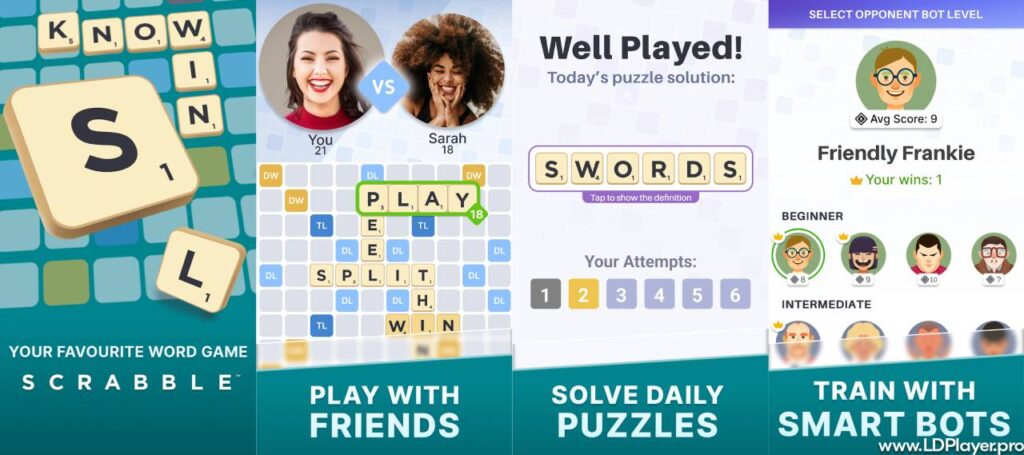
Online play allows users to face friends, family members, or other word game fans. Some matches happen live. Others use a turn-based system that lets each player move when free.
This setup works well for people with different schedules. A player can make a move, leave the game, and return later. The other player receives a notice when the next turn is ready.
Social tools may also support direct challenges, player profiles, match records, and rankings. In addition, chat tools can help players communicate during friendly matches. Players should still keep chats polite and avoid sharing private details.
Single-Player Practice and Adventure Modes
Single-player modes help users practise without waiting for another person. Players can face computer opponents and improve at a comfortable speed.
Different difficulty levels may suit beginners and skilled players. Easier levels help new users learn the board. Harder levels can test rack control, word choices, and scoring plans.
Practice games also give players a safe place to try new ideas. For example, users can test opening words or learn when to exchange tiles. They can also practise keeping useful letter groups for later turns.
Some versions include puzzle tasks or progress paths. These modes may ask players to find a certain word, reach a score, or clear a set challenge.
In-Game Dictionaries and Stats Tracking
The built-in word checker helps prevent long arguments. When a player enters a word, the system checks it against the supported game dictionary.
Invalid entries are usually rejected before the turn ends. Therefore, players do not need to stop and search through a printed dictionary.
Stats tools may track average scores, wins, losses, best words, and longest matches. These details help players understand their progress. For instance, a low average score may show that bonus squares are not being used well.
Match records can also reveal repeated mistakes. A player may notice too many turns with poor tile balance. That player can then focus on saving vowels, consonants, or useful letter pairs.
How To Install SCRABBLE on LDPlayer
Playing on a computer gives users a larger screen and simple mouse control. It may also help users who prefer a keyboard and desktop setup.
Follow the steps below to install the mobile game through LDPlayer.
1. Download and Install LDPlayer
Approximate time: 3 minutes.
Open the official LDPlayer website in a browser. Download the latest installer made for Windows.
Next, open the downloaded setup file. Follow the instructions shown on the screen. Choose the install location when asked, then wait for the setup to finish.
Avoid downloading the emulator from unknown websites. Unofficial files may include unwanted software or harmful programs.
2. Launch LDPlayer and Open Google Play
Approximate time: 1 minute.
Open LDPlayer from the desktop shortcut or Start menu. Wait for the Android home screen to load.
Find the System Apps folder on the main screen. Open it, then select the Google Play Store.
3. Sign In to a Google Account
Approximate time: 1 to 2 minutes.
Enter the email address and password linked to a Google account. This step gives access to apps available through Google Play.
Use a trusted account and check that the sign-in page belongs to Google. Also, avoid saving login details on a shared computer.
4. Search for SCRABBLE
Approximate time: 30 seconds.
Select the search bar at the top of Google Play. Type the game name and press Enter.
Review the search results carefully. Look at the app icon, developer name, user rating, and app details before opening the download page.
5. Install the Application
Approximate time: 1 to 2 minutes.
Open the correct app page and select Install. Google Play will download and set up the files.
The total download time depends on the internet speed. Once installation ends, the game icon will appear on the LDPlayer home screen.
6. Launch and Configure Controls
Open the game from the emulator home screen. Complete any first-time setup steps, such as language choice or account login.
The mouse can usually drag and place tiles. LDPlayer also includes a keymapping tool in the side menu. This tool can assign keyboard buttons to selected screen actions.
Keep the control setup simple at first. Later, change the keys based on personal comfort.
How To Play SCRABBLE
Knowing the rules helps each match run smoothly. The steps below explain the normal flow of play.
1. The Setup
Each player begins with seven letter tiles. The remaining tiles stay in the tile bag.
A starting player is selected. In some versions, the system chooses the player at random. After each turn, the player draws new tiles until the rack holds seven again.
2. Making the First Move
The first player must create a valid word with at least two letters. That word must cover the star in the centre of the board.
The centre star works as a Double Word Score square. Therefore, the value of the first word is doubled.
A strong opening can give an early lead. However, placing a long word may also open useful spaces for the next player.
3. Subsequent Turns
Players take turns adding words to the board. Every new play must connect with at least one tile already placed.
Words can run across or down. Tiles placed during one turn must stay in one straight line. In addition, every connected letter group created by the move must form a valid word.
A player may also exchange tiles instead of building a word. This action usually requires enough tiles to remain in the bag. The turn then ends without a score.
Passing is another option. However, too many passes may cause the match to end.
4. Utilizing Premium Squares
Bonus squares can greatly increase a score. Their value only applies when a new tile covers them.
| Premium Square | Short Form | Effect |
|---|---|---|
| Double Letter Score | DL | Doubles the value of one tile |
| Triple Letter Score | TL | Triples the value of one tile |
| Double Word Score | DW | Doubles the full word score |
| Triple Word Score | TW | Triples the full word score |
Letter bonuses are counted before word bonuses. Therefore, a high-value letter placed on a Triple Letter Score can earn many points.
Using all seven rack tiles in one turn gives a 50-point bonus. This move is often called a bingo. Building a bingo takes planning, tile balance, and a good board opening.
Safety and Legality
Playing through an official app and a trusted emulator is generally safe. Still, users should take basic steps to protect their devices and accounts.
Legality
The game name, board design, rules, and related rights belong to their legal owners. Licensed apps may use these parts under official agreements.
Players should install the game through approved app stores. Modified copies may break service rules and may include unsafe files.
Emulator Safety
Android emulators allow mobile apps to run on a computer. To reduce risk, users should download LDPlayer only from its official source.
Before installation, keep Windows and security software updated. Also, review any permission request before approving it.
Account Security
Sign in only through trusted Google, Facebook, or game account pages. Never share passwords through chat messages or public posts.
A strong password should not be reused across many services. Two-step verification can also add another layer of account protection.
Players should avoid sharing full names, addresses, phone numbers, or payment details with unknown users.
SCRABBLE FAQ
Can I play without an active internet connection?
Some versions include offline practice against computer players. However, online matches, account syncing, rankings, and friend challenges usually need an internet connection.
Available offline features may depend on the app version and installed game files.
How do blank tiles work?
Blank tiles have no point value. Still, each blank can represent any letter.
When placing a blank, the player chooses the letter it will represent. After the move is accepted, the blank keeps that letter for the rest of the game.
Even when placed on a letter bonus square, the blank still scores zero points.
What happens if an invalid word is placed?
The digital app normally checks the word before accepting the move. Invalid words are rejected, and the player must choose another move.
The exact word list may depend on the language, region, or game mode.
Is playing SCRABBLE on LDPlayer free?
LDPlayer can be downloaded without a purchase. The main mobile game may also be free to install.
However, the app may offer optional purchases, paid items, or ads. Costs can change based on the version and region.
How does a match end?
A match usually ends when the tile bag is empty and one player uses every remaining tile. It may also end after repeated passes.
At the end, unused tile values are taken away from each player’s score. When one player has no tiles left, that player may receive the value of the other players’ remaining tiles.
Final Words
SCRABBLE offers a clear mix of word knowledge, board planning, and score control. The rules are easy to learn, yet each match can bring new choices.
Beginners can start with simple words and learn the bonus squares. Over time, better rack balance and stronger board control can improve results.
The digital version also makes matches easy to manage. It checks words, counts scores, and supports both solo and online play. Meanwhile, LDPlayer allows the mobile app to run on a larger computer screen.
Use official download sources, protect login details, and review app permissions. Then learn the tile values, watch the board, and plan each move with care.